
 Chirply
Two systems means the log is always wrong
The phone system knows a call happened. The CRM knows who the customer is. Nothing knows both unless a human retypes it, and nobody retypes it on a busy day.
Chirply is a real phone system — softphone in the browser, SIP handsets on the desk, IVR menus, per-line routing and guided carrier registration — running on your own Twilio account. The difference is that every call already knows who it is talking to, because the contact record is in the same tab.
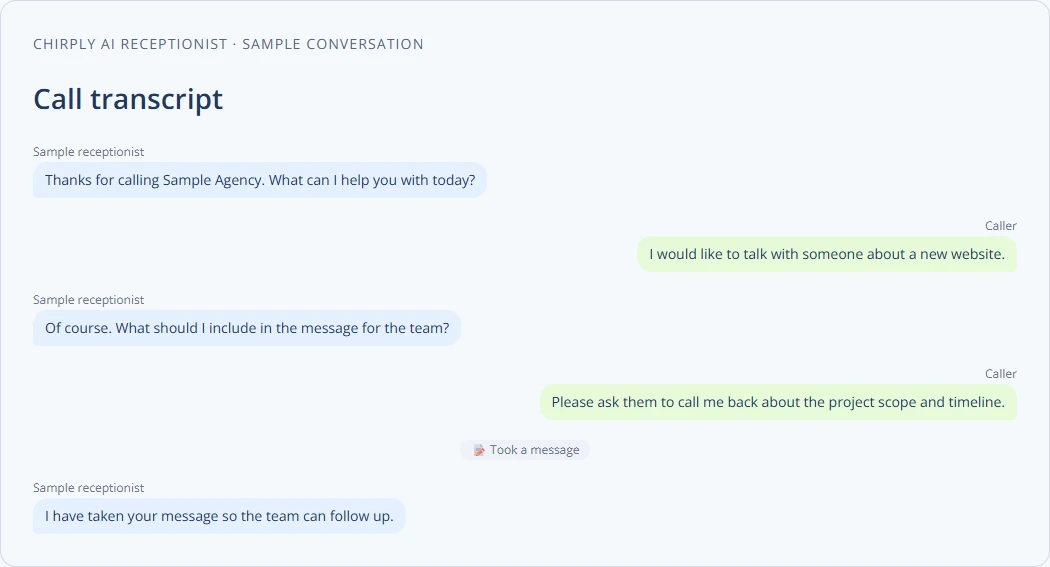
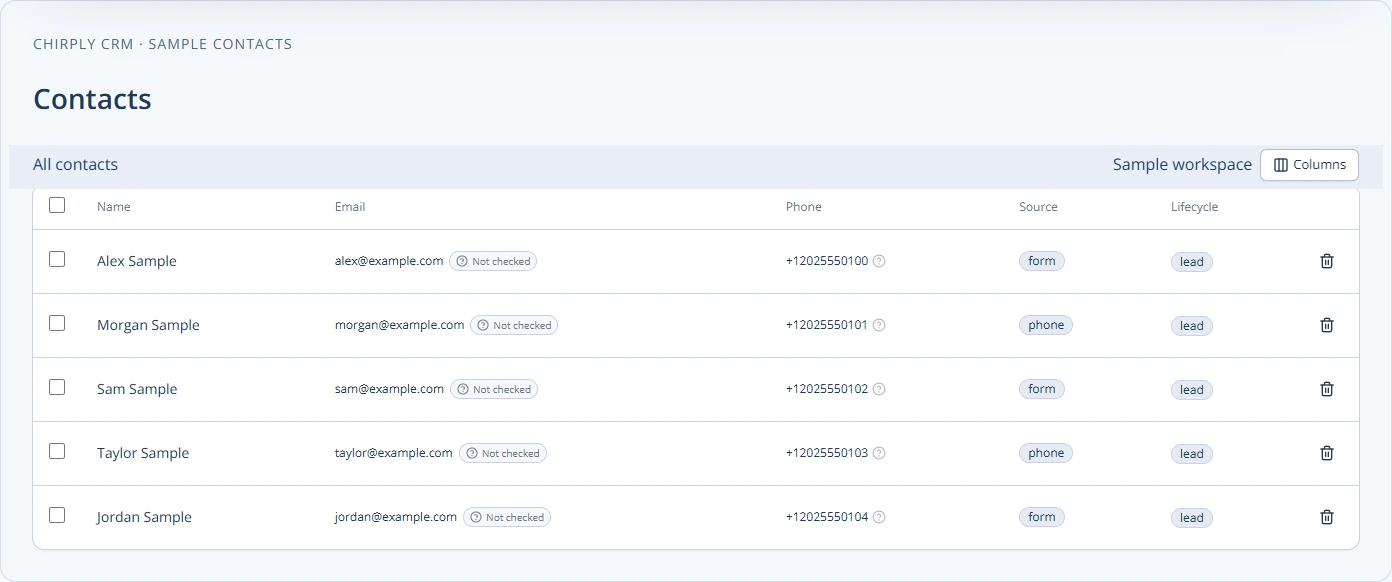
You pay one company for the calls and another for the customers, then pay a person to copy what happened from one into the other.
It is that nobody has the hours, and the cost of skipping it never shows up as a line on any invoice.
The phone system knows a call happened. The CRM knows who the customer is. Nothing knows both unless a human retypes it, and nobody retypes it on a busy day.
Per-seat phone pricing charges for the person rather than the usage. Add a part-timer who takes four calls a week and you pay for them like a full desk.
A call ends and the next step lives in a rep's head. Nothing fires, nothing is logged, and the customer hears from you again whenever someone happens to think of it.
Bring
Chirply runs on your Twilio, so you keep carrier-rate pricing and own every number, recording and log. Bring your own providers is on every plan — nothing here is resold back to you with a margin on it.
Register
A guided business profile, CNAM, brand and campaign registration on your own Twilio, so your number displays properly and your texts are not treated as unregistered traffic.
Route
Each number gets its own settings page: an internal label so the call log names the line, inbound routing to a team, an IVR, an AI agent or a forward, transparent forwarding, outbound caller ID, availability hours and recording toggles.
Answer
A softphone docked in the top bar of every page with mute, keypad, three-way and warm transfer — plus SIP desk phones provisioned against your workspace's own Twilio SIP domain, assigned to seats, with control over which numbers ring which handset.
Before you move the business line
Connect the intended Twilio account in Settings → Integrations, then buy or import a number and choose where its calls go. Chirply prepares the voice connection on save. Your Twilio account still owns the numbers and provider bill; importing a number you already hold in Twilio is separate from porting one from another carrier.
Browser calling starts on Launch at $47/month; SIP desk phones need Scale at $97/month. Check number allowances, SMS registration and the incoming-call destination before moving a working business line.
Follow the Twilio setup and test-call guide →These are not roadmap items. Each one is running in production today, described here in the same words the full product catalog uses.
Take and make calls from the same tab your CRM is in.
A real softphone docked in the top bar of every page. Inbound calls ring your browser wherever you are in the app, and outbound goes out on your business caller ID.
Put a physical phone on the same system as the browser dialer.
Provision standard VoIP desk phones against the workspace's own Twilio SIP domain, assign them to team seats, and control exactly which business numbers ring each handset.
Route every caller correctly without hiring a receptionist.
Build press-1 phone trees once and use them on the way in and the way out. Each digit can dial a number, take a voicemail, speak a message, send a text, or open a sub-menu.
Every line behaves exactly the way that line should.
Each phone number gets its own settings page — no hunting through a shared console.
Handle the registration work that keeps calls and texts deliverable.
Guide each workspace through Twilio business identity, caller-name, call-signing, messaging-profile, and A2P brand and campaign registration.
Carrier-rate pricing and no vendor holding your data hostage.
Twenty providers you connect with your own accounts and pay directly — telephony, email, AI, media, leads, commerce, payments and hosting. Chirply never marks up the wire.
This is the part of Chirply that solves phone system. See the other 14 areas — CRM, scheduling, messaging, automations, funnels, commerce, reputation and the rest — all included in the same workspace.
You do not have to migrate anything to find out whether this works. Start the trial, set up the one thing you came here for, and judge it on that.
Your trial runs on Scale, the top plan, so nothing is locked while you evaluate. If phone system is all you need afterwards, Scale at $97/mo carries it — switch down before the trial ends and keep the lower price.
Your order
$0 today. A card keeps the workspace running after the trial, and Scale renews at $97/month unless you change plans or cancel first.
Cancel any time before day 14 and nothing is charged. Calls, texts, emails and contacts are unlimited on every plan — you bring your own Twilio, Mailgun and model keys and pay those providers directly.
No trial subscription charge today. Cancel before renewal.
Provider usage and optional app purchases are separate. The card only exists so a workspace you decide to keep does not stop working on day 31.
Scale, at $97 a month, and only because SIP desk phones are a Scale feature. Core phone features start on Launch: the browser softphone, warm transfer, recording, per-number routing, carrier registration and bring-your-own-Twilio all start on Launch at $47. If you never plug in a handset, Launch or Grow may genuinely be enough — and we would rather you knew that.
Carrier rates, direct. You connect your own Twilio account, so minutes and messages are billed to you at cost with no per-minute markup and no per-seat dialer fee. Calls, SMS and email are not metered by us on any plan.
Standard VoIP handsets provision against your workspace's own Twilio SIP domain. The first device sets that domain up automatically, credentials are displayed once with secure rotation, and you control per device which business numbers ring it.
You do not have to — but the point is that you can. Every call, text and voicemail lands on the contact's timeline in the same product, and there is a GoHighLevel connection and migration path if that is where your contacts, pipelines, deals and appointments live today.
One number on Launch, five on Grow, unlimited on Scale. IVR flows follow the same shape: 1, then 5, then unlimited — and the same builder drives them inbound and outbound.
Weighing it against something specific?