Everything your business needs. And the next thing it invents.
Chirply already runs the customer journey from first visit and first call through follow-up, scheduling, payment, delivery, retention, and resale. When your business needs something beyond the built-in platform, your AI can build an app that installs inside Chirply and works with everything already here.
Whatever you wish Chirply did, your AI can build into Chirply.
Not a disconnected side tool. A real installed app that can read the right Chirply data, add pages and widgets, react to events, and put its actions inside the workflows your team already runs.
Your brief to your AI
“Build an app that watches every won deal, creates the fulfillment job, shows its status on the contact, and alerts the account owner when delivery stalls.”
30 minutes → a few hoursfor a focused first version, depending on scope
01Describe itTell your coding agent the exact job Chirply needs to do.
02Build itIt uses Chirply's developer guide, manifest, and capability catalog.
03Install itApprove the scopes and add it privately or through the marketplace.
04Use it everywhereIts UI, actions, data, and events join the rest of the platform.
Installed inside Chirply
Now Chirply does it.
The app works with the contact, the deal, the team, and the automation engine instead of making you stitch together another silo.
Record an explanation. Build a guide when you need one.
Videos, screenshots, optional walkthroughs and a shared place for feedback are included from Spark. Workspace storage limits apply; optional AI uses your connected provider and is billed separately.
5live capabilities
Screen and camera recording
Explain the work while you show it.
Record a screen, window or tab, your camera, or both, with microphone audio. Keep the result as a video when a written guide would add unnecessary work.
Device selection, microphone level preview and countdown
Pause, resume, restart and discard with confirmation
Saved local recording segments and retryable upload
Browser audio depends on the source and operating system
Screenshots and visual annotations
Make your point with one image or a timed callout.
Take a standalone screenshot, crop and annotate it, then share it with comments and replies. Video annotations and caption layouts can move and change over time.
Screenshot crop, drawing, arrows, highlights and text
Timed video annotations and draggable caption layouts
Shared conversations on screenshots and videos
Original media and published image revisions remain intact
Optional walkthroughs and guides
Give someone steps they can follow at their own pace.
Choose a walkthrough to collect supported browser steps, or create and edit a guide after recording. Ordinary video mode does not collect page interactions.
Edit and reorder steps, screenshots and instructions
Crop, highlight and redact guide screenshots
Share a video, guide or combined view
Manual guides work without an AI connection
Recording comments and watch activity
Keep questions and follow-up next to the explanation.
Use timestamped comments and replies, reactions, watch notifications and recent dashboard activity. Choose notification preferences for the workspace recording.
Timestamp links take viewers to the relevant moment
Comment moderation and author editing
Watch and comment notification preferences
Recent recording activity available from the dashboard
Recording library and publishing
Organize your explanations and choose what viewers see.
Keep personal or workspace recordings in a searchable library, organize playlists, and publish a reviewed version before sharing. Saving a draft does not silently replace the published guide.
Collections, ordered playlists and watch later
Published snapshots and explicit draft restore
Revocable share links with expiry
Original video download and video export tools
The Chirply workspace in practice
Chirply's dashboard, rendered with sample data: contact totals, communication activity and pipeline value in one account.Chirply's contacts table with synthetic example.com records, showing contact details, source and lifecycle together.A sample follow-up flow in Chirply's production workflow builder: form submission, wait, SMS and a team task. No messages were sent.Chirply's weekly activity calendar brings calls, email, new leads and workflow activity into one view. Every count shown is synthetic sample data, not a customer result.
Plan access and limits vary, and connected-provider usage is separate. Check the plan comparison before choosing. Follow the CRM setup guides to build and test your first workflow.
How it works
The three call flows everyone asks us to explain.
Ringless voicemail, sales bridges, and IVRs sound abstract until you see the call legs. Here is exactly what Chirply does on the wire.
How ringless voicemail actually works
Two calls, a few seconds apart. The first one busies the line; the second one gets routed to voicemail by their own carrier. Their handset never rings.
Swipe to follow the call flow →
How a sales bridge connects a lead in seconds
One ready lead, your whole rep pool ringing at once, and a whisper so whoever answers already knows who they're about to talk to.
Swipe to follow the call flow →
How an IVR routes a call — inbound and outbound
Build the phone tree once. The same menu greets people who call you, and people your campaigns call.
Swipe to follow the call flow →
Telephony
A whole phone system, not a click-to-dial button.
Chirply runs on your own Twilio account, so you keep carrier-rate pricing and own every number, recording, and log. Everything below is built in — no bolt-on dialer, no second login.
Take and make calls from the same tab your CRM is in.
A real softphone docked in the top bar of every page. Inbound calls ring your browser wherever you are in the app, and outbound goes out on your business caller ID.
Mute, keypad (for punching through other companies' IVRs), add a third party, warm transfer with the caller held while you consult
Simulring your online team — first to answer takes it
Missed calls fall through to voicemail and land on the contact's timeline
Drag the panel anywhere; it survives navigating the app
Work a list of 200 leads without touching the dial pad once.
Keep as many named call queues as you need — “Callbacks today”, “Trial expiring”, “New leads” — and fill them from anywhere: tick contacts in the CRM, add someone by hand, or have an automation drop them in. Open a queue, hit Start calling, and Chirply walks it for you: dial, talk, log the outcome, next.
Many queues, worked whenever you want — the list lives on the server, not in one browser tab
Anything can fill a queue: bulk select, a workflow step, a call outcome, or the API
Outcomes are written back to the queue, so two reps can work the same list without doubling up
Auto-advance after you log a disposition and a note; pause and resume any time
Automations can fire the moment someone is called off a queue, branching on the outcome
Predictive dialer
Keep every seated rep talking instead of listening to ringback.
A second way to work a call queue: the server dials several numbers per free agent, screens answering machines, and only bridges the people who say hello. Pacing, abandon-rate targets, and wrap-up live on the session — billed on the workspace's own Twilio account.
Opens on any existing call queue; a session with no seated rep dials nobody
Answering-machine detection with a separate path for machines versus live answers
Lines-per-agent, max lines, and an abandon-rate target you can change mid-shift
Outcomes write back to the same queue and fire the same follow-up actions as power dial
Call outcomes that do the follow-up
Stop remembering to send the follow-up. Picking the outcome sends it.
Define your own call dispositions (name + color) in Settings, then attach actions to them. Choosing an outcome fires those actions in the background while you're already dialing the next number — and the calls nobody logged are collected into a queue instead of quietly disappearing.
"Left voicemail" → text them, tag them, and enroll them in a follow-up sequence — automatically
Any action in the platform is attachable: SMS, email, RVM, tag, list, pipeline stage, task, AI call
An "awaiting outcome" review queue catches every call no browser saw end — desk phones, the mobile app, sales-bridge legs — with a workspace-wide count and one click to work through them
Set an outcome on any past call, including calls made before you had outcomes at all; the same actions and automations fire either way
Ask for a suggestion and it reads the call's own transcript on your AI account, then tells you which outcome it picked and why — it suggests, you decide
A call outcome is its own automation trigger, filterable by which outcome and by call direction, and it re-fires when you correct a wrong one
Land in 500 voicemail boxes without a single phone ringing.
A two-leg carrier drop that deposits your recording straight into their mailbox. Their handset never rings, so you're not interrupting anyone — they just see a voicemail waiting.
Record it in the browser or generate it with text-to-speech
Merge fields are spoken correctly — no robot reading "open brace"
DNC list, suppressions, and quiet-hours enforced before every drop
Fire it one-off from a contact, from a call outcome, from an automation, or in bulk
Connect a hot lead to a live human in about 15 seconds.
The moment a lead is ready, Chirply rings your entire rep pool at once, whispers the lead's context to whoever answers, and bridges the first one to press 1 straight through to the lead.
Simulring cell phones and browser softphones together
Whisper the lead's name, city, and source before they're connected — recorded or spoken
Atomic first-to-claim: exactly one rep wins, every other leg is dropped cleanly
Optional SMS heads-up to each rep, dual-channel recording on the bridged call
IVR builder — inbound and outbound
Route every caller correctly without hiring a receptionist.
Build press-1 phone trees once and use them on the way in and the way out. Each digit can dial a number, take a voicemail, speak a message, send a text, or open a sub-menu.
Recorded intro (record in-browser or upload) or text-to-speech greeting
Merge fields in the greeting — callers hear their own name
Nested sub-menus, graceful no-input fallback
The same menu drives outbound campaigns: they answer, they hear the menu, they press a key
Voice broadcast & call blast
Get one message to a whole list in minutes.
Dial an entire audience with a pre-recorded message, text-to-speech, an interactive IVR, or an AI agent — with answering-machine detection branching to a separate voicemail script.
Answering machine detection: humans hear one script, mailboxes hear another
Quiet hours, DNC, and wallet balance checked before every single dial
Concurrency cap so you don't blow up your own switchboard
Optional SMS follow-up fired off the same campaign
Recording & transcription
Coach from real calls instead of relying on memory.
Opt-in recording per number. Audio is pulled off Twilio into your own storage and the provider's copy is deleted, so there's one place your recordings live.
Per-number opt-in, with a recording announcement for consent where you need it
Automatic transcription attached to the call log
Delete the audio and keep the log and transcript
Per-number control
Every line behaves exactly the way that line should.
Each phone number gets its own settings page — no hunting through a shared console.
Internal label (the call log names the line, not just the digits)
Inbound voice routing: ring the team, an IVR, an AI agent, or forward out
Transparent forwarding that shows the original caller's number
Outbound caller ID, availability hours, recording and transcription toggles
Line-type intelligence
Know it's a mobile before you spend money texting it.
Every contact and lead number is classified mobile, landline, or VoIP and shown with an icon across contacts, contact detail, and lead results.
Automatic lookup on new numbers, plus a one-time scan of your existing database
Platform-wide shared cache — a number is only ever paid for once
Runs on your own Twilio at roughly a fraction of a cent per number
Know which ad, keyword, and publisher produced the phone call.
Build call-tracking campaigns that route inbound calls, attribute the source, apply conversion rules, and calculate revenue, payout, and margin from the same call record.
Static tracking numbers or website number pools with a one-line DNI snippet
Priority, round-robin, and weighted routing with geo and business-hours filters
Duration, webhook, or manually confirmed conversions
Sticky callers, repeat-call dedupe, recording, and campaign-level reporting
SIP desk phones
Put a physical phone on the same system as the browser dialer.
Provision standard VoIP desk phones against the workspace's own Twilio SIP domain, assign them to team seats, and control exactly which business numbers ring each handset.
Automatic SIP-domain setup on the first device
One-time credential display with secure password rotation
Per-device enable, seat assignment, and number routing controls
Inbound ringing and outbound calling billed through the workspace's Twilio account
Call scripts & live objection assist
Give a new rep the words, and a quiet nudge when the call turns.
Ordered talk-track steps plus a handler for each objection, written once and open beside the dialer. Switch assist on for a script and Chirply reads the live transcript and puts one short line on the rep's screen — it never speaks to the customer.
Ordered steps for the talk track, and objection handlers keyed to the same 13 objections call intelligence counts, so coaching and reporting share one vocabulary
Assist stays off until you enable it on that script, and stays quiet until the line's transcription has produced something to read
One coaching line of 200 characters or less, on the rep's screen only — the assist never joins the call and never speaks
Runs on your own AI account, and only re-reads once the transcript has actually grown
Scripts travel in snapshots and arrive switched off, so a cloned workspace never starts assisting before anyone has read them
AI
AI that answers the phone — not a chatbot in the corner.
Chirply's AI agents hold real phone conversations, take real actions in the CRM, and hand off to humans when it matters. Bring your own model key and pick the model per agent.
Never miss another inbound call, at 3am or on a Sunday.
Point any number at an AI agent and it answers, holds a natural conversation, and actually does things — captures the caller's details, takes a message, or warm-transfers to a human.
Creates and updates the contact record from what the caller says
Takes a message and files it as a task for the right person
Warm-transfers to a number or to whoever on your team is online — with take-a-message fallback if nobody picks up
Leaves your voicemail script after the beep when it hits an answering machine
Real-time voice, not walkie-talkie
It sounds like a person, because it doesn't leave dead air.
Calls stream in real time over a dedicated edge worker instead of waiting for a full reply before speaking. The agent starts talking on its first few words, and you can interrupt it mid-sentence.
Roughly one second of gap after you stop talking
Barge-in: talk over it and it stops and listens
Automatically falls back to the standard flow if anything on the streaming path hiccups — a caller is never dropped
AI Brain knowledge base
Teach it your business once, and every agent knows it.
Organize everything your agents should know into topics and items — hours, pricing, services, policies, objection handling — then drop it into any agent's greeting, persona, or goals.
Upload what you already have: PDF, Word, spreadsheets, HTML, CSV, Markdown, or plain text
Or point it at your website and let it read the pages — one page, a section, or the whole domain
Merge the whole brain, one topic, or one item into any prompt
Word counts and copy chips so you can see what you're spending on context
Change the knowledge once; every agent using it updates
Pick the voice it speaks in
Audition voices in the browser instead of calling yourself to hear one.
Every agent gets its own voice and language. Choose from the built-in phone voices, or from your own cloned and premium voices if you've connected ElevenLabs.
Your ElevenLabs account's own voices — including ones you cloned — listed in the picker
Press play and hear a sample right there, no test call needed
Set per agent, so your receptionist and your outbound campaigns can sound different
Outbound AI calls & AI campaigns
Qualify a list of 1,000 without a rep on the phone.
The same agents make outbound calls — one at a time from a call outcome or an automation, or as a bulk campaign with a per-campaign goal.
"AI call" is a first-class action anywhere actions live
Bulk AI campaigns ride the same dispatcher: quiet hours, DNC, wallet, metering
Every call logged with a full transcript, an AI summary, and an outcome on the contact timeline
AI throughout the app
The blank page problem, gone.
AI is woven through the CRM, messaging, and the funnel builder — draft a reply, summarize a contact, or generate a whole landing page.
AI page and funnel generation
Message drafting and contact summarization
A searchable model picker with live input/output pricing and context windows, so you compare cost before committing
AI Writer & brand voice
Turn a campaign brief into copy and a reviewable follow-up sequence.
Write, grade, and rewrite emails using a copywriting framework, the workspace's brand voice, and selected AI Brain knowledge. Generate a coordinated series and compile it into an automation.
Framework selection with strategy and email-by-email sequence briefs
Workspace voice settings shared across generated copy
Email and sequence generation uses the workspace's billed AI account
Compiled sequences start paused with a manual trigger; generating copy sends nobody a message
AI Studio for images, video & audio
Create the campaign assets without opening six more subscriptions.
Generate and transform images, video, avatars, voice, music, and audio from one studio while using your own connected AI accounts.
Image generation plus video generation, animation, upscaling, background removal, and lip sync
Talking-head avatars, voiceovers, voice cloning and conversion, transcription, cleanup, and dubbing
Music, songs, and sound effects from the same generation library
Model catalog exposes the real provider, price, and capabilities before you run anything
In-app Copilot
Ask for the outcome instead of hunting through menus.
A workspace-aware assistant can search Chirply, answer questions from live CRM context, and propose the same actions available throughout the app.
Searchable conversation history and workspace-specific context
Reads and actions come from the platform's documented capability catalog
Approval required before it sends, spends, publishes, or destroys
Past chats can be reopened or removed from one place
Custom tools for voice agents
Let a caller check an order, book service, or update another system live.
Connect authenticated external APIs, describe safe reusable operations, test them, publish immutable versions, and assign each tool only to the AI agents that need it.
Bearer, basic, API-key, and unauthenticated HTTPS connections
Typed inputs, request templates, response instructions, and hard timeouts
Encrypted credentials that are never returned to the browser or model
Draft, test, publish, assign, and redacted execution history
Hire a coworker with a name, a job, and permissions you set.
A five-step hiring wizard — face and name, personality, duties, permissions, then the offer letter — produces a named AI coworker with standing duties, a budget and an approvals inbox, instead of a chat box holding the keys to everything.
Access granted per domain at four levels: nothing, view, do the work, or propose — where propose lets it ask to send, spend or delete and a person approves each one
Standing duties on a schedule down to every five minutes, each borrowing a named person's authority, with a run log for every execution
A duty that fails five times running pauses itself instead of failing forever
A daily token budget per employee, checked before each run, so nothing quietly loops up a bill overnight
An approvals inbox with a pending count — approving in chat and approving in the inbox settle the same record
Revenue Operator (shadow mode)
See the stalled deals worth recovering, without an AI sending anything on its own.
A read-only recovery board over at-risk pipeline: prioritized next moves, coverage, and a flagged-to-won-or-lost ledger that does not pretend correlation is causation. It proposes. It does not text, book, or collect until a later approval phase ships.
Ranks open risks from stored deal intelligence — no extra model call and no spend
Proposed next moves sit beside the deal, with coverage KPIs for the book
Currencies stay separate; partial populations are marked instead of rounded away
Sends nothing, starts nothing, and changes nothing — Copilot can open the board, not act from it
AI-first app platform
If Chirply cannot do it yet, your AI can add it.
Chirply is an extensible business operating system, not a sealed feature list. Give your AI coding agent the outcome you need and it can build an app against Chirply's documented capability catalog, install it inside the workspace, and make it part of the same data, automation, and customer journey — often in 30 minutes to a few hours.
9live capabilities
AI-built custom apps
Turn “Chirply does not do that” into a working first version today.
Use Codex, Claude, or another coding agent to build a focused Chirply app from a plain-language requirement instead of waiting through a traditional product roadmap.
The developer guide, manifest contract, and capability catalog are readable by coding agents
A narrow internal tool can take about 30 minutes; a richer app can take a few hours
Build privately for one workspace, distribute to clients, or submit it to the public marketplace
The result installs inside Chirply instead of becoming another disconnected login
Pages, widgets & contact cards
An installed app lives where the work already happens.
Apps can add full pages to workspace navigation, widgets to the customizable dashboard, and context-aware cards directly on contact records.
Up to 20 declared pages, 20 dashboard widgets, and 20 contact cards per app version
Contact cards receive the current contact context automatically
App surfaces inherit the workspace install and permission boundary
External and hosted interfaces render in isolated, sandboxed frames
App actions & event triggers
The app becomes part of Chirply's workflows, not a tab beside them.
An app can contribute its own typed actions to automations, call outcomes, bulk selections, and contact menus, then react to the same business events Chirply already emits.
Chirply renders the app action's fields and sends the validated inputs to the app
Subscribe to events such as contact created, message received, deal won, and invoice paid
Signed event delivery with retries and delivery history
The same app action can appear across automation, disposition, bulk, and contact surfaces
Scoped access to the whole platform
Build on Chirply's CRM, communications, billing, and operations instead of recreating them.
Installed apps call the same permanent capability registry used by Chirply's REST API, MCP server, and Copilot, through a short-lived in-app bridge or a rotatable server token.
Read or act across contacts, pipelines, tasks, messaging, bookings, commerce, sites, and more
Fine-grained domain read/write scopes are approved at install time
Money-spending and outward-facing operations require an explicit confirm grant
Revoking an install immediately closes its data and action access
App-owned data inside Chirply
Keep extension data tenant-scoped and attached to the installation.
Every install gets a simple namespaced data store for settings and records, so lightweight apps do not need a separate database just to remember their state.
Set, get, list, and delete JSON values through documented capabilities
Data is isolated by workspace, app, and installation
Multiple installs of the same app can keep separate configurations
Hosted apps can stay entirely inside Chirply's runtime for compact use cases
Public marketplace & private distribution
Install the missing capability or turn your solution into a product.
Browse a moderated app store, install public listings with a clear permission screen, or keep an app private and deploy it only to the workspaces that need it.
Native integrations, external apps, and Chirply-hosted apps
Listing pages with screenshots, feature copy, pricing choices, and publisher details
Moderation and reporting before unsafe or misleading listings spread
Any workspace can install; eligible agencies can build and publish
Versions, release notes & controlled updates
Improve an app without silently changing every customer's workspace.
Publish immutable app versions, show installed workspaces what changed, and let an admin review and apply an available update deliberately.
Draft, publish, review, list, install, update, uninstall, and revoke lifecycle
Version-specific manifest and permission requests
Release notes and update availability inside the installed-app screen
Rotatable install tokens and platform-admin revocation controls
Sell apps and collect recurring revenue
The extension you needed can become a software business of its own.
Publishers can price an app as a one-time purchase, monthly subscription, yearly subscription, or several buyer-selectable options, then receive payouts through Stripe Connect.
Optional setup fees plus monthly, annual, lifetime, or free price choices
Marketplace checkout installs only after Stripe verifies the payment
Developer payout onboarding and status inside Chirply
Subscription status controls whether a paid installation stays active
Native & connected apps
Core extensions can change how Chirply works, not just render in a box.
First-party native apps use the same install model while opening built-in product surfaces. Connected apps can bring an outside system's data and operations into Chirply.
Native apps for directories, desk phones, business cards, and other modular features
GoHighLevel provisioning and migration inside the workspace
Complete industry applications that live inside the platform rather than beside it. The Restaurant and gym apps run on the workspace's own contacts, messaging, payments, and automations — so an order, a check-in, or a booking is CRM activity the moment it happens, with no sync to configure and no second customer list to keep straight.
Run the floor, the kitchen, and online orders from the system that already holds your customers.
Thirteen screens covering a working restaurant — menus, point of sale, kitchen display, table tablets, inventory, and a public ordering and reservation site on your own address — with every guest landing in the same contact record your marketing already uses.
Menus with categories, dishes, modifier groups, and one-tap 86'ing when something runs out
Point of sale that splits a check evenly or by item, records cash, takes cards on your own Stripe account, and emails or texts the receipt
Kitchen display with per-station tickets — bump a single item or the whole ticket
A per-table tablet screen staff launch and hand to the guest, plus a live floor view of which tables have an open check and what is booked next
Inventory with recipes that deplete stock as dishes are fired, a full movement history, and a reorder list of everything at or below its par level
Public ordering and reservations at /eat/your-restaurant — or on your own custom domain — fully under your brand, with no mention of the platform
A ready-made restaurant website template whose menu section reads the live menu, so 86'ing a dish updates the website and the kitchen at once
Guests get their own links to track an order and pay from their phone, or to view and cancel a reservation without calling
Belts, attendance and the front-desk tablet, tied to the contact record.
Programs with your own rank ladders, students who are simply CRM contacts with an enrollment, and a class schedule they check into — plus a kiosk link that turns any tablet at the front desk into a check-in station.
Custom belt ladders per program, with stripes and the full promotion history for every student
A member is a CRM contact plus an enrollment — there is no second list of people to keep in sync
Promotion eligibility computed from classes attended since the last promotion and months at the current rank — advisory, because the instructor decides
Weekly class schedule with check-in, an attendance log, and reporting that surfaces the students who have gone quiet
A signed kiosk link that turns any tablet into a check-in station with no login, and one button that disconnects every tablet at once if it leaks
A ready-made gym website template whose timetable section renders the live class schedule, so the site is current the moment you move a class
Chirply Signage
Add digital signage to the platform for $9.99 a month, free for the first 30 days.
Chirply sells and provisions Chirply Signage end to end — the public offer page, the Stripe subscription and its trial, and the provisioning that creates the workspace, the owner login, and the live app install in one atomic step. The screens themselves are driven from the Signage app that install points at.
$9.99 a month through Stripe with a 30-day free trial, and nothing charged at signup — the card is held for the day-30 renewal
Signing up provisions the workspace, the owner account, the app install, and the welcome email in one pass, and unwinds the whole thing cleanly if any step fails
A time-limited upgrade at signup swaps the app subscription for the full Scale plan at $47 a month with Signage included free
Owner-only capabilities report the plan, renewal date, and offer status and accept or decline the upgrade, so an AI agent can answer "what am I paying for" without a human
CRM
The system of record everything else writes to.
Calls, texts, emails, payments, AI conversations, and automation runs all land on the same contact record — so there's one place to look before you pick up the phone.
11live capabilities
Contacts & companies
One record per human, with everything they've ever done on it.
Inline-editable contact records with companies, business name, website, and address — plus your own custom fields for whatever your business actually tracks.
Custom fields of every type, usable as merge fields everywhere
Phone matching that ignores formatting — (409) 893-0064 finds 4098930064
Duplicate phone numbers are refused on the way in, and anything already doubled up is surfaced for you to sort out
Tags, lifecycle stage, and per-row quick actions
Sales pipelines
See the whole board and drag a deal to where it really is.
Drag-and-drop deal pipelines with stages you define — and stage changes that can trigger automations.
Multiple pipelines, custom stages
"Deal stage changed" is an automation trigger
"Move pipeline stage" is an action any automation, outcome, or bulk selection can fire
Tasks & activity timeline
Nothing falls through, and you can prove what happened.
A tabbed activity feed on every contact with multi-select filters by channel and direction, plus tasks with priorities and due dates.
Calls, SMS, email, AI sessions, payments, and automation runs on one timeline
Filter to just inbound calls, or just email, in a click
Tasks created by hand, by an automation, or by an AI agent taking a message
Lists & bulk actions
Do one thing to two thousand people at once.
First-class contact lists, plus a multi-select bulk actions bar on contacts and lists that offers every action the platform has. Lists are the ones you curate by hand; smart segments below are the ones that keep themselves current.
Select all across pages, not just the visible ones
Point any bulk action at a saved smart segment instead of ticking rows
Works in SMS, email, voice TTS, IVR greetings, AI personas and goals, and campaign copy
Custom dashboard & business activity
Open Chirply and see what moved before you open a report.
A drag-and-resize dashboard combines pipeline, revenue, calls, contacts, tasks, live visitors, chat, and recent activity in the layout each workspace wants.
Date and pipeline filters shared across the dashboard
Live operational widgets alongside revenue and conversion widgets
Activity calendar and feed with channel-level filters
Saved per-workspace layout with a one-click reset
Digital business cards & card scanner
Turn a handshake into a clean CRM record before the card gets lost.
Create public, shareable team business cards and use AI vision to read physical cards into the CRM, including front and optional back images.
Public profile and downloadable vCard for every published team card
Names, roles, phones, emails, website, socials, bio, and theme controls
AI card scan creates a contact or updates the phone/email match
Save another Chirply card into contacts without creating duplicates
Workspace-wide search
Jump to the record you meant without remembering where it lives.
Search contacts, companies, deals, and pipelines together from one command surface and open the matching record directly.
One query across the core CRM object types
Direct links to the exact contact, company, deal board, or pipeline
Available to people, the REST API, MCP clients, and Copilot
Define an audience once as rules and let it keep itself current.
Rule-based audiences over the contact record and everything attached to it, so “booked but never showed, and nobody has called them in two weeks” becomes a saved segment you send to — not a spreadsheet someone exports again every Monday.
49 built-in fields grouped as Contact, Address, Consent & safety, Membership, Broadcast email engagement, Website engagement and CRM activity — plus every custom field you have added
Related-record rules across Bookings, Stripe, Sales, Work, Conversations, Calls and Forms, with 45 more filters underneath them
Text, number, date, boolean and relation operators — including “is in the last N days” and count rules like “has more than two open tasks”
Every filter on a related record has to match the same record, so two unrelated appointments can't fake a match
Preview the exact match count and sample contacts before saving, with up to 20 conditions per segment
Custom report builder
Answer your own questions about the business without exporting to a spreadsheet.
Build reports at /reports from six datasets — contacts, deals, calls, messages, appointments and revenue — choosing the dimensions, metrics, filters and time bucket yourself. Save the ones you'll run again and share them with the workspace.
Six datasets with their own dimensions, metrics and filters — daily, weekly, monthly or total time buckets
Reports run only through a declared catalog, so a report can never reach data its dataset doesn't expose
Save reports privately or share them with the whole workspace
Model the records your industry actually runs on, not just contacts and deals.
Define your own record types — properties, vehicles, policies, pets — with typed fields, then create, list, and link records under /objects like any built-in part of the CRM.
Text, number, date, boolean, select and more field kinds, with a chosen display label per type
The record form validates with the same rules the server enforces, in plain language
Records are workspace-scoped with row-level security like every other table
Full API, MCP and Copilot access through the same capability registry as the rest of the product
Scheduling
From available slot to paid appointment.
Publish branded booking pages, coordinate one person or a whole team, collect the right intake details, and keep every appointment attached to the contact who booked it.
Let leads book the right meeting without the email ping-pong.
Every event type gets a shareable booking page with your availability, timezone handling, intake questions, confirmation copy, and location instructions.
One-on-one, group, collective, and round-robin events
Phone, in-person, video, Google Meet, Zoom, Teams, or custom locations
Minimum notice, date range, buffers, capacity, and slot interval controls
Custom confirmation message and post-booking redirect
Team availability & round robin
Offer the team, not one person's calendar.
Create reusable schedules, date-specific overrides, and host pools that distribute appointments or require multiple people to attend together.
Workspace-local hours with invitee timezone display
Per-host schedules, priority, and required-host rules
Round-robin assignment and collective availability
Closed dates and custom hours without rebuilding the week
Appointment operations
See every booking and keep the customer informed.
Staff can manage appointments while customers receive secure links to confirm, reschedule, or cancel their own booking.
Confirmed, completed, canceled, and no-show states
Contact matching and appointment history
Email and SMS reminders at configurable offsets
Cancellation reason and reschedule lineage retained
Paid appointments
Take the deposit before the time is reserved.
Require payment on an event type and collect it on the workspace's own Stripe account, so the deposit lands in the business's bank and not in a platform balance.
Per-event price and currency
Payment status carried on the appointment
Money is collected on the workspace's own Stripe account, never pooled through the platform
Booking notifications wait for the payment outcome
Google & Microsoft calendar sync
Your outside calendar and your booking pages stop double-booking each other.
Connect a host's Google Calendar or Microsoft 365 / Outlook account. Busy times flow in before slots are offered, and confirmed bookings are written out as real calendar events.
Google Calendar and Microsoft 365 / Outlook, linked per host from Scheduling → Connections
Inbound busy-time sync merged into availability before a slot is ever shown
Outbound event creation, update and deletion mirrored onto every calendar marked for write-back
A broken or expired connection records its error and falls back to internal availability — it can never take the booking page down
Staff can also reschedule any appointment from their side with a slot picker, keeping the lineage
Messaging & email
Every conversation in one thread.
Two-way SMS, email, WhatsApp, Messenger, and Instagram against the same contact, with the compliance plumbing — unsubscribes, STOP handling, suppressions, quiet hours — already wired.
12live capabilities
Internal team chat
Keep staff conversations alongside the work they are discussing.
Create open or private channels and direct messages for workspace members, with message search, mentions, reactions, unread state, and notification preferences.
Channel membership and private conversations respect the acting person's access
Edit and delete messages with the same permissions in the UI and capability handlers
API integrations can participate in open channels under an integration identity; keys cannot read private channels or direct messages
Staff chat is separate from the customer conversations inbox
Stop switching apps to find out what you already told them.
Inbound and outbound SMS, email, WhatsApp, Messenger, and Instagram threaded together per contact, with color-coded bubbles for direction.
Reply from the inbox or straight from the contact record
Inbound email routed in via your own sending domain
WhatsApp, Messenger, and Instagram sit in the same thread as SMS and email
Every message on the shared activity timeline
WhatsApp Business
Text the number they already have open, inside the 24-hour window or with an approved template.
Connect a WhatsApp Business number through Meta, match inbound chats to CRM contacts, reply free-form inside the customer-care window, and send live-revalidated approved templates outside it.
Account and number discovery against the connected Meta business
24-hour free-form replies, with the window shown before a send can fail
Approved templates revalidated before send, including variables and media
Independent WhatsApp consent ledger, quiet hours in the recipient's timezone, and delivery receipts reconciled to a local message id
RCS business messaging
Send branded rich cards when the handset supports them, and fall back to SMS when it doesn't.
Onboard an RCS sender in the workspace's own Twilio account, then send rich cards with a plain-text fallback. Twilio decides at delivery time whether the message went out as RCS or SMS, and Chirply meters whichever actually landed.
Sender status, templates, and a Google-verified onboarding path that typically takes weeks — Chirply does not invent a shortcut
Rich cards with a required SMS fallback for handsets that cannot do RCS
Delivered-channel recorded after send, so reporting and wallet charges follow what Twilio actually used
Hidden until RCS is enabled for the workspace; every other message still goes out as ordinary SMS
Messenger & Instagram DMs
Answer social leads without losing the CRM context.
Connect Facebook Pages and linked Instagram professional accounts so inbound DMs become real Chirply conversations attached to the right contact.
Facebook Messenger and Instagram direct messages in the shared inbox
Meta's reply-window rules shown before a send can fail
Comments, mentions, reactions, and message events retained
Human replies and AI assistance use the same conversation history
Autoresponders
A reply goes out in seconds, at 2am, without you.
Rule-based automatic replies on inbound messages, fully merge-field aware.
Trigger on inbound message content
Personalized with the contact's real details
Handed off to automations for anything more involved
Broadcast campaigns
Reach a whole segment on any channel, from one screen.
One-off blasts by email, SMS, ringless voicemail, outbound IVR or AI call — one composer, one audience builder, real analytics. Multi-step follow-ups are automations.
Any channel from one composer — email, SMS, voicemail drop, IVR or AI call
Send windows, days of week, timezone, and throttle-per-minute
Email goes out through your sender pool, so warmup caps are respected and a send bigger than today's capacity parks the remainder for tomorrow instead of failing it
Every send appears in the background jobs monitor, where you can pause, stop, reschedule or slow it down while it is still running
Signed one-click unsubscribe, SMS STOP handling, and provider bounce/complaint suppression
Opens, clicks, bounces, unsubscribes, and per-recipient status
Templates
Write the good version once and reuse it forever.
Reusable SMS, email, and ringless-voicemail templates — including recorded audio or text-to-speech for voicemail — available from every composer.
"Start from a template" in the bulk text and email composer
Voicemail templates store the recording or the TTS script
Templates are selectable from automations and call outcomes too
Compliance built in
The boring parts that keep you out of trouble.
A shared compliance layer every outbound channel runs through — no per-feature reimplementation, no gaps.
Do-not-call list and per-org suppressions
Quiet hours by local timezone on every voice and campaign channel
TCPA consent text on the click-to-call widget, recording announcements on calls
Communications command center
See what needs a human across every channel.
A cross-channel communications view rolls unread conversations, calls, email, SMS, social messages, and live chat into one operational queue.
Unread counts shared with the navigation
Archive and restore without deleting history
Newest customer touch surfaced first
Direct path back to the contact and full thread
Email senders, pools & warmup
Send from several mailboxes so no single domain carries the whole list.
Connect as many Mailgun and Resend accounts as you want, give every address its own identity, and group them into a pool your campaigns send through. Warmup ramps a new address up instead of throwing a cold domain at fifty thousand people on day one.
Multiple Mailgun and Resend connections, each address with its own display name, reply-to and status
Pool rotation always picks the mailbox that has sent the least so far today, skipping any already at its cap
Warmup starts at 10 a day, steps up by 10 a day and settles at 200 — every one of those numbers adjustable per address
A one-click domain health check covering provider verification, SPF, DKIM, DMARC and MX, reported in plain language
A campaign larger than the pool's remaining capacity parks the rest until tomorrow — nobody is marked failed for running out of room
AI inbound email responses
Every inbound email gets a considered reply, even the ones that arrive at 2am.
Point an AI agent at an inbound email address and it answers on your behalf — or, in draft mode, writes the reply and waits in the thread for a human to approve it before anything sends.
Per-address modes: off, draft-for-approval, or send automatically
Draft mode queues the reply in the conversation itself — approve, edit or discard from the thread
RFC 3834 loop guards so two robots can never trap each other in an infinite reply loop
Runs on your own AI account with your Brain knowledge, like every other AI surface
Automations
One action catalog. Available everywhere.
Chirply has a single registry of things it can do. Every surface that fires actions — workflows, call outcomes, bulk selections — draws from the same list, so a capability can never exist in one place and be missing in another.
Multi-step workflows with waits and branching, triggered by what actually happens in your business.
Triggers: contact created, tag added, deal stage changed, form submitted, message received, call completed, on a schedule, or manually / by webhook
Steps: send SMS or email, add or remove tags, add to a list, move a pipeline stage, create a task, wait, call a webhook, notify your team
Branches read your own custom fields as well as the built-in ones, and steps can fill a custom field from what the event carried
Voice steps: ringless voicemail, outbound IVR, sales bridge, AI call, enroll in a campaign
Full run history so you can see what fired and why
Route each plan down its own path
One automation can serve every plan you sell.
Stripe entry points carry the price and product the customer actually bought, so a workflow can narrow to one plan or send each plan somewhere different — assign the right access, tag them, create the account, and tell your team.
Narrow a Stripe entry point to the Price IDs or Product IDs you choose, straight from your Stripe catalogue — list the monthly and the yearly price together and one workflow serves both
Or keep one workflow and split it: an If / otherwise or a Switch routes on the price the event carried
Every Stripe event publishes its price, product, plan name, amount, interval and quantity as data you can insert into any step
Works on new subscriptions, cancellations, and the payments and renewals behind them
The shared action engine
Add a capability once and it shows up in every menu.
Actions are defined in one registry with their fields and the surfaces they're allowed on. Workflows, call dispositions, and bulk actions all render from it.
Same action, same options, whether you're in a workflow or a bulk selection
Pickers for numbers, IVR menus, campaigns, sales bridges, AI agents, lists, and stages
Registry-driven, so the menus can't drift out of sync
Webhooks & external API actions
Connect the odd system nobody has a native integration for.
Trigger a workflow from a signed public URL or call an outside API from inside a flow with configurable method, authentication, headers, query parameters, and body.
Incoming webhook trigger per workflow
Bearer, basic, and API-key authentication
JSON, form, raw, or automatic Chirply payloads
Merge fields work in URLs, headers, queries, and bodies
Branching, waits & run history
Build a real journey and see exactly where every person went.
Visual flows branch on contact and event data, park safely through timed waits, and retain the node-by-node execution history for every enrolled contact.
Condition branches and explicit success paths
Durable waits that resume on a later dispatcher tick
Manual, bulk, event, schedule, and API enrollment
Run detail shows what fired, what changed, and what failed
Click-to-call widget
Turn website visitors into live phone calls.
An embeddable call-me button for any site. A visitor enters their number, your team rings, and the two are bridged — usually inside 20 seconds.
Simulring or sequential dialing of your rep pool, with a whisper before connect
Business-hours scheduling and a desktop / mobile visibility switch
Your logo, colors, copy, and "powered by" line — or none at all
Change your mind halfway through a send to twelve thousand people.
Every bulk action runs as a job you can watch and steer. Pause it, stop it, move its start time, or slow it down while it is running — the change lands on what has not gone out yet, and never on what already has.
Pause, resume, cancel, reschedule or re-pace a running job in a single action
A cursor tracks exactly what has been sent, so re-pacing or stopping only touches the remainder
Scheduled jobs wait here until their start time, honouring send windows and per-minute, per-hour and per-day throttles
Covers outbound work — bulk email, SMS, automation enrollment, action runs — and bulk record updates like tags, lifecycle, lists and deletes
Sites, funnels & commerce
Build the journey, take the order, and deliver the access.
Websites, funnels, checkout, invoices, gated content, and domains share the same CRM and automation layer. A submission is never stranded in a separate page-builder account.
Collect structured answers and put them straight to work.
Build reusable forms, surveys, quizzes, and applications outside the page editor, publish them for embedding or sharing, and map every submission into the CRM and automation layer.
Drag-and-configure fields with required states, CRM mappings, and multi-step pages
Conditional branching, answer piping, scoring, outcomes, and qualification logic
Published embed and share destinations
Submission history tied to the matching contact
Form-submitted triggers for immediate follow-up
AI creative partner
Start with a complete first draft instead of an empty canvas.
Generate a site or funnel from a prompt, rewrite copy in place, create supporting images, and ask AI to make structured edits without flattening the page into uneditable markup.
Whole-funnel and single-page generation
Structured AI edits that preserve editable components
Copy rewriting and image generation
Version snapshots and restore before risky changes
Durable build progress with pause, resume, cancellation, and page-level retry controls
Review and revise the sitemap, resolve missing business facts, and connect booking or product resources
Generation uses bounded AI allowances and leaves pages as drafts for separate publication
Templates & marketplace
Reuse the good setup instead of rebuilding it for every client.
Start from built-in funnel patterns, save a page or section as a reusable template, or publish approved templates for other workspaces to install.
Built-in templates for lead gen, webinars, offers, events, SaaS, and local business
Page, section, funnel, and workspace-level templates
Private reuse plus moderated public marketplace listings
Preview before install or publish
Checkout, order bumps & upsells
Raise the order value without sending buyers through another tool.
Sell through embedded order forms with optional bumps and one-click post-purchase upsells, all charged through the workspace's connected Stripe account.
One-time and recurring products
Order bump on the checkout step
One-click upsell and downsell flows
Orders, payment state, refunds, and customer identity retained
Run the entire store without splitting customer and order data across platforms.
Launch a branded storefront from the same catalog funnels use, then manage variants, inventory, collections, carts, discounts, checkout, orders and fulfillment beside the CRM.
Physical, digital, service, subscription, variant, SKU, stock, and backorder support
Server-validated discounts, abandoned carts, delivery details, order status, and tracking
Purchases become CRM customers, inventory movements, and automation triggers automatically
Member sites & access products
Sell protected content and control who can open each page.
Turn a site into a member experience with passwordless login, named access products, page-level gates, invitations, and manual or automated entitlement changes.
Secure email login links
Page access by one or more products
Invite, grant, revoke, suspend, and sign out members
Deliver a real learning product and see who finishes it.
Build courses from ordered modules and rich lessons, enroll contacts, track progress, test comprehension, and issue publicly verifiable completion certificates.
Video, rich content, downloads, duration, drafts, and ordered modules
Drip schedules and community-level gates
AI-generated multiple-choice quiz drafts with passing requirements
Enrollment, lesson progress, completion automations, and certificate lookup
Move from scoped work to a signed agreement without another document tool.
Create proposals, estimates, and contracts, link them to invoices, email a private review link, and keep a typed-name signature plus a certificate row on the document. This is not DocuSign-class multi-party signing.
Draft and edit commercial documents before anything is sent
Real recipient delivery through the workspace's Mailgun account
The buyer types their name to accept; Chirply stores certificate data and document history
Signed records become immutable and stay linked to payment
A separate paid Proposals app adds a price book, financing options, and convert-to-invoice
Custom domains
Your brand on the address bar, not ours.
Point a domain at Chirply and it's provisioned automatically — DNS record and SSL certificate handled through the Cloudflare API.
Search, purchase, connect, and verify domains inside Chirply
Custom domains for funnels, links, invoices, and the white-labeled app
Automatic certificate issuance
Host and path routing to the right tenant experience
Pixels & site scripts
Install measurement once and use it across every published page.
Create reusable advertising pixels and scripts, attach them to the right domains and funnels, and keep the installation visible in one place.
Facebook and custom pixel definitions
Reusable script library
Per-domain and per-page attachment controls
Safe hosted delivery instead of copy-paste drift
CMS, blogs & SEO operations
Publish an actual content system, not a pile of disconnected landing pages.
Create structured content collections and blogs, draft and schedule entries, import WordPress content, and audit the on-page SEO before publishing.
Reusable collections and custom entries for structured site content
Draft, schedule, publish, unpublish, and update lifecycle
WordPress import for existing posts and content
SEO audit plus page-level titles, descriptions, redirects, and social metadata
Launch and operate client WordPress sites from the same agency workspace.
Provision hardened WordPress servers in your own DigitalOcean account, connect domains, issue HTTPS, and manage the site lifecycle without leaving Chirply.
Plan catalog and domain availability checks before launch
Automated server, WordPress, DNS, and certificate provisioning
Site status, retry controls, credentials, backups, and operational details
Confirmed destruction for sites you intentionally retire
Turn a niche or geography into an owned lead-generation asset.
Build branded directories with categories, custom listing fields, editorial posts, claim flows, lead forms, custom domains, and automated listing acquisition.
Custom categories, fields, listings, posts, themes, and public publishing
Business claim review and lead-routing operations
Geography-based acquisition planning, budgets, campaigns, and retryable imports
Each directory installs as a native Chirply app and feeds the wider CRM
Funnel A/B testing
Let the traffic decide which page version sells, not the loudest opinion.
Run two versions of a funnel page against live traffic. Visitors are assigned server-side — no flicker, no client-side swap — and stay on their version for the whole test.
Deterministic assignment via a first-party cookie, so a returning visitor always sees the same version
Adjustable traffic split between the two arms
Bots and cookie-less clients get version A and are never counted, so crawlers can't skew a result
Results are reported with honest significance — the page tells you when there isn't enough traffic to call a winner yet
Assets & design
Make the artwork where the campaign already lives.
Every file the workspace uploads or generates lands in one library, and the editor that makes the next one sits beside it — so a graphic goes from idea to a funnel, an email, or a Facebook post without a round trip through another tool or another subscription.
3live capabilities
Capture videos & guides
Show someone how it works, then share the video or turn it into a guide.
Record your screen or camera from Assets → Videos & guides. A quick screencast stands on its own; add an editable walkthrough when the task needs written instructions.
Browser recording with pause, resume, local recovery, and resumable private uploads
Import existing videos, edit guide steps, maintain transcripts and timed captions, and trim a separate video copy
Share a video, a guide, or both through a branded unlisted page; revoke the link when access should end
Embed shared recordings and download the original source file
Use recording management through the REST API, MCP server, and in-app assistant
The downloadable Chrome extension adds selected-tab walkthrough capture; its ZIP release and Chrome Web Store rollout are separate
Media library
One address for every image, video, audio file, and PDF the business owns.
Upload it once, file it into folders, and reuse it anywhere. Every file gets a permanent public URL, so a link you pasted into a campaign last quarter still resolves after the file has been renamed and moved.
Images, video, audio, and PDFs — up to 25 MB a file, 10 files and 60 MB in a single upload, with the type checked against the bytes and not the extension
Folders, rename, move, and delete; renaming a file never changes its URL
Generate an image on your own AI account and it lands in the library ready to use
Machines can pull a file straight in from a URL through the API, with private and internal addresses refused
Uploaded SVGs are served under a no-script sandbox, so a logo someone sent you can't carry code into your pages
AI Studio output, funnel AI images, and social uploads file themselves here automatically — nothing to remember and nothing to re-upload
Design the post, the flyer, and the email header without a separate subscription.
A drag-and-drop canvas editor built into the workspace. Start from a named size or type your own, layer text, shapes, and images, and export a PNG that is already in your media library.
16 named presets — Instagram post, Story/Reel, Facebook post and cover, YouTube thumbnail, LinkedIn banner, flyer, poster, email header, 16:9 presentation, business card, logo, invoice header, website hero, blog cover, and link preview — plus any custom size
Layered text, shapes, and images with a properties panel for position, rotation, opacity, fill, gradient, and stroke
Twelve curated fonts, documents up to 20 pages, and a lock control on any element you are done moving
Ten built-in starter designs, and PNG export at 1x or 2x — download it or push it straight into the library
Pull artwork from the media library or generate it on your own AI account without leaving the canvas
Save any design as a reusable template the whole workspace starts from
Lead generation & intent
Find new prospects and see who is already raising a hand.
Chirply combines outbound lead sourcing with first-party visitor identity, tracked links, embedded chat, and conversion widgets so both cold and warm demand land in the same CRM.
Build a targeted prospect list without leaving the CRM.
Search a large B2B business database, Google Maps, Yelp, or domain registrant data, inspect the results, and import only the prospects you want.
Business, category, geography, keyword, rating, review, and contact filters
Paginated results with select-all across pages
Email, contact, and company-detail enrichment where available
Live cost estimate before a paid search or enrichment runs
Domain-owner prospecting
Find the people behind relevant domains, not just another company list.
Search a historical database of roughly 26 million non-private domain registrations by keyword, domain ending, country, or registrant, then bring selected owners into the CRM.
No subscription and no per-search fee once the app is in the workspace
Registrant name, company, phone, email, address, registrar, and dates where available
Look up one domain or discover other domains owned by the same registrant
Privacy-protected registrations are excluded instead of sold as empty leads
Bulk import up to 500 matched registrants into contacts
Lead dedupe & import control
Pay for new prospects, not the same phone number twice.
Every source normalizes phones and business data before import, flags matches against prior searches and the CRM, and reports exactly what was new or skipped.
Install a lightweight first-party tracker and watch live visitors, sessions, pages, traffic sources, campaigns, and returning people across every connected site. The same tracker feeds the heat maps and session replay below — one script, three views of the same behaviour.
Live visitor board with page and session context
Anonymous visitor history that merges into a known person later
UTM, referrer, click-id, device, and geography context
Per-person and per-site activity timelines
Heat maps and session replay run off this same tracker, so turning one on adds no second snippet to your site
Link Wizard
Turn every shared URL into a measurable, controllable asset.
Create branded links with schedules, expiry, click caps, destination rules, pixels, recipient tracking, and custom social-preview cards.
Custom link domains and branded slugs
Device, country, date, and maximum-click routing
Per-link analytics and known-recipient history
Optional tracking script and advertising pixels
Live chat & AI handoff
Capture the question while the buyer is still on the page.
Embed a branded chat widget, answer from the Chirply inbox, let AI handle routine turns, and take over with the full visitor and conversation context intact.
Multiple widgets with their own branding and status
Shared human inbox with close and takeover controls
AI-to-human and human-to-AI handoff
Visitor identity and click-path context beside the conversation
Heat maps
See where people actually click, and where they give up.
Click and scroll maps for any tracked page, aggregated as visits happen rather than reconstructed one session at a time — so a thousand visits fit in a single picture and you can still tell which button people are hammering.
Click density plus a ranked list of the elements taking the most hits, each with its share of the total
Rage clicks flagged when someone jabs the same 30-pixel area three times, each click within 700ms of the last — usually something that looks clickable and isn't
A scroll-depth curve with a fold line marking where half your visitors stop reading
Separate maps for mobile, tablet and desktop, because the layout they saw was not the same one
A plain warning below about 30 views, so nobody redesigns a page off the back of four visitors
Reset a page's map after a redesign so the old layout's clicks don't muddy the new one
Session replay
Watch the session that went wrong, without recording anything private.
Turn it on for a site and Chirply records visits as a replayable document. Every input is masked in the browser before a single byte is uploaded, so what comes back is behaviour — never keystrokes.
Off by default and enabled per site; a site not using it never even downloads the recorder
Retention you choose from 1 to 365 days — 30 by default — with expired recordings purged automatically
Player at 1x, 2x, 4x and 8x with inactivity skipped, so a nine-minute session watches in about one
Every keystroke masked in the browser before upload; add data-redact or the block class to exclude whole regions
Recordings are attributed to the identified person, so a replay sits alongside everything else you know about them
Contact enrichment waterfall
Fill in what you don't know about a contact without ever overwriting what you do.
An ordered waterfall of lookups — website visitor identity, cross-field inference, the Domain Leads database, phone line-type intel, and an optional paid Outscraper business lookup — that runs cheapest first and stops as soon as nothing is missing.
Fill-blanks-only by contract: a non-empty field can never be overwritten, whatever a provider claims
Every value carries provenance — which step supplied it, and what a paid lookup cost
Paid steps are opt-in per run with a budget cap, and are skipped with a logged reason otherwise
Paid lookups bill the workspace's own provider accounts (Outscraper key, Domain Leads access) — never a platform meter
Revenue & billing
From deal value to money collected.
Quotes, invoices, payment schedules, Stripe activity, attribution, affiliates, and workspace usage live beside the contacts and deals that produced them.
Send the commercial terms from the same record your team sold from.
Create branded invoices and quotes with reusable line items, public links, status history, reminders, and a customer-facing payment experience.
Draft, publish, send, duplicate, close, archive, and mark paid
One-time, recurring, payment-plan, and scheduled charge structures
Public document, order, and payment timeline
Charge a saved card or collect through checkout
Flexible payment collection
Match the payment schedule to the way the customer agreed to buy.
Collect a one-time payment, start a subscription, split a finite payment plan, schedule a future charge, or combine immediate and recurring line items.
Card collection and saved payment methods through Stripe
Finite installment plans distinct from subscriptions
Deferred and scheduled payments
Failed, paid, canceled, and refunded states retained
Stripe customer & revenue sync
See what a contact paid without opening Stripe.
Connect one or more Stripe accounts and sync customers, payments, refunds, subscriptions, and failed charges into Chirply's customer and revenue views.
Real-time webhook sync plus manual backfill
Payer matching by contact identity
Provider retries deduped before they reach the timeline
Revenue separated from unrelated activity on a shared platform account
Revenue & conversion dashboards
Connect activity to the money it produced.
Monitor collected revenue, subscription run rate, pipeline value, source performance, funnel conversion, campaigns, links, and orders from their operational dashboards.
Gross, cost, refund, and collected-revenue treatment
MRR and ARR kept separate from cash collected
Pipeline, source, funnel, link, and campaign reporting
Let partners bring the customers and see what they earned.
Run first-party affiliate campaigns with tracked links, referrals, commissions, multi-level downlines, leaderboards, payout methods, and Stripe Connect onboarding.
Campaign-specific links and default attribution
Referral, commission, and payout ledgers
Affiliate portal and leaderboard
Admin payout queue with Stripe Connect or manual payout state
Usage wallets & cost controls
Know the spend before a campaign quietly runs the account dry.
Meter calls, messages, email, AI, leads, lookups, and voicemail against workspace balances and agency rate cards, with enforcement at the expensive operation itself.
Per-event usage ledger and balance
Stripe-backed wallet top-up and auto-recharge off a saved card, credited only after the payment succeeds
Agency wholesale cost, markup, and client rate cards
Campaigns pause cleanly when funds are unavailable
Turn what was actually said on your calls into a number you can act on.
Call transcripts analysed against a fixed taxonomy — a closed list of objections, topics, outcomes and risks — so the answers are countable instead of a wall of prose that reads differently every week.
Ranked objections and topics over a 30-day window, with talk ratio reported only for the calls where the speakers could be told apart
Per call: a short summary, the outcome, sentiment, the next step if anyone agreed to one, and one coaching note — or none, because it will not manufacture criticism
Deals scored on health, risk and days since contact, with the evidence behind each verdict stored beside it
Two forecasts side by side — one from stage win rates, one from what was said on the calls — and the gap between them
Feeds your automations: workflows can start when a call's analysis lands (filtered by mood, topic, or objection) or the moment a deal turns at-risk
Runs on your own AI account, switched on per phone number, and needs that number's transcription on to see anything
Recurring subscriptions you sell
Sell your own memberships and let access manage itself.
Sell recurring products through your funnels on your own Stripe account. A paid subscription grants the buyer's access automatically, a lapsed one revokes it, and subscribers manage their own card and cancellation through a Stripe billing portal.
Charged on the workspace's own Stripe account — including Connect sales — never pooled through the platform
Membership access is granted on payment and revoked when the subscription ends, with no manual list-keeping
Buyers update their card or cancel through Stripe's billing portal, so card details never touch Chirply
A sensible default portal configuration is created for Stripe accounts that never set one up
Reputation
Ask for the review at the only moment it works.
The minute a job is done is the minute goodwill peaks. Chirply asks then, routes the happy ones to whichever public site you care about, and quietly catches the unhappy ones before they post.
Generate a trackable review link per customer and send it from a workflow the moment work is marked complete. You see who opened it, who clicked, and who left one.
One link per customer, so you know exactly who reviewed
Fires from any workflow trigger — task completed, invoice paid, deal won
Opened / clicked / completed status on every request
A permanent review link per location for QR codes, NFC tap cards and receipts
Send over SMS or email on the channel they already reply to — through your own number and sending address, logged in their conversation
Review destinations
Send people to the site that actually matters for your business.
Attach Google, Facebook, Yelp, Trustpilot, BBB, Tripadvisor or any custom URL to each location. Happy customers go straight to your site, or pick from the ones you chose, in the order you set.
Per-location destinations — a multi-site business isn't one review page
Any custom review URL, not just the platforms we pre-list
Order them so your priority site is first
Pause a location without deleting its history
Private feedback & service recovery
Hear about the bad experience before the internet does.
Customers give you their honest experience first. That feedback stays private to your team, with an assignee and a recovery status, so an unhappy customer becomes a phone call instead of a one-star review.
First-party feedback that is never published anywhere
Needs follow-up / in progress / resolved, with an owner
Internal notes on every response
Happy customers go to your review sites; concerns come straight to your team
Google review ingestion, AI replies & review widget
See every Google review in one place, draft the response in seconds, and show the best ones on your site.
Link each location to its Google Maps listing and Chirply pulls its reviews in through your own Outscraper account — deduplicated on re-sync, never doubled. An AI draft gets a reply started, and an embeddable widget puts your reviews on any site you run.
Google review sync per location, keyed on the provider review id so re-syncing never duplicates
AI reply drafts written on your own AI account — you edit and post them; publishing directly back to Google is still to come
Embeddable review widget with a minimum-star threshold you control
Runs on the workspace's own Outscraper key, the same connection the lead finder uses
Social & advertising
Connect advertising and social activity to the CRM.
Connect your own advertising accounts, build Google and YouTube campaigns, manage Meta advertising, publish social content, and bring leads and conversion evidence back into the workspace. Provider permissions and account eligibility still apply.
5live capabilities
Google Search & YouTube campaigns
Build the ad, landing page, and follow-up in one workspace.
Connect an advertiser account, generate Search copy and keyword suggestions or a YouTube script, review the campaign, and validate it before creating or launching it.
Account reporting, published landing-page selection, and campaign status controls
Brand voice and AI Brain context, with voice intake and screenshot references
Launch creates enabled advertising and can spend the reviewed daily budget on your Google account, subject to Google's review and eligibility
A YouTube script is not a rendered video; AI generation and advertising have separate provider costs
Advertising conversion delivery
Send consented conversion signals and see delivery receipts.
Configure Meta, Google Ads, and optional GA4 tracking for the workspace's sites, with server delivery settings, connection checks, and recent event receipts.
Meta Pixel and server events, Google Ads server authorization, and optional GA4 settings
Recent event delivery states and safe error details
Synthetic connection and validation tools without recording real purchases
Transport acceptance is not proof of attribution, and validation does not guarantee campaign results
Plan and publish without losing the campaign context.
Draft, schedule, publish, retry, and cancel Facebook Page and Instagram posts from one visual content calendar, with optional manual handoff for Groups.
One post, many destinations across Facebook Pages and Instagram
Text, link, and uploaded-image posts
Per-network rules checked before you schedule, not at publishing time
Draft, scheduled, published, failed, and canceled states
Group posting checklist when Meta requires a human handoff
Meta ads management
Build and control campaigns beside the leads they generate.
Browse connected ad accounts, build campaigns and creatives, inspect campaign and individual-ad performance, and pause or resume delivery from the workspace.
Campaign, ad-set, creative, and ad inventory
New campaigns created safely in a paused state
Budget, objective, targeting, and destination controls
Activation is an explicit, confirmed action
Delivery states and parent campaign/ad-set state are shown when resuming an individual ad
Advertising is billed by Meta; access depends on the connected account's permissions
Facebook Lead Ads
Lead-form submissions in the CRM in seconds, mapped the way you want.
Discover the lead forms on each connected Page, decide question by question where every answer lands, and let new leads arrive as contacts your automations can act on straight away.
Forms are discovered per Page and start switched off — a new form never quietly begins importing
Map each question to a CRM field, keep it as a custom answer, or ignore it outright
Leads arrive as contacts and fire a lead-received trigger any workflow can start from
Runs on the workspace's own connected Facebook account, with the last sync time and any error kept per form
Agency & platform
Built to be resold, from the schema up.
Chirply is multi-tenant at the database level, not by convention — four tiers, row-level security on every table, and a white-label layer that was in the design from day one.
21live capabilities
White-label & reseller
Sell it as your own product, at your own price.
Run the whole platform under your brand and your domain, issue sub-accounts to your clients, and bill them yourself.
Your logo, colors, and domain across the app and auth emails
Client workspaces under your agency, each fully isolated
Agency rebilling and markup on usage
Teams, roles & sub-accounts
Give people exactly the access they should have.
A four-tier hierarchy — platform, agency, sub-account, user — with owner, admin, and member roles and email invites.
Agency admins reach into their own sub-accounts; clients never see each other
Invite by email with a role attached
Superadmin console with audited "view as org" impersonation
Reseller plans, pooling & client billing
Package Chirply as your own recurring software offer.
Create your own client plans and limits, pool selected provider credentials, connect Stripe, set rate-card markups, and start or stop billing per sub-account.
Custom plan names, entitlements, usage limits, and client assignment
Stripe Connect onboarding and account status for agencies; client charges are collected on the client's own Stripe account
Optional pooled Twilio, Mailgun, AI, and lead-provider credentials
Client credit adjustments, suspension, restoration, and billing sync
Bring your own providers
Carrier-rate pricing and no vendor holding your data hostage.
Twenty providers you connect with your own accounts and pay directly — telephony, email, AI, media, leads, commerce, payments and hosting. Chirply never marks up the wire.
Connect services including Twilio, Mailgun, Resend, OpenRouter, ElevenLabs, fal.ai, Replicate, Outscraper, Firecrawl, Facebook & Instagram, Google Ads, Stripe, PayPal, Shopify, Klaviyo, BookFunnel, GoHighLevel, Supabase and Cloudflare; availability and setup differ by provider
Plus DigitalOcean behind managed WordPress hosting, and NeverBounce behind email validation
Credentials stored encrypted, per workspace, never shared across tenants
Every provider card shows the exact webhook URLs to paste and the events to enable
Providers that need no setup say so outright instead of leaving you guessing
Package a working workspace and deploy it again safely.
Bundle funnels, workflows, templates, fields, pipelines, widgets, settings, and related assets into versioned snapshots for clients or the marketplace.
Preview every create, update, replace, and skipped item before install
Resolve workspace-specific numbers, domains, and credentials through install slots
Publish versions and push approved updates to sub-accounts
Undo an install when the generated changes need to be removed
The public REST action API, built-in MCP server, and in-app Copilot all read the same capability registry, so software can operate the same product people do.
Hundreds of documented reads and actions across every product domain
Catalog, search, describe, and run from the same permanent action names
Bearer-authenticated with scoped, revocable API keys
Confirm-classified actions stop Copilot before it sends, spends, or destroys
Developer apps & integration marketplace
Let partners extend the platform without sharing a master key.
Create installable apps with versioned permissions and tokens, test their connections, publish a version, and submit it for platform review and directory listing.
Draft, version, publish, review, install, and uninstall lifecycle
Declared capability scopes per app version
Rotatable installation tokens
Moderated app and snapshot marketplace
GoHighLevel connection & migration
Run both systems together, or move into Chirply without treating the old account like a black box.
Provision or connect a HighLevel sub-account, scan what is there, monitor signed webhooks, import contacts safely, and use the official LeadConnector API for migration or ongoing interoperability.
Create a complimentary HighLevel sub-account from inside Chirply and link it to the workspace automatically
Inventory contacts, pipelines, calendars, workflows, forms, surveys, and custom fields
Non-destructive contact, pipeline, opportunity, and appointment import matched by normalized phone or email
Conversation history and workflow conversion are not imported yet — those stay on the HighLevel side until that seam closes
Snapshot metadata, share links, webhook health, and per-resource scope diagnostics
Carrier trust & messaging registration
Handle the registration work that keeps calls and texts deliverable.
Guide each workspace through Twilio business identity, caller-name, call-signing, messaging-profile, and A2P brand and campaign registration.
Business profile validation and submission
CNAM, SHAKEN/STIR, Voice Integrity, branded-calling guidance, and messaging-profile paths
A2P brand, use case, campaign, and number assignment
Provider status refresh and plain-language review state
Security, privacy mode & audit trail
Keep tenants separate and demos safe.
Row-level security protects tenant data, provider secrets stay server-only and encrypted, sensitive screens can be privacy-masked, and privileged impersonation is visibly audited.
RLS enabled on every table, policies delegating to security-definer helpers
Impersonation recorded to an audit log and surfaced with a persistent banner
Server-only secrets never reachable from the browser bundle
Configurable blur and reveal controls for screen-sharing real accounts
Platform administration & crash operations
Operate the whole SaaS without reaching into the database.
A guarded superadmin console covers tenants, users, plans, payments, usage, affiliates, marketplace review, support, and a deploy-aware production crash queue.
Tenant inspection, entitlements, suspension, and audited impersonation
User suspension, deletion preview, and account compensation
Revenue, payment, plan, and usage controls
Grouped crash reports that reopen automatically when a deployed regression returns
Desktop notifications
Know a customer replied without keeping a tab open all day.
Browser push to each device you approve, so a message, a missed call or an approval waiting on you reaches the machine you are actually sitting at.
Approved per device — turn it on for your laptop and not for the shared machine at reception
Choose what is allowed to interrupt you: messages, calls, approvals, payments or reminders
Send yourself a test notification, so you know it works before you start relying on it
On a white-label agency's own domain the notification carries the agency's name and icon
Your own installable app
Your agency's clients install your app, not ours.
On a white-label agency's own domain Chirply serves a complete web app manifest under the agency's name, icon and colors — so a client installs it to a phone home screen or a desktop dock as the agency's product, with nothing in it naming the platform.
Requires the white-label entitlement; on by default from there, with one switch to turn it off
Agency name, short name, theme and background color, plus long-press shortcuts into Conversations and Contacts
No icon uploaded yet? One is generated from the brand's initial on the brand's own color, in both standard and maskable form
The offline screen names the agency rather than Chirply
A shared Chirply iOS/Android companion covers inbox, dialer, contacts, and pipeline; agency-branded store listings are the remaining seam
the BRANDING is the white-label part: an agency's app carries their name, icon and colors on their own domain. Chirply's own host installs as Chirply.
Bring your own Supabase
Own the database your funnels and apps write into.
Connect your own Supabase account and point workspaces, funnels or installed apps at your own projects. Chirply never bills you for the database, because Supabase bills you directly.
Connect by OAuth or a pasted access token, both encrypted server-side, with the token refreshing itself and falling back if OAuth is revoked
Create a real project in your own Supabase organization, in any of 17 regions, on your own card with nothing added on top
Link a backend per workspace, per funnel or per installed app, falling back to the workspace default
Only the anon key ever reaches the browser — the service-role key and database password stay encrypted on the server
Support center & feature board
Report a bug with the recording attached, and watch what gets built.
Support lives inside the app: threaded bug reports with real attachments, and a feature board where requests are voted on in the open and carry a status you can see.
Bug reports with a threaded conversation and attachments — screenshots, screen recordings, PDFs and logs, up to 25 MB each
One feature board shared across the whole platform, with upvotes, comments and six statuses: open, under review, planned, building, shipped and declined
Members see their own reports and owners and admins see the workspace's — enforced by row-level security, not by hiding buttons
Runs under the agency's brand in a white-label workspace
What's new
Tell whether the fix you were waiting for has actually reached you.
Every production deploy that goes green writes an entry, summarised from the commits it carried, with the version you are currently running shown at the top of the page.
One entry per deploy that actually shipped — nothing lists a build that never made it out
The running version is displayed and its entry pinned, so “is this live for me yet” takes one glance
Notes are generated from the commits in that release rather than written up afterwards
Brand-scrubbed for white-label, so an agency's clients never read the platform's name in a changelog
Run your own support operation — tickets, SLAs and satisfaction scores — under your own brand.
Every workspace gets a help desk at /helpdesk: a branded public portal where customers submit tickets, agent queues with priorities and SLA timers, and a CSAT score collected when the ticket closes.
Branded submission portal and a secure per-ticket status link — no login needed to follow a ticket
Queues, priorities, assignees, and SLA due times tracked per ticket
CSAT score and comment collected from the requester on resolution
Replies land on the ticket's status link and notify your team by push — email delivery of replies isn't built yet, so requesters follow the link
Scheduled client reports
Every client gets their numbers on schedule without anyone assembling them.
An agency sets a standing order per sub-account — weekly or monthly — and Chirply emails that client their report for the completed period, plus a cross-client rollup so the agency sees every account's numbers side by side.
Weekly or monthly cadence per sub-account, with chosen recipients
Reports cover the previous completed period and can never send twice for the same one
White-labeled under the agency's brand, not the platform's
A cross-client rollup view for the agency across all sub-accounts
Outbound webhooks API
Your systems hear about events the moment they happen, instead of polling for them.
Register webhook endpoints against your API key and Chirply delivers platform events to them — signed, retried with backoff, and logged per delivery.
Subscribe any HTTPS endpoint to the events you care about, via /api/v1/webhooks or the capability surfaces
Every delivery is HMAC-signed; the signing secret is shown exactly once at creation and stored encrypted
Failed deliveries retry with backoff, with per-delivery status and error visible
Up to 200 active event-endpoint subscriptions per workspace
Two-factor authentication (TOTP)
A stolen password stops being enough to get into the account.
Enroll an authenticator app in Settings → Security and sign-in asks for the six-digit code. Enforcement runs at the database level, so a session that skipped the second factor is limited everywhere — not just where the UI remembered to check.
Standard TOTP — works with any authenticator app, no SMS codes to intercept
Enroll, verify and remove factors from Settings → Security
Database-level step-up: a password-only session on a 2FA account is restricted by policy, not by the front end
Available to every workspace on every plan
Setup checklists
Find out what is missing before the campaign fails, not after.
Plain-language prerequisite cards for the parts of the platform that depend on an outside account, each step checked against your own connected accounts wherever a machine can check it.
Eleven checklists: AI phone agents, business texting, custom domains, email sending and receiving, Facebook & Instagram, AI Studio, affiliate payouts, Restaurant, Google review ingestion, contact enrichment and recurring subscriptions
Live checks against your own connections — Twilio, Mailgun, OpenRouter, ElevenLabs, fal.ai, Replicate, Meta, Stripe, PayPal, Cloudflare, Outscraper, and whether you have an active number
Steps no machine can see — carrier registration, DNS verification, an addendum you signed — are yours to confirm, and say so plainly
Advisory and never blocking: once every step is met the card disappears instead of nagging
Start with Scale
All 144 built-ins. Plus whatever you build next.
Start with Scale access free for 14 days, with no subscription charge today. A card is required. The trial renews at $97 per month unless you change plans or cancel. Provider usage and partner subscriptions are separate.

 Chirply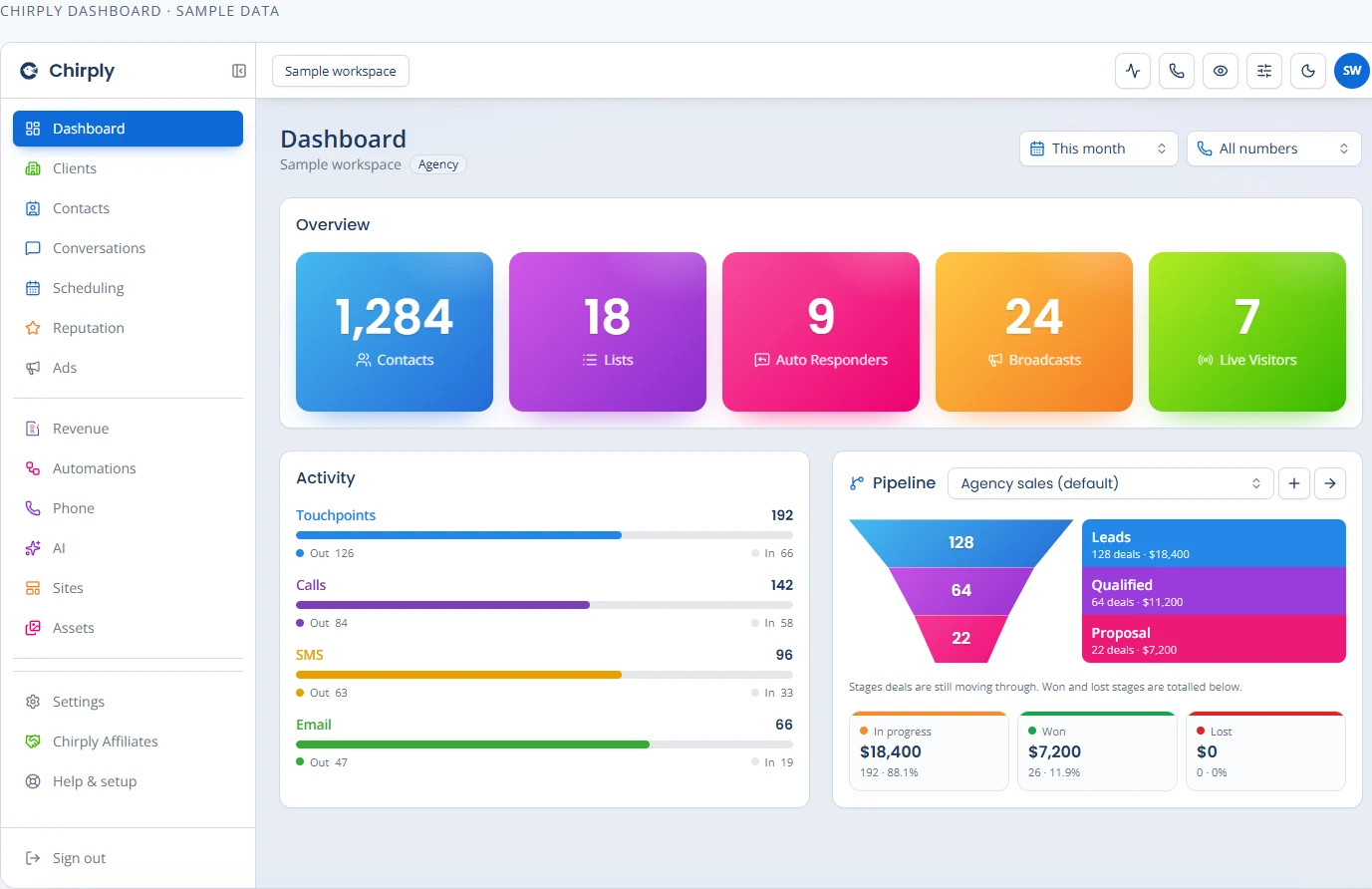
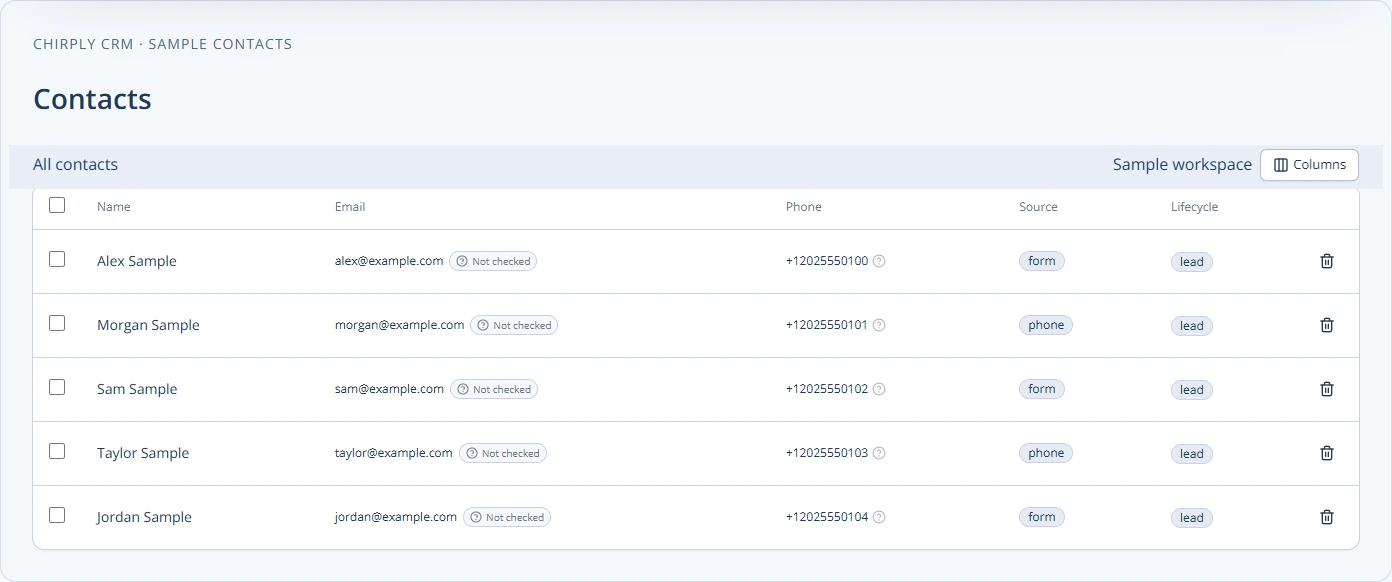
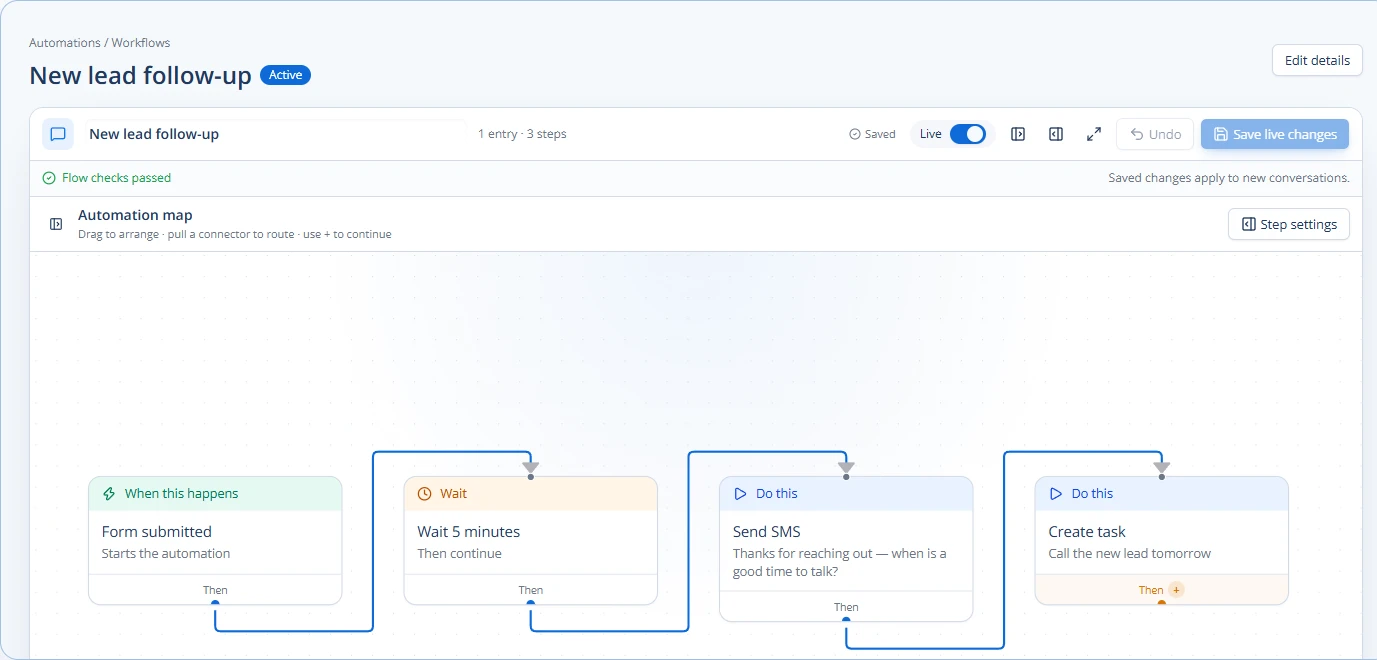
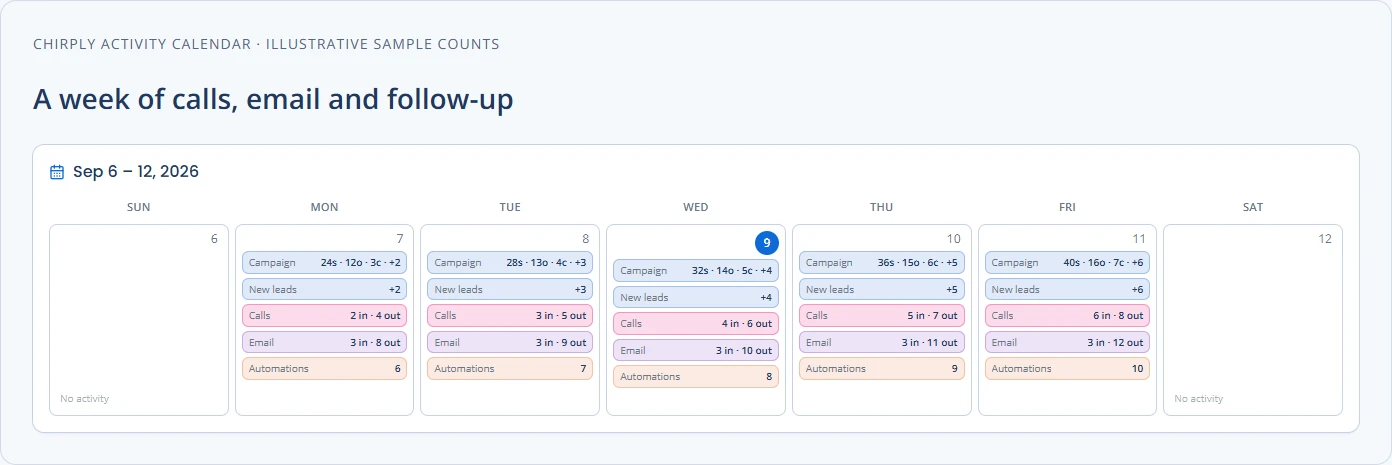
Connect advertising and social activity to the CRM.
Connect your own advertising accounts, build Google and YouTube campaigns, manage Meta advertising, publish social content, and bring leads and conversion evidence back into the workspace. Provider permissions and account eligibility still apply.
Google Search & YouTube campaigns
Build the ad, landing page, and follow-up in one workspace.
Connect an advertiser account, generate Search copy and keyword suggestions or a YouTube script, review the campaign, and validate it before creating or launching it.
Advertising conversion delivery
Send consented conversion signals and see delivery receipts.
Configure Meta, Google Ads, and optional GA4 tracking for the workspace's sites, with server delivery settings, connection checks, and recent event receipts.
Social content calendar
See the workflowPlan and publish without losing the campaign context.
Draft, schedule, publish, retry, and cancel Facebook Page and Instagram posts from one visual content calendar, with optional manual handoff for Groups.
Meta ads management
Build and control campaigns beside the leads they generate.
Browse connected ad accounts, build campaigns and creatives, inspect campaign and individual-ad performance, and pause or resume delivery from the workspace.
Facebook Lead Ads
Lead-form submissions in the CRM in seconds, mapped the way you want.
Discover the lead forms on each connected Page, decide question by question where every answer lands, and let new leads arrive as contacts your automations can act on straight away.