
 Chirply
You paid for these leads once already
The acquisition cost is spent and unrecoverable. Everything a reactivated contact spends is margin against a bill you settled years ago.
Every enquiry that went cold, every quote nobody chased, every customer who has not bought in two years. You already paid to acquire all of them. One campaign is the difference between a dead list and next month's revenue.
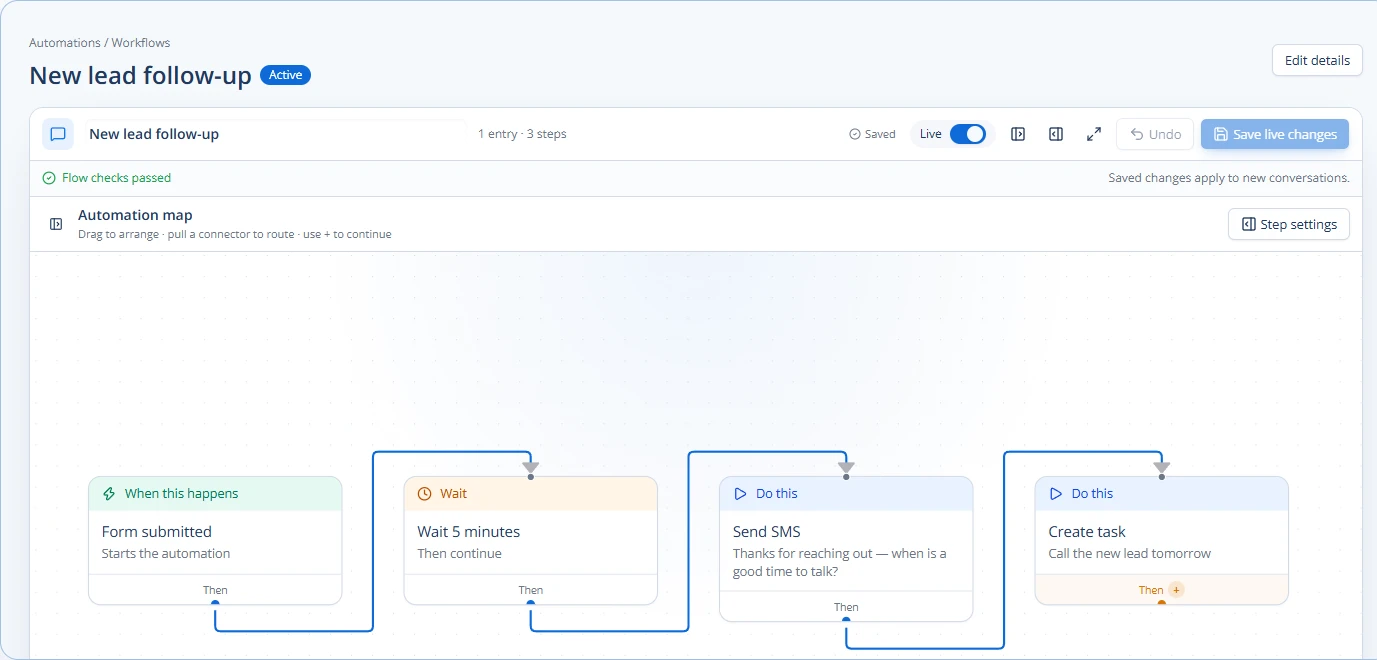
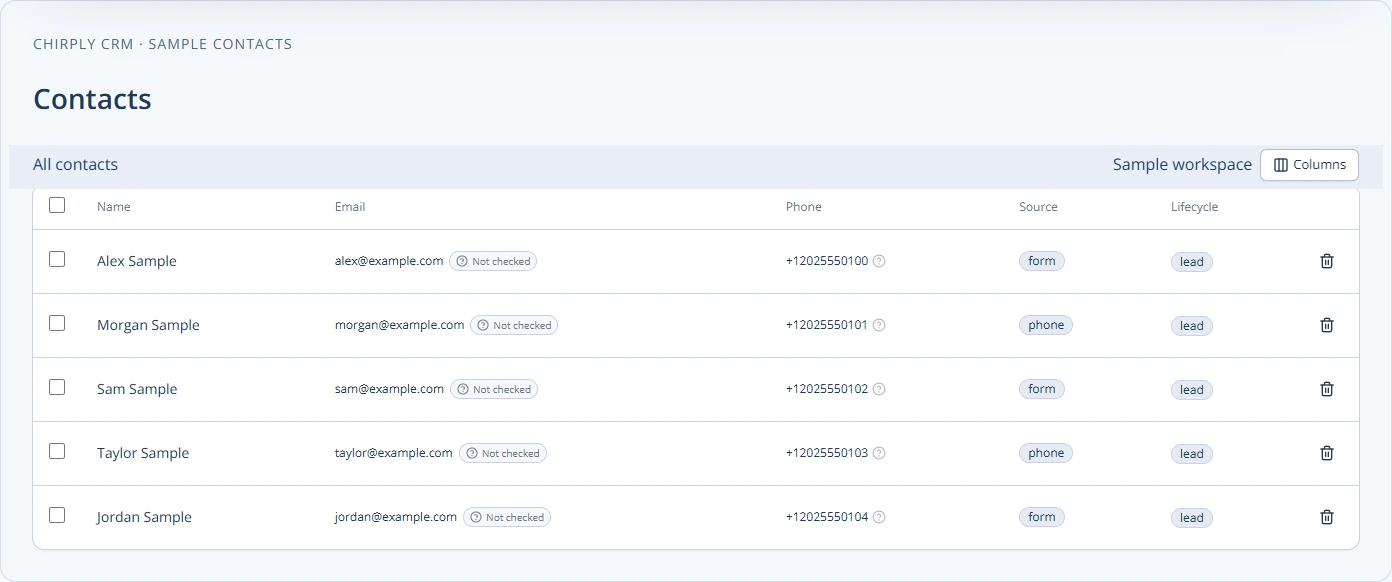
You are buying strangers at $40 a lead while three thousand people who already know your name sit untouched in a spreadsheet.
It is that nobody has the hours, and the cost of skipping it never shows up as a line on any invoice.
The acquisition cost is spent and unrecoverable. Everything a reactivated contact spends is margin against a bill you settled years ago.
Numbers change, mailboxes close, people move. The list is worth more today than it will be next quarter, and it has never been worth more than right now.
An email blast to a two-year-old list mostly lands in spam. The ones who answer a voicemail drop are rarely the ones who answer a text, and neither is the one who picks up the phone.
Segment
Define the audience as rules — last purchase, quote value, source, stage — and the segment keeps itself current instead of going stale the day you export it.
Reach
Text, email, ringless voicemail and outbound AI calls, on the same audience, paced so no sender or number carries the whole list at once.
Qualify
Autoresponders answer in seconds. The AI agent handles the ones that need a conversation and puts the ready ones straight onto the calendar.
Count
Revenue dashboards tie the campaign to the money, so the answer to whether it worked is a number rather than a feeling.
These are not roadmap items. Each one is running in production today, described here in the same words the full product catalog uses.
Define an audience once as rules and let it keep itself current.
Rule-based audiences over the contact record and everything attached to it, so “booked but never showed, and nobody has called them in two weeks” becomes a saved segment you send to — not a spreadsheet someone exports again every Monday.
Reach a whole segment on any channel, from one screen.
One-off blasts by email, SMS, ringless voicemail, outbound IVR or AI call — one composer, one audience builder, real analytics. Multi-step follow-ups are automations.
Land in 500 voicemail boxes without a single phone ringing.
A two-leg carrier drop that deposits your recording straight into their mailbox. Their handset never rings, so you're not interrupting anyone — they just see a voicemail waiting.
Qualify a list of 1,000 without a rep on the phone.
The same agents make outbound calls — one at a time from a call outcome or an automation, or as a bulk campaign with a per-campaign goal.
A reply goes out in seconds, at 2am, without you.
Rule-based automatic replies on inbound messages, fully merge-field aware.
Change your mind halfway through a send to twelve thousand people.
Every bulk action runs as a job you can watch and steer. Pause it, stop it, move its start time, or slow it down while it is running — the change lands on what has not gone out yet, and never on what already has.
Connect activity to the money it produced.
Monitor collected revenue, subscription run rate, pipeline value, source performance, funnel conversion, campaigns, links, and orders from their operational dashboards.
The boring parts that keep you out of trouble.
A shared compliance layer every outbound channel runs through — no per-feature reimplementation, no gaps.
This is the part of Chirply that solves database reactivation. See the other 14 areas — CRM, scheduling, messaging, automations, funnels, commerce, reputation and the rest — all included in the same workspace.
You do not have to migrate anything to find out whether this works. Start the trial, set up the one thing you came here for, and judge it on that.
Your trial runs on Scale, the top plan, so nothing is locked while you evaluate. If database reactivation is all you need afterwards, Scale at $97/mo carries it — switch down before the trial ends and keep the lower price.
Your order
$0 today. A card keeps the workspace running after the trial, and Scale renews at $97/month unless you change plans or cancel first.
Cancel any time before day 14 and nothing is charged. Calls, texts, emails and contacts are unlimited on every plan — you bring your own Twilio, Mailgun and model keys and pay those providers directly.
No trial subscription charge today. Cancel before renewal.
Provider usage and optional app purchases are separate. The card only exists so a workspace you decide to keep does not stop working on day 31.
It is the point. Line-type intelligence and email validation tell you what is still reachable before you spend anything, so you work the live half instead of burning a sender on the dead one.
Not if it is paced. Sends run as background jobs with capacity limits per sender, opt-out handling and quiet hours built in — and you can change your mind halfway through a send to twelve thousand people.
Least is best: a short, specific, single-question message. The AI writer drafts from your own past campaigns, and templates keep the good version once you find it.
Attribution runs from the campaign through to the invoice, so the dashboard shows the revenue the campaign produced rather than just the opens it got.
Weighing it against something specific?