
 Chirply
Chirply can help an agency collect one-time project fees, sell recurring retainers and offer fixed installment plans from the same invoicing workspace. The first decision is the billing model: an ongoing subscription and a finite payment plan behave differently. Choose that model before automating delivery or follow-up.
This guide explains the current Chirply workflow and what to verify before connecting it to your accounting process. It does not assume that linking a CRM automatically creates two-way bookkeeping sync.
Choose the invoice model that matches the agreement
| Agency need | Chirply approach | What to check |
|---|---|---|
| One project fee for one client | Standard invoice with a one-time line item | Correct customer, amount, currency and collection timing |
| The same service sold to multiple buyers | Product invoice with a reusable checkout page | Public offer copy and who should receive the link |
| An ongoing retainer until canceled | Standard or Product invoice with a recurring line item | Billing interval, recurring amount and agreed cancellation process |
| A fixed project total paid in installments | Payment Plan invoice | Total amount, installment schedule and any configured additional charges |
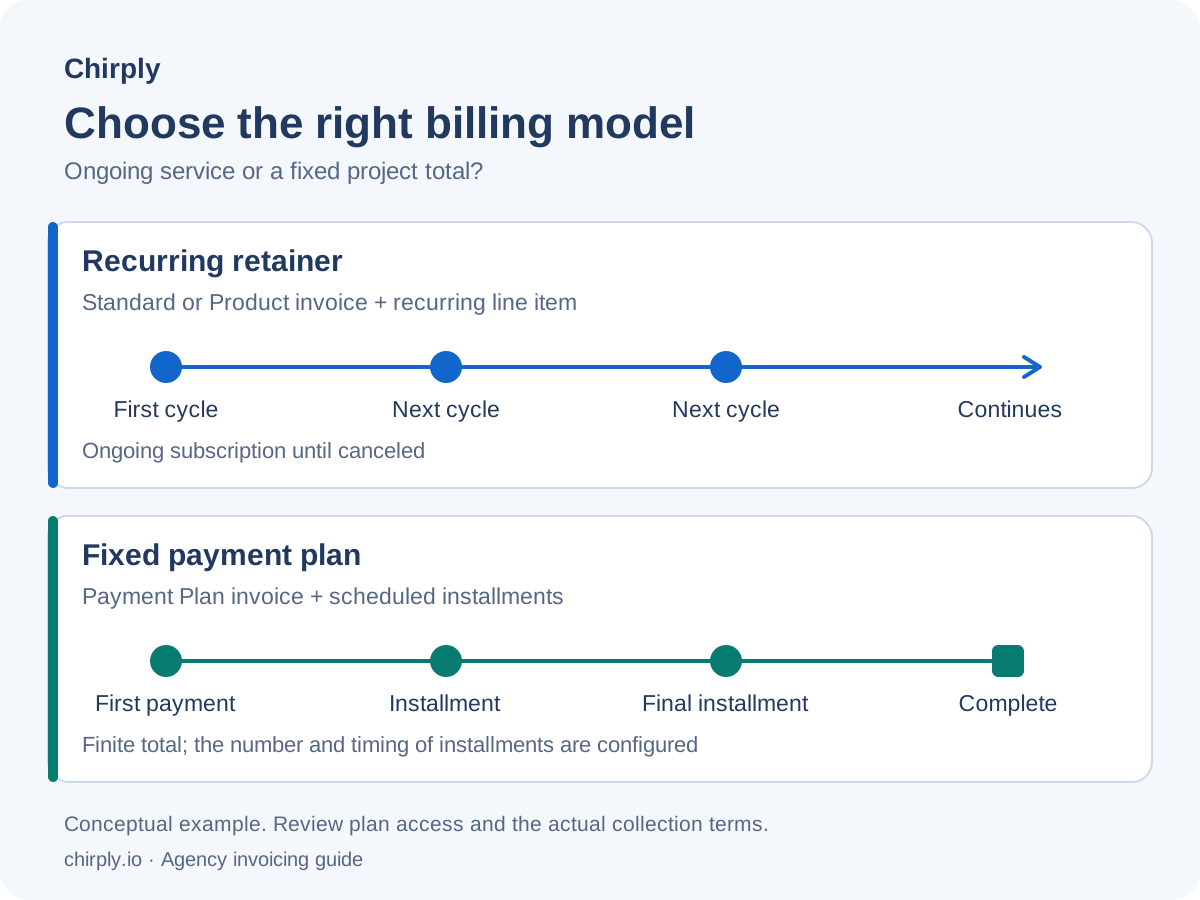
A monthly retainer should not be modeled as a finite Payment Plan just because both collect money more than once. Chirply's recurring line items use subscriptions; its Payment Plan type divides a fixed total into scheduled installments. Stripe's subscription overview explains the provider's recurring-payment lifecycle.
Standard and Product invoices support simple recurring line items. More advanced invoice structures depend on the workspace's plan access. Check the current plan comparison against the invoice type you intend to use before moving client billing.
Set up one billing flow in Chirply
Start with a specific offer, such as an ongoing design retainer or a website project paid in installments. Write down what the customer is buying, when payments should happen and which business receives the money.
- Open the correct workspace. Keep the client and seller context clear, especially when your agency manages multiple businesses. Check the contact's name and billing email before preparing the invoice.
- Choose the connected Stripe account. Chirply collects invoice payments through the workspace's connected Stripe account. Confirm the intended seller before publishing; do not assume every connected account represents the same business.
- Open Invoices → New invoice. Select Standard, Product or the appropriate advanced type. Creating a draft does not email anyone or charge a card.
- Add the line items. Review descriptions, quantities, prices and currency. For an ongoing service, configure a recurring line item and its interval. For installments, review the finite schedule instead.
- Review the buyer-facing details. Confirm what is due now and what will be collected later. Make the amount and timing understandable to the customer before they enroll.
- Publish when the offer is ready. Publishing makes the payment page available to people with the link. Sending an invoice is a separate action that emails a real recipient.
Use the Chirply feature overview for the broader CRM and invoicing context. The public handbook and action catalog describe the available invoice operations, including draft creation, line items, publication and payment history.
Automate delivery without creating duplicate billing
Chirply's workflow action Send an invoice emails a contact a link to an existing published invoice or checkout page. It does not create a new invoice for each workflow run. That distinction matters when the same contact can enter a flow more than once.
For a reusable service offer, confirm that the selected Product invoice is the page each recipient should receive. For an invoice addressed to one client, verify the intended recipient before attaching its link to an automation. A workflow configured with the wrong invoice can repeatedly send the wrong offer even if the email itself is delivered successfully.
Map the trigger, eligibility check, message and exit condition before enabling delivery. Decide what happens when a client has already paid, asks a billing question or needs a revised scope. Do not treat an unconditional reminder sequence as an overdue-invoice detector. Check the payment state and the conditions available in your actual workflow before assuming follow-up will stop automatically.
Follow the payment state, not just the email
An invoice being published or emailed is not proof that the client paid. Chirply exposes orders, payment history, scheduled charges and an invoice timeline. Use those records to investigate a failed payment or see whether a scheduled installment remains pending.
For a payment received by another method, Mark paid outside Stripe records the outstanding balance as paid and cancels remaining scheduled charges against that order. It does not charge a card. Use it only after confirming receipt; clicking it to tidy up a report would create an inaccurate payment record.
When investigating a problem, record the invoice or order identifier, expected amount, actual status and relevant date. Check the connected provider's record before initiating another collection attempt. A customer retry, a scheduled charge and a manual charge can have different purposes; resolve what already happened before adding another action.
Plan the accounting connection explicitly
Payment collection and bookkeeping are separate jobs. Before claiming a CRM-to-accounting integration is complete, decide which system owns each record and how updates reach the other system.
- Match customer and invoice identifiers rather than relying only on names.
- Document how payments received outside the processor are represented.
- Decide who handles refunds, disputed amounts and corrections.
- Define what happens when an integration fails after one side has already saved a record.
- Reconcile totals in the accounting system your business uses for its books.
Chirply's REST API and MCP documentation provide a starting point for evaluating integration work. The existence of invoice actions does not establish a ready-made two-way connector for every accounting package. Verify the specific connector, field mapping and error handling you need before making that part of a sales promise.
Verify the flow before client rollout
Use a supported test environment to exercise payment behavior. Stripe's testing guidance explains simulated payments with test credentials and test payment details. Confirm that the entire connection is in the intended test environment; a draft label or an internal customer name does not turn a live payment page into a sandbox.
Review these outcomes before enabling the flow for clients:
- The correct seller, customer and invoice are selected.
- The page clearly distinguishes the first payment from later recurring charges or installments.
- A successful payment appears in the expected records.
- A failed payment leads to a defined review or recovery path.
- Repeated workflow entry does not create unintended messages or collection attempts.
- The team knows where to inspect payment history and who owns exceptions.
Start with one well-defined service and measure time spent preparing invoices, payment exceptions and manual corrections. Those measurements are more useful than assuming automation will eliminate late payments.
For an ongoing agency retainer, evaluate Standard or Product invoicing with recurring line items. For a fixed project price spread across dates, evaluate Payment Plan access. Use Chirply's current pricing and trial terms to choose a plan, then verify the workflow against your actual client agreement.
Common questions
Answers at a glance
Can Chirply bill an ongoing agency retainer?
Yes. Use a Standard or Product invoice with a recurring line item for an ongoing subscription. Review the billing interval and buyer-facing terms. A Payment Plan is for a finite total split into installments.
Does sending an invoice automatically charge the client?
No. Sending an invoice emails a link to an existing published payment page. Publishing makes the page available; collection follows the invoice and payment setup. Creating a draft does not send an email or charge a card.
Does the Send an invoice workflow action create a new invoice?
No. It sends the contact a link to the published invoice or checkout page selected in the action. Check the intended recipient and offer, especially if the contact can enter the workflow more than once.
Does Chirply automatically sync invoices with every accounting app?
Do not assume so. Evaluate the specific connector or API integration, field mapping, ownership of records and error handling. Available invoice actions do not establish two-way bookkeeping sync with every accounting package.
How do I record a payment received outside Stripe?
After confirming that the money arrived, use Mark paid outside Stripe for the order. It records the outstanding balance as paid and cancels remaining scheduled charges against that order. It does not charge a card.
Put this into practice
Use a setup guide and its acceptance checks to turn the idea into a working process.
- CRM Workflow Testing Checklist & Acceptance Matrix
- Lead Follow-Up Automation: Chirply Setup Checklist
- CRM Data Quality Checklist: Fields, Tags & Ownership
Put the system to work
Run the whole client journey in one place.
CRM, phone, messaging, automation, funnels, and AI, connected on one contact record and ready for your brand.
See Chirply plans