
 Chirply
Building an Automated Client Success Workflow
A step-by-step blueprint to create automated workflows that monitor client health, trigger proactive outreach, and manage renewals for agencies.
Read articleChirply field notes
Learn how to design CRM automation and AI workflows for lead response, onboarding and task handoffs. Follow a practical trigger, test and measurement checklist.
CRM automation runs a defined sequence when an event occurs, such as a form submission or a change in a contact record. Rules determine the steps and conditions. AI can help with tasks that involve language, such as drafting a response or summarizing a conversation. A useful workflow gives each step a purpose, clear inputs and a result a person can verify.
Browse Automation + AI articlesChoose one process, such as responding to a new inquiry. Write down the event that starts it, the conditions that qualify a contact and the result you want. Decide what happens when the same person enters again and which event should stop the sequence.
Explore the workflow builderBuild the smallest useful sequence, then test the normal path, a missing field and a repeated event. Check the contact history, task ownership and any resulting appointment. Review message content, audience and timing before turning on actions that contact customers.
See a lead-response workflowGive the AI the context it needs for one defined task and decide where a person reviews the result. For a phone agent, test the knowledge, booking permissions and transfer route. Measure completed outcomes and exceptions before expanding the scope.
Follow the AI receptionist setup guideStart with a frequent process that has a clear trigger and a short path to completion. Lead intake and internal task creation are useful candidates. Measure the manual process first, then use a sample contact to verify each automated step and the handoff to the responsible person.
Record eligible entries, successful completions, exceptions and time to the intended outcome. Compare like-for-like periods and contact groups. Review a sample of the underlying records to confirm that a completed workflow also produced the task, response or appointment you intended.
A step-by-step blueprint to create automated workflows that monitor client health, trigger proactive outreach, and manage renewals for agencies.
Read articleLearn how agencies can streamline client contract handling by integrating CRM with contract management software to automate creation, signing, and renewals.
Read articleDiscover how AI can transform how agencies train new hires and upskill existing teams, making learning faster and more effective.
Read articleHow to keep control and personalization when you automate client-facing work. Practical patterns for adding human checkpoints without losing efficiency.
Read articleLearn how AI predictive analytics can transform agency sales by accurately forecasting revenue and identifying high-potential leads within your CRM.
Read articleA clear framework and list of KPIs to measure financial and operational ROI for CRM and AI automation in agencies, plus a practical example and checklist.
Read articleLearn how to use workflow automation to speed up client support in agencies. Automate ticket routing, common responses, and escalation to improve satisfaction and efficiency.
Read articleA clear, step-by-step checklist to automate client onboarding inside your CRM. Reduce manual work, deliver consistent welcome flows, collect documents, assign tasks, and hand off to delivery.
Read articleA practical guide for agencies to build privacy-compliant automated workflows. Covers design principles, anonymization, access controls, monitoring, and a checklist to use today.
Read articleTrack the right automation performance metrics to know if CRM and AI automation are saving time, raising revenue, and improving client outcomes. This guide lists key KPIs, dashboards, a sample dashboard, a checklist, and a simple decision framework.
Read articleDiscover how AI helps marketing agencies improve campaign performance by analyzing data, predicting outcomes, and automating adjustments for better ROI.
Read articleLearn how AI can help agencies create winning proposals and set profitable prices, avoiding lost bids and leaving money on the table.
Read articleLearn how to foster a culture where your agency team embraces automation and new technology, making your business more efficient.
Read articleLearn how to introduce automation to your agency team smoothly. We cover communication, training, and showing the real benefits to overcome fears.
Read articleLearn how agencies can safely use AI tools. This guide covers data privacy, fairness, and smart oversight to protect your clients and your business.
Read articleLearn how to use automation to make project handoffs smoother and prevent miscommunication between agency teams.
Read articleAI can be a powerful partner for agencies, helping with new ideas, understanding trends, and creating different content quickly.
Read articleLearn how CRM automation can clean, enrich, and maintain high-quality data for agencies, leading to better marketing and reporting.
Read articleLearn how AI helps agencies spot clients at risk of leaving. Use data to predict churn and keep your clients happy and loyal.
Read articleLearn where AI fits in a CRM workflow, how it differs from rule-based automation, and how to evaluate a focused agency pilot using verified Chirply features.
Read article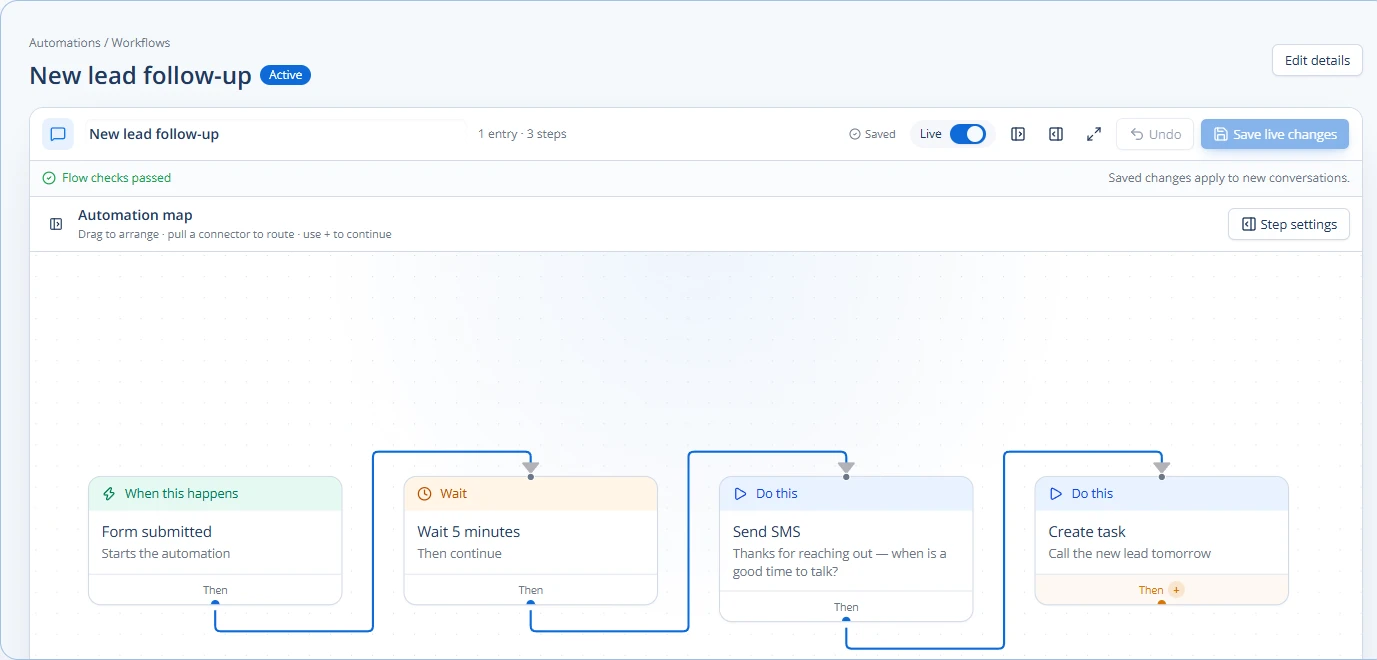
Learn how to automate lead response for your agency to save time, impress prospects, and close more deals. This guide covers setting up multi-channel workflows.
Read articleA clear, practical explanation of RPA for agencies: what it is, how it differs from other automation, real examples, and a checklist to pick the right tasks to automate.
Read articleAgencies can use AI to find new ways to grow their client accounts. AI looks at client data and how they use services to suggest the best upsell and cross-sell ideas. This helps agencies offer more value and make more money.
Read articleLearn how agencies can save time and improve client meetings by automating scheduling, reminders, and data preparation.
Read article