
 Chirply
The scheduling link is a stranger to your CRM
The booking happens in one tool and the customer lives in another. Nothing you know about them travels with the appointment, and nothing the appointment produces travels back.
Publish a booking page carrying your real availability, let people pick a slot, and have it land on the calendar your team already works — with the deposit taken up front on your own Stripe when the appointment is worth protecting.
Every no-show was somebody who booked a free slot they had no particular reason to keep.
It is that nobody has the hours, and the cost of skipping it never shows up as a line on any invoice.
The booking happens in one tool and the customer lives in another. Nothing you know about them travels with the appointment, and nothing the appointment produces travels back.
When booking costs nothing, cancelling costs nothing either. Your no-show rate is not a discipline problem; it is a pricing one.
Offer a time your outside calendar already owns and the first thing a new customer learns about you is that your system does not work.
Publish
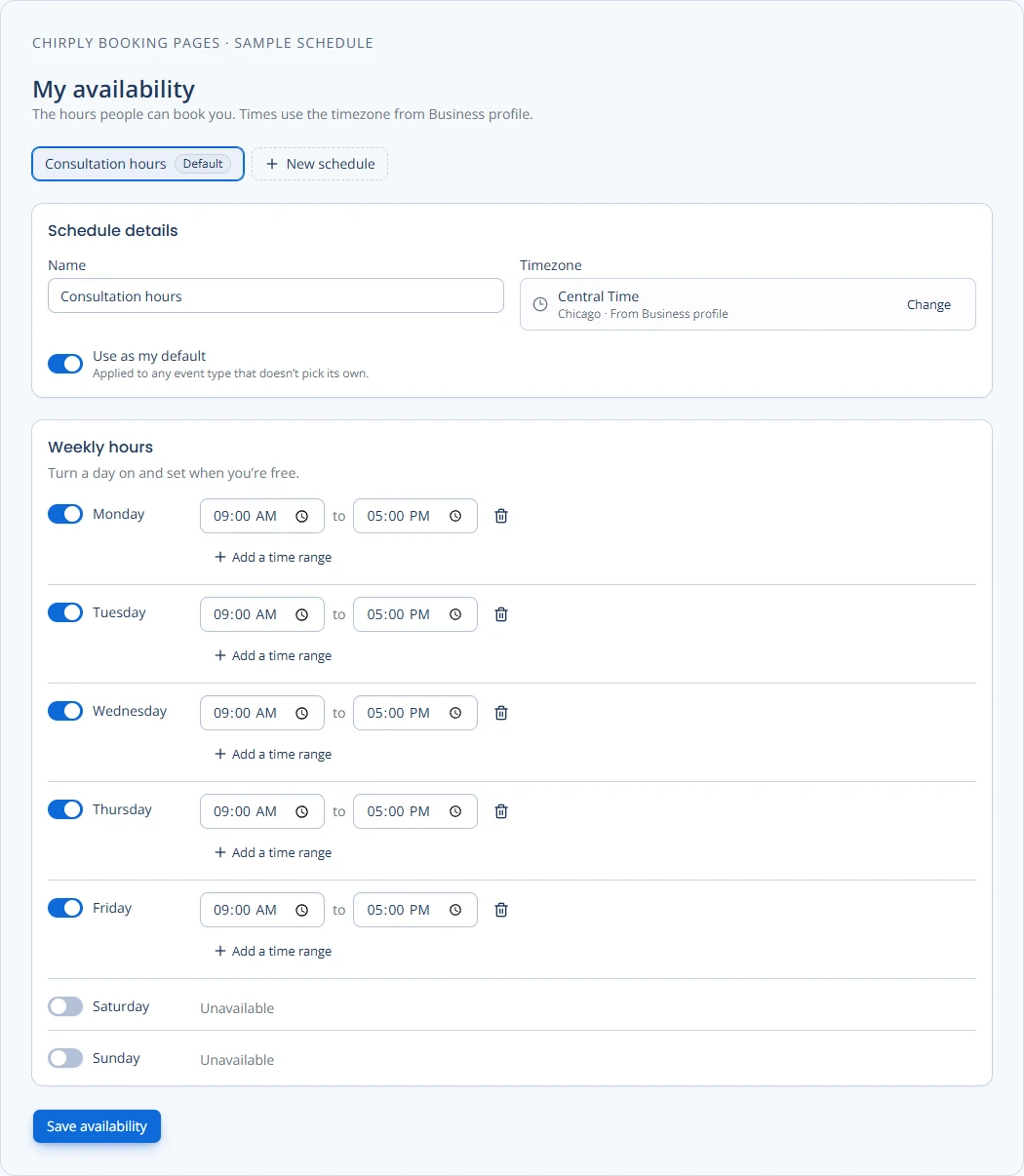
Every event type gets a shareable page with your availability, timezone handling, intake questions, confirmation copy and location instructions — phone, in person, video, Google Meet, Zoom, Teams or custom.
Sync
Connect a host's Google Calendar or Microsoft 365. Busy time flows in before a slot is ever shown, and confirmed bookings are written back out as real calendar events.
Share
Reusable schedules, date-specific overrides and host pools that either round-robin the appointment or require several people to attend together.
Protect
Require payment on an event type and collect it on the workspace's own Stripe account — the money lands in your bank rather than a platform balance, and the booking notification waits for the payment outcome.
These are not roadmap items. Each one is running in production today, described here in the same words the full product catalog uses.
Let leads book the right meeting without the email ping-pong.
Every event type gets a shareable booking page with your availability, timezone handling, intake questions, confirmation copy, and location instructions.
Your outside calendar and your booking pages stop double-booking each other.
Connect a host's Google Calendar or Microsoft 365 / Outlook account. Busy times flow in before slots are offered, and confirmed bookings are written out as real calendar events.
See every booking and keep the customer informed.
Staff can manage appointments while customers receive secure links to confirm, reschedule, or cancel their own booking.
Offer the team, not one person's calendar.
Create reusable schedules, date-specific overrides, and host pools that distribute appointments or require multiple people to attend together.
Take the deposit before the time is reserved.
Require payment on an event type and collect it on the workspace's own Stripe account, so the deposit lands in the business's bank and not in a platform balance.
This is the part of Chirply that solves booking pages. See the other 14 areas — CRM, scheduling, messaging, automations, funnels, commerce, reputation and the rest — all included in the same workspace.
You do not have to migrate anything to find out whether this works. Start the trial, set up the one thing you came here for, and judge it on that.
Your trial runs on Scale, the top plan, so nothing is locked while you evaluate. If booking pages is all you need afterwards, Grow at $77/mo carries it — switch down before the trial ends and keep the lower price.
Your order
$0 today. A card keeps the workspace running after the trial, and Scale renews at $97/month unless you change plans or cancel first.
Cancel any time before day 14 and nothing is charged. Calls, texts, emails and contacts are unlimited on every plan — you bring your own Twilio, Mailgun and model keys and pay those providers directly.
No trial subscription charge today. Cancel before renewal.
Provider usage and optional app purchases are separate. The card only exists so a workspace you decide to keep does not stop working on day 31.
Grow, at $77 a month, because team round robin and paid appointments both start there. If you are one person booking free calls, Launch at $47 already carries booking pages, reminders, rescheduling and calendar sync.
In your own bank. Payments are collected on the workspace's own Stripe account and are never pooled through a platform balance. You set price and currency per event type, and the payment status is carried on the appointment itself.
The booking page stays up. A broken or expired connection records its error and falls back to internal availability — an expired token can never take your booking page down.
Yes. Customers get secure links to confirm, reschedule or cancel their own booking, email and SMS reminders go out at offsets you choose, and the cancellation reason and reschedule lineage are both kept.
You can — but the booking is only the first minute of the relationship. Here the appointment is attached to the contact, so the reminder text, the call recording, the invoice and the review request afterwards are all the same record, instead of five tools agreeing to disagree.
Weighing it against something specific?