
 Chirply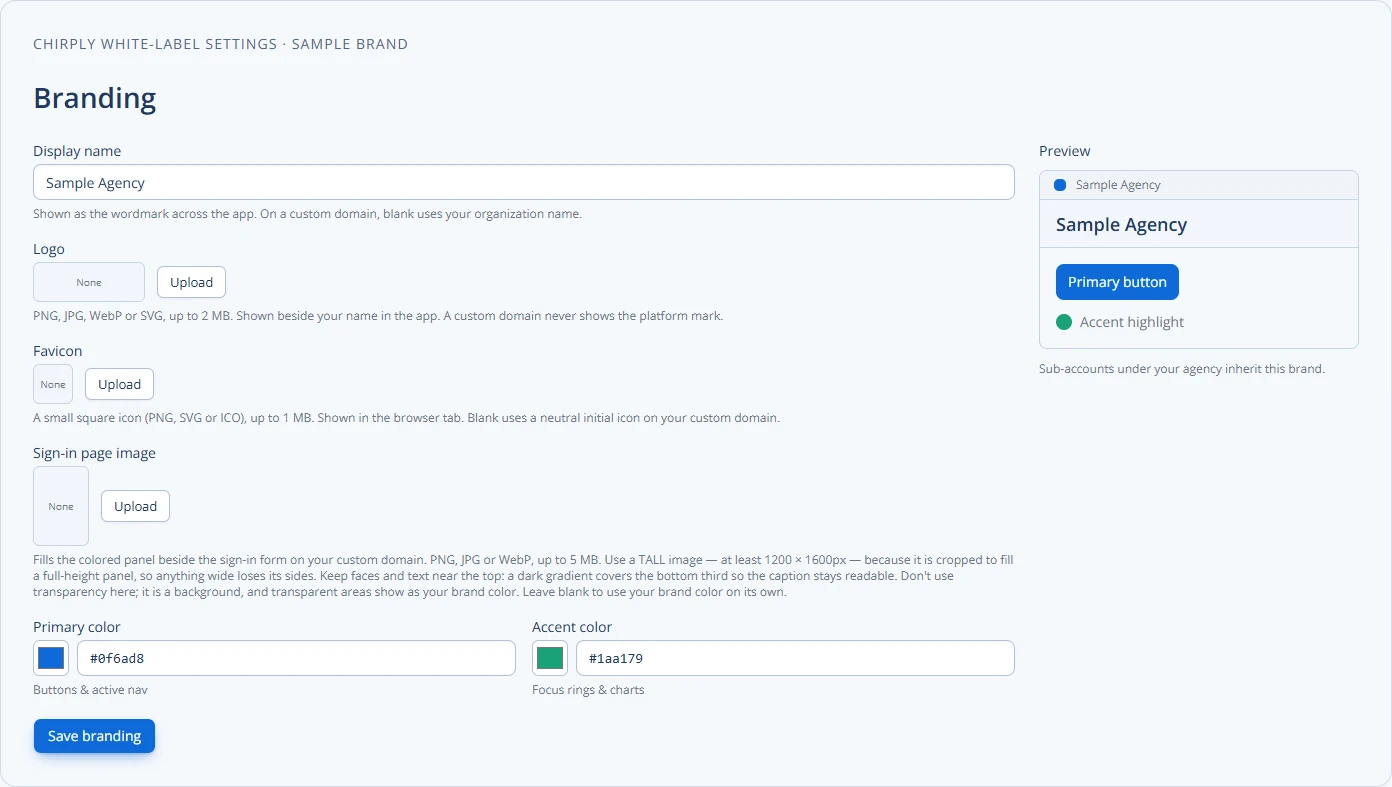
Choosing a white-label CRM for your agency starts with understanding what features truly matter for managing clients and operations efficiently. You need a platform that adapts to your workflows, supports your brand, and helps you deliver value to your clients. This article breaks down the essential features agencies should look for in a white-label CRM.
Test the agency workflow in Chirply before choosing a platform
A white-label CRM evaluation should end with a working client scenario, not a feature tally. In Chirply, test branding, workspace isolation and the daily sales workflow separately.
- Compare the current white-label CRM options and partner plans. Reselling client accounts and rebranding the platform are different entitlements; confirm the plan includes the one you need.
- In the entitled agency workspace, open White-label. Set a sample display name, primary color and accent color, then check the preview. The editor also has separate logo, favicon and sign-in image fields. Save your changes and review the sign-in experience on your verified domain.
- Create a separate sample client workspace from Clients. Switch into it before importing any sample contacts. Invite a test teammate with only the access their job needs, and check that their view is limited to that workspace.
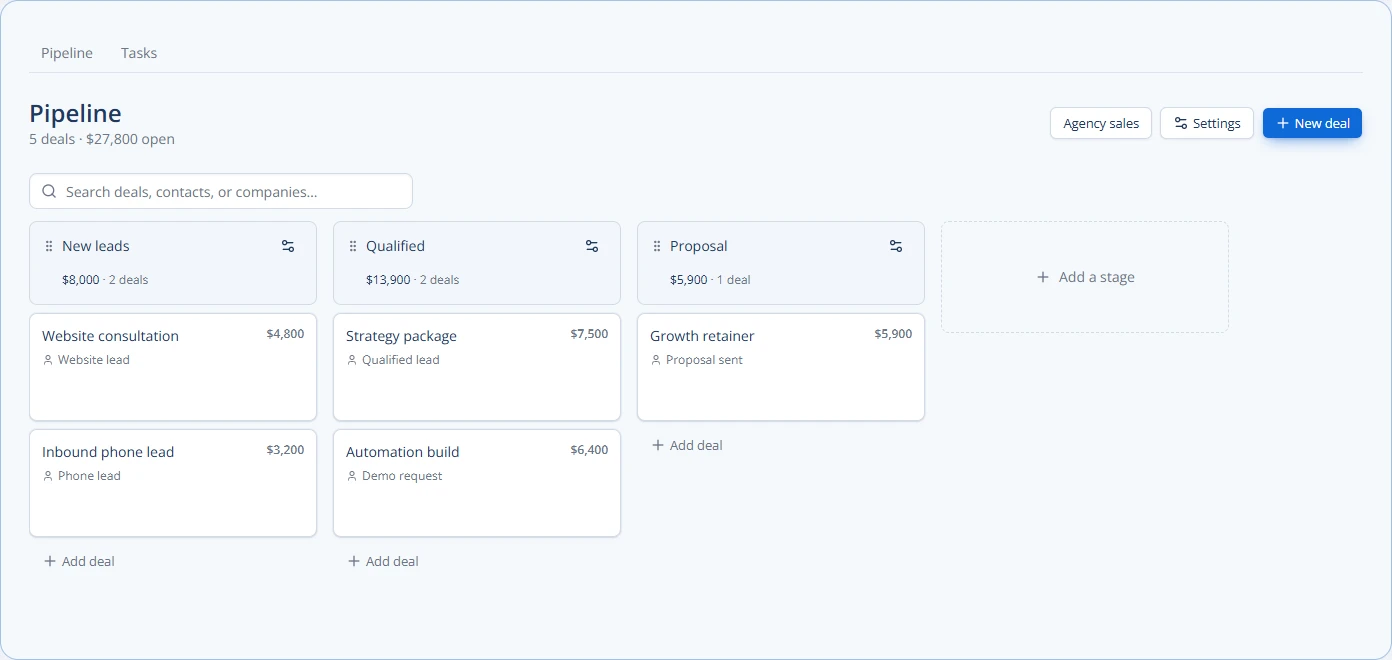
- Add a sample lead, make a deal and move it through the pipeline. Ask the person who will do the work to find the contact, the next task and the current stage without your help.
The screenshot below shows Chirply's actual pipeline component with synthetic deals. It demonstrates the board layout; it is not evidence of a customer's revenue.
Use a short acceptance sheet: correct agency identity, correct workspace, correct permissions and a completed follow-up task. Mark each item pass or needs work. If a requirement depends on an integration or a different plan, record that dependency beside it. Review Chirply's white-label workflow with that sheet, then choose the smallest pilot that exercises your real client handoff.
Client Workspace Separation and Management
Agencies handle multiple clients, often with different teams and projects. A good white-label CRM must offer separate client workspaces. This means each client’s data, pipelines, and communications are isolated but easy for your team to access.
For example, if you manage marketing campaigns for three clients, each should have its own workspace to track leads, tasks, and results without mixing data. This helps maintain client confidentiality and keeps your agency organized.
Integrated Communication Tools
Communication is key in agency work. Look for a CRM that integrates calling, SMS, and email directly into the platform. This saves time by letting your team make calls, send messages, and track conversations without switching apps.
Automation features like broadcasts and automated follow-ups are also important. These help nurture leads and clients with timely messages, keeping your agency proactive and responsive.
Automation and Funnels
Efficiency is a must for agencies. White-label CRMs should include tools for building funnels and automations that guide leads through marketing and sales processes.
For example, you might set up an automation that sends a welcome email, schedules a follow-up call, and assigns a task to a team member when a new lead comes in. These workflows reduce manual work and ensure no leads fall through the cracks.
Task and Appointment Management
Managing multiple clients means juggling many tasks and meetings. A white-label CRM should offer a task management system integrated with calendars and appointments. This keeps your team on track with deadlines and client meetings.
Having everything in one place prevents missed follow-ups or double bookings. It also makes it easier to report progress to clients.
Lead Generation and Reputation Tools
Agencies often need to generate and qualify leads for clients. Look for CRMs with built-in lead generation features like forms, landing pages, or integrations with your existing marketing tools.
Reputation management tools can help monitor and improve your clients’ online presence. These features give agencies an edge by combining marketing and sales in one platform.
Custom Branding and White-Labeling
Since you offer CRM services to your clients, the platform must support custom branding. This means you can replace the CRM’s logos, colors, and domain with your own, creating a seamless experience for clients.
A white-label CRM should also allow you to connect your own service providers, so you maintain control over the tech stack and client experience.
API Access and Automation Capabilities
For agencies with technical resources, public REST APIs and automation capabilities are vital. They let you integrate the CRM with other software, build custom workflows, and expose human actions programmatically.
This flexibility helps scale your agency’s operations and tailor the CRM to specific client needs.
Practical Checklist for Choosing a White-Label CRM
| Feature | Why It Matters | Example Use Case |
|---|---|---|
| Separate Client Workspaces | Keeps client data organized and secure | Managing campaigns for multiple clients |
| Integrated Calling, SMS, Email | Centralizes communication | Making calls and sending follow-ups in one tool |
| Automation and Funnels | Saves time, improves lead nurturing | Automating welcome emails and task assignments |
| Task & Appointment Management | Prevents missed deadlines and meetings | Scheduling client meetings and tracking tasks |
| Lead Generation Tools | Helps find and qualify new clients | Using forms and landing pages to capture leads |
| Reputation Management | Improves client online presence | Monitoring reviews and social feedback |
| Custom Branding | Maintains your agency’s professional image | Replacing CRM logos with your brand |
| API and Integration Access | Enables custom workflows and system connections | Syncing CRM with billing or marketing platforms |
Example Decision Framework
- List your agency’s core needs: client count, communication style, automation level.
- Match these needs against CRM features: use the checklist above.
- Test platforms with real workflows: request demos or trial access.
- Check for customization and white-label options: branding and integrations.
- Evaluate support and scalability: can the CRM grow with your agency?
Chirply is an example of a white-label CRM that covers many of these bases. It offers separate client workspaces, integrated calling, SMS, email, automation, funnels, invoicing, and even AI phone agents. Its built-in MCP server and public REST API provide flexibility and control, making it suitable for agencies looking to customize deeply.
To learn more about what a white-label CRM is and how it can benefit your agency, visit What Is a White-Label CRM and What Is White-Label SaaS.
Choosing the right white-label CRM can transform your agency’s efficiency and client satisfaction. Use this guide to evaluate your options carefully and select a platform that fits your unique workflows and growth plans.
Next Step
Start by listing your agency’s specific needs and priorities using the checklist above. Then, schedule demos with a few white-label CRM providers to see how their features align with your workflows and branding goals.
Common questions
Answers at a glance
What is a white-label CRM?
A white-label CRM is a customer relationship management platform that agencies can rebrand and customize as their own, offering CRM services under their agency’s brand.
Why do agencies need separate client workspaces in a CRM?
Separate client workspaces keep each client’s data and communications organized and secure, preventing data mix-ups and ensuring confidentiality.
How does automation in a white-label CRM benefit agencies?
Automation saves time by handling repetitive tasks like sending follow-ups, managing lead funnels, and assigning tasks, which helps agencies stay efficient and responsive.
Can I customize the branding in a white-label CRM?
Yes, white-label CRMs allow agencies to replace logos, colors, and domains with their own branding, creating a seamless client experience.
What role does API access play in choosing a white-label CRM?
API access lets agencies integrate the CRM with other software and build custom workflows, providing greater flexibility and scalability.
Put this into practice
Use a setup guide and its acceptance checks to turn the idea into a working process.
- CRM Evaluation Checklist & Weighted Scorecard Template
- White-Label CRM Launch Checklist for Agencies
- Client Onboarding Checklist: Owners, Access & Handoff
Put the system to work
Try the workflow in your own account.
Review the feature, choose one sample contact and test the handoff before you expand it to the rest of your team.
Explore this Chirply feature See Chirply plans