
 Chirply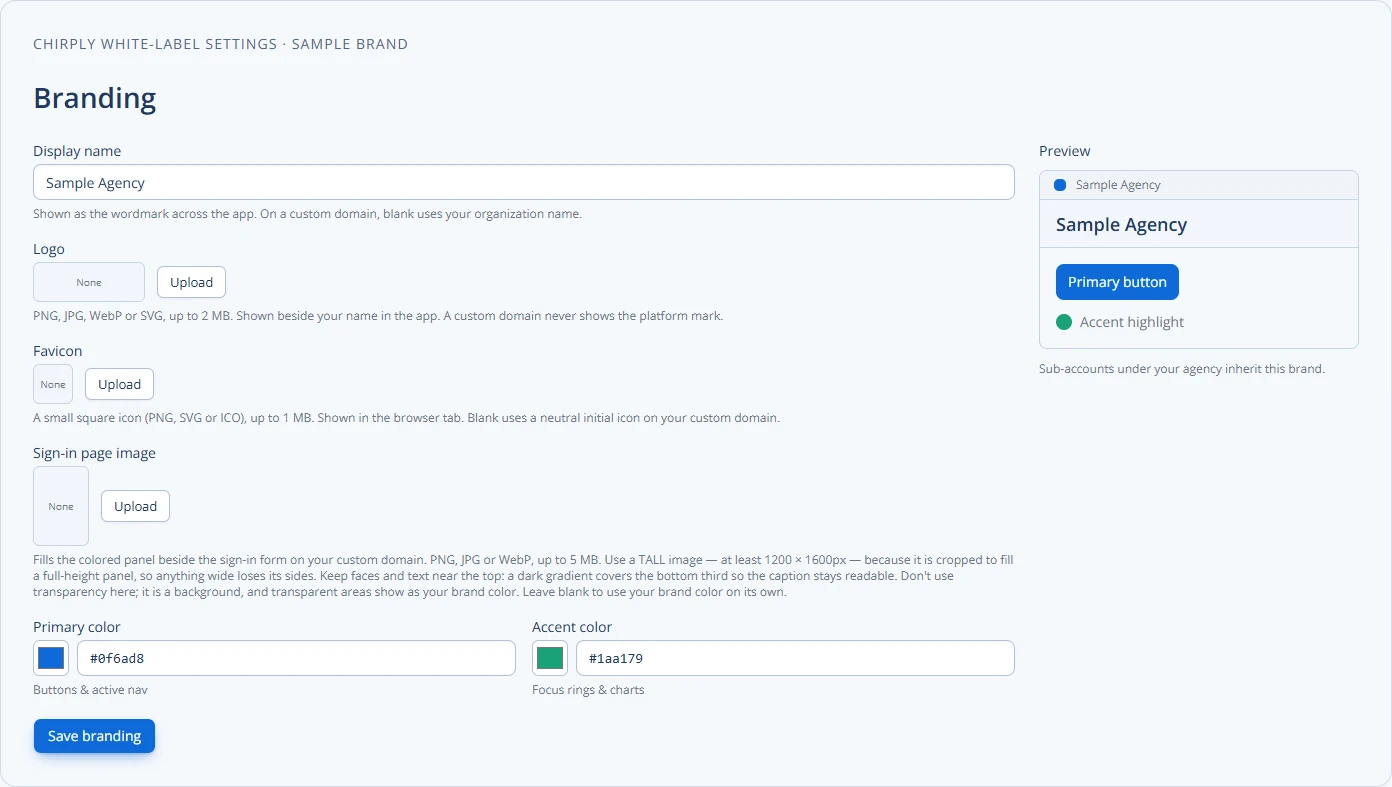
Getting new clients to use your branded software platform can feel tricky, but it doesn't have to be. A smooth onboarding process is key to making sure they actually use and love your white-label SaaS. This guide will walk you through the steps to make client onboarding easy and effective, focusing on getting them to adopt your platform fully.
A practical first-client onboarding sequence in Chirply
Treat the first client as a pilot. The goal is one complete journey from a sample inquiry to an assigned next step, under the client's expected brand.
- Open Clients in your entitled agency workspace and create the client's separate workspace. Verify the workspace switcher before you configure or import anything.
- Review the agency identity in White-label. The production editor separates the name, logo, favicon, sign-in image and colors, so check the app and sign-in page as distinct surfaces.
- Choose the provider arrangement for this client. Chirply supports client-owned connections and agency-managed pooled service; the choice affects setup, usage funding and support responsibility. Document who owns the numbers, sending identity and billing relationship.
- If you use a snapshot, install the reviewed version into the intended workspace. A snapshot carries configuration, not customer conversations or contacts. Imported automations and pages arrive inactive or unpublished; resolve the install's Finish setup items before enabling them.
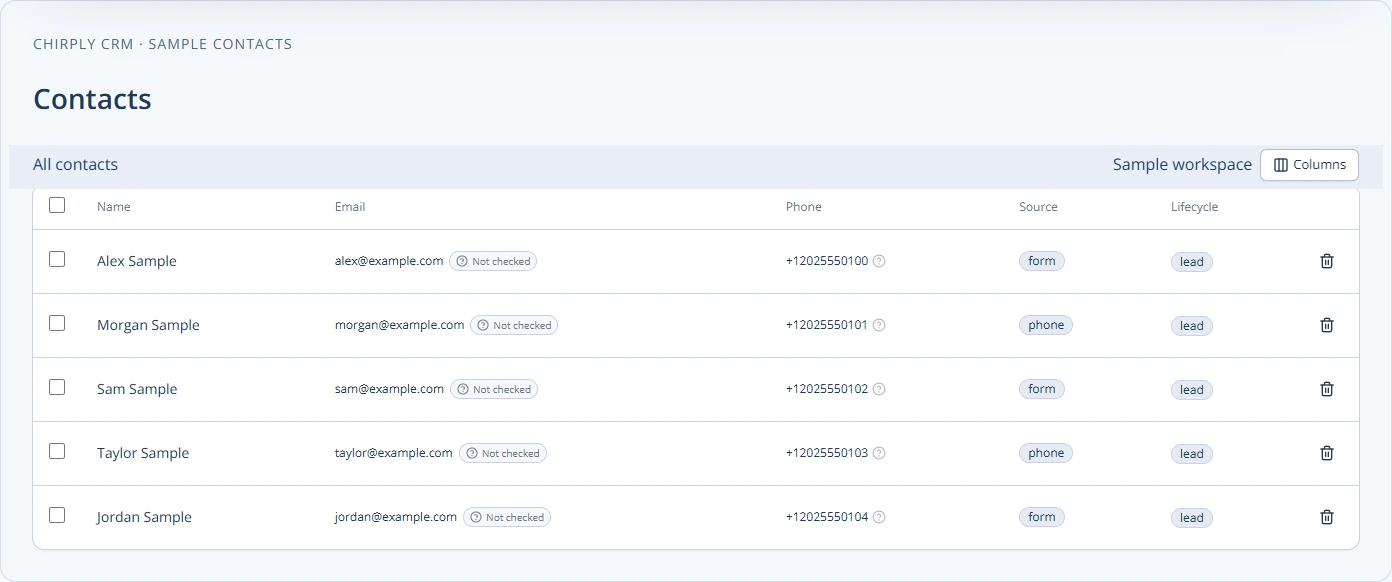
- Import a few synthetic contacts, confirm the field mapping, then walk the client through finding a contact, recording the next task and opening the shared inbox.
The contacts screenshot uses example.com addresses and fictional numbers. Use similarly controlled records for onboarding instead of copying one client's data into another's workspace.
Sign off on the first workflow together: the inquiry reached the correct workspace, a person owns the response and the next step is visible. Only then add the remaining users and data. See the white-label setup and reusable snapshots to decide which parts of this sequence you can standardize for the next client.
Why Good Onboarding Matters for Your Branded Platform
Think about buying a new gadget. If it's hard to set up, you might give up or not use all its cool features. The same goes for your white-label SaaS platform. When you onboard clients well, they learn how to use your tool quickly and see its value. This means they're more likely to stick around and be happy customers. Poor onboarding, on the other hand, can lead to frustration, clients not using the platform, and eventually, them leaving.
Good onboarding helps your clients:
- Understand the value: They see how your platform solves their problems.
- Feel confident: They know how to use the features that matter most to them.
- Become active users: They log in often and get real results.
- Stay loyal: Happy users are long-term users.
This is especially important for a white-label platform because your brand is on the line. You want your clients to associate a positive experience with your name.
Preparing for a Smooth Client Onboarding
Before your client even logs in, you need to have a plan. Preparation makes the actual onboarding much easier.
Step 1: Set Up Their Workspace
First, create a dedicated space for your client within your platform. This might involve setting up their account, adding their team members, and making sure all the basic settings are correct. Think of it like preparing a new office for them – everything should be ready to go.
Step 2: Customize and Brand
Since it's a branded platform, make sure it looks like your client's brand, or your own agency's brand if that's your model. This means adding their logo, choosing their brand colors, and setting up any custom domains. This makes the platform feel like a natural extension of their business, not just a generic tool.
Step 3: Pre-load Essential Data (If Applicable)
If your client has existing data that needs to be in the platform (like contact lists or past projects), try to get this imported before their first login. This saves them time and shows them the platform is ready to work for them from day one. For example, if your platform is a CRM, a checked import of their current customer list gives the team a useful starting point.
Step 4: Create a Welcome Packet or Resources
Put together a simple welcome kit. This could be a short email series, a PDF guide, or a link to a dedicated help page. It should include:
- Their login details.
- A direct link to their branded platform.
- Basic "getting started" instructions.
- Contact information for support.
- A link to schedule their first training session.
The Onboarding Journey: A Step-by-Step Checklist
Here's a checklist to guide your clients through their first days and weeks with your platform. Focus on making each step clear and valuable.
Phase 1: Initial Setup & First Login
- Send Welcome Email:
- Include login details, platform link, and a warm welcome.
- Briefly explain what they can expect next.
- Example: "Welcome to [Your Branded Platform Name]! Your account is ready. Click here to log in: [Link]. We'll be in touch soon to schedule your personalized setup call."
- First Login & Tour:
- Schedule a live video call or provide a guided video.
- Walk them through the platform's layout.
- Show them how to change their password and update their profile.
- Point out key areas like their dashboard, settings, and help resources.
- Connect Essential Integrations:
- Help them connect any necessary tools, like their email provider, calendar, or payment gateway. For a platform like Chirply, this might involve connecting their phone provider for calling and SMS, or their email service for broadcasts. This makes the platform functional for their daily operations.
Phase 2: Core Feature Training & First Wins
- Identify Key Use Cases:
- Ask your client: "What do you want to achieve with this platform first?"
- Focus training on the features that directly help them reach those goals. Don't overwhelm them with everything at once.
- Example: If they want to manage leads, show them the pipeline. If they want to send emails, show them the email builder.
- Hands-On Training Session(s):
- Conduct personalized training. Let them share their screen and guide them as they perform tasks.
- Encourage them to do things in the platform, not just watch.
- Provide simple "first tasks" they can complete during or right after the session.
- Example: "Let's add your first 3 contacts to the CRM together." or "Let's send your first test email broadcast."
- Set Up Basic Automations (If Applicable):
- Show them how to automate simple tasks to save time.
- Example: "Let's set up an automation so that when a new lead comes in, they automatically get a welcome email." This highlights the power of the platform.
Phase 3: Ongoing Support & Adoption
- Provide Easy Access to Help:
- Make sure they know how to reach your support team.
- Point them to your knowledge base, FAQs, or video tutorials.
- Consider a dedicated client portal for support tickets.
- Schedule Follow-Up Check-ins:
- A few days or a week after initial training, schedule a quick call.
- Ask: "What's working well? What challenges are you facing? Do you have any questions?"
- Address any issues and offer further training on specific features.
- Share Best Practices & Tips:
- Regularly send out helpful tips, new feature announcements, or use-case examples.
- This keeps them engaged and helps them discover more ways to use the platform.
- You can find more ideas on supporting clients in our article on the role of a customer success manager in white-label saas.
- Gather Feedback:
- Ask clients what they like and what could be better. This shows you value their input and helps you improve your platform and onboarding process.
Common Onboarding Pitfalls to Avoid
Even with a good plan, things can go wrong. Here are some common mistakes and how to avoid them:
- Overwhelming Clients: Don't try to teach them every single feature on day one. Focus on their immediate needs and primary goals. Introduce advanced features later.
- Lack of Personalization: A generic onboarding process won't resonate with everyone. Tailor your training to each client's specific business and goals.
- Poor Communication: Keep clients informed about what's happening and what to expect. Don't leave them guessing.
- No Clear "First Win": Clients need to feel successful quickly. Give them a simple task they can complete to see immediate value from the platform.
- Ignoring Feedback: If clients tell you something is confusing, listen! Use their feedback to improve your process for the next client.
- Setting and Forgetting: Onboarding isn't a one-time event. It's a process that continues with follow-ups and ongoing support.
Measuring Onboarding Success
How do you know if your onboarding is working? Look at these signs:
- Login Frequency: Are clients logging in regularly after their initial setup?
- Feature Usage: Are they using the core features you trained them on?
- Task Completion: Are they completing important tasks within the platform (e.g., sending emails, managing contacts, closing deals)?
- Support Tickets: A decrease in basic "how-to" questions after onboarding suggests they understand the platform.
- Client Feedback: Are they happy with the process? Do they feel confident using the tool?
- Retention Rate: Ultimately, good onboarding leads to clients staying with you longer.
By tracking these metrics, you can see what's working well and where you might need to adjust your onboarding strategy. Remember, the goal is not just to get them into the platform, but to get them using it effectively.
A well-structured onboarding process is the foundation for client success with your branded SaaS platform. By preparing thoroughly, guiding clients step-by-step, and offering continuous support, you'll ensure they not only adopt your platform but also become long-term, satisfied customers.
Your next step should be to create a detailed onboarding checklist tailored specifically to your white-label platform's features and your clients' typical needs.
Common questions
Answers at a glance
What is white-label SaaS onboarding?
White-label SaaS onboarding is the process of guiding new clients to use and adopt your branded software platform. It involves setting up their account, providing training, and ensuring they understand how to use the platform's features to meet their business goals.
Why is good onboarding important for white-label platforms?
Good onboarding is crucial because it ensures clients quickly see the value of your branded platform, feel confident using it, and become active users. This leads to higher client satisfaction, better retention, and reinforces your brand's reputation.
What are the key steps in a client onboarding process?
Key steps include preparing the client's workspace, customizing the platform with their branding, providing initial training on core features, helping them connect integrations, and offering ongoing support and resources. The goal is to move them from setup to active usage.
How can I measure the success of my onboarding?
You can measure success by tracking client login frequency, feature usage, completion of key tasks within the platform, the number of support tickets filed, direct client feedback, and ultimately, your client retention rates. These metrics show how well clients are adopting the platform.
What are common mistakes to avoid during onboarding?
Avoid overwhelming clients with too much information at once, using a generic process instead of a personalized one, failing to communicate clearly, not providing a clear "first win" for clients, and neglecting to follow up or gather feedback after initial training.
Put this into practice
Use a setup guide and its acceptance checks to turn the idea into a working process.
- CRM Evaluation Checklist & Weighted Scorecard Template
- White-Label CRM Launch Checklist for Agencies
- Client Onboarding Checklist: Owners, Access & Handoff
Put the system to work
Try the workflow in your own account.
Review the feature, choose one sample contact and test the handoff before you expand it to the rest of your team.
Explore this Chirply feature See Chirply plans