Chirply
To track phone call conversions in Google Analytics 4, define the call outcome you want to measure, capture that outcome from a reliable source and send the corresponding event to GA4. A click on a phone link only measures the click. It does not prove that the caller connected, qualified as a lead or bought anything.
This guide uses GA4. Universal Analytics is retired and should not be part of a new setup. Google's Analytics migration guidance explains the change. Replace old goal-based instructions with an event measurement plan that your team can test against actual call records.
Define what counts before adding a tag
Choose separate names and reporting definitions for separate stages. The following names are examples for your measurement plan, not built-in events that appear automatically when you install a CRM.
| Example event | Evidence needed | What it does not establish |
|---|---|---|
| phone_link_click | A visitor activates a telephone link | An answered call |
| phone_call_connected | Provider evidence that the call connected | A qualified sales opportunity |
| qualified_phone_lead | An agreed qualification outcome | Collected revenue |
| purchase | Verified transaction evidence | A reason to count the same call again |
Agree on the definition with whoever answers the phone. A duration threshold is easy to implement but can include time on hold or a support conversation. If the business cares about booked estimates, define the booking evidence and keep that outcome distinct from call length.
Write the definition beside the event name, including its source system, owner and expected frequency. Decide how repeat callers, transferred calls, spam and internal tests should appear. This prevents a dashboard from changing meaning when another teammate edits the workflow later.
Choose static numbers or visitor-level attribution
A dedicated number for a channel can associate calls with that placement. It is useful for a printed flyer or a specific campaign, but it cannot reconstruct an individual website session by itself.
Dynamic number insertion uses number assignments associated with website visits. The implementation needs enough numbers, a fallback when assignments are unavailable and a dependable link between the visit and the incoming call. Attribution quality depends on what was actually captured. Do not promise an exact organic search keyword or cross-device identity for every caller.
Document what happens when a visitor denies analytics consent, calls later from a saved number or shares the number with somebody else. Those cases may produce incomplete attribution. Report unknown sources as unknown instead of assigning them to the most convenient campaign.
For a small pilot, choose one landing page and one call route. Save the campaign labels and a controlled test identifier in your QA notes. Keep real customer phone numbers and conversation details in the systems that need them, rather than copying them into analytics event labels.
Connect call evidence to GA4
Use an integration whose behavior you have verified, or an explicitly implemented server-side connection. Google provides the GA4 Measurement Protocol for sending server and offline events. It supplements website tagging; it does not make complete session attribution appear when the necessary identifiers were never collected.
A developer implementing that connection should validate the event payload, timing, applicable identifiers and consent behavior against Google's documentation. Keep integration secrets on the server. Build an explicit duplicate check so a repeated provider notification does not generate another copy of the same business outcome.
After confirming the event arrives, mark the selected important event as a key event in GA4. Google's key-event instructions cover the current interface and required access. This classification does not create the underlying phone event or prove that a provider integration is working.
Treat the GA4 connection and any Google Ads conversion setup as separate verification tasks. Do not count a browser phone click and the server's qualified-call event as two copies of the same lead. Keep their names and purposes visible in the measurement specification.
Check the call record in Chirply
Chirply has call-tracking campaigns, tracking numbers, number pools and call records. Its conversion rules support duration, webhook and manual approaches. Those product capabilities do not, by themselves, establish that an event has been delivered to your GA4 property.
- In the intended workspace, open Call Tracking and review the campaign and sending or routing numbers with an authorized teammate.
- Confirm the destination and conversion rule. Decide whether the rule reflects a call-length threshold or a separately verified outcome.
- Make a controlled test call to a team-owned destination after reviewing provider charges.
- Open the tracked call and compare its answered state, connected duration, recorded attribution and conversion outcome with your QA notes.
- Independently inspect GA4 for the expected event from your configured integration. If the CRM record exists but the analytics event does not, investigate that connection rather than assuming the call did not happen.
See Chirply's feature overview and Twilio connection guide for the product setup. This article does not promise a one-click native GA4 export. Confirm the integration you intend to use before buying it or reporting its results to a client.
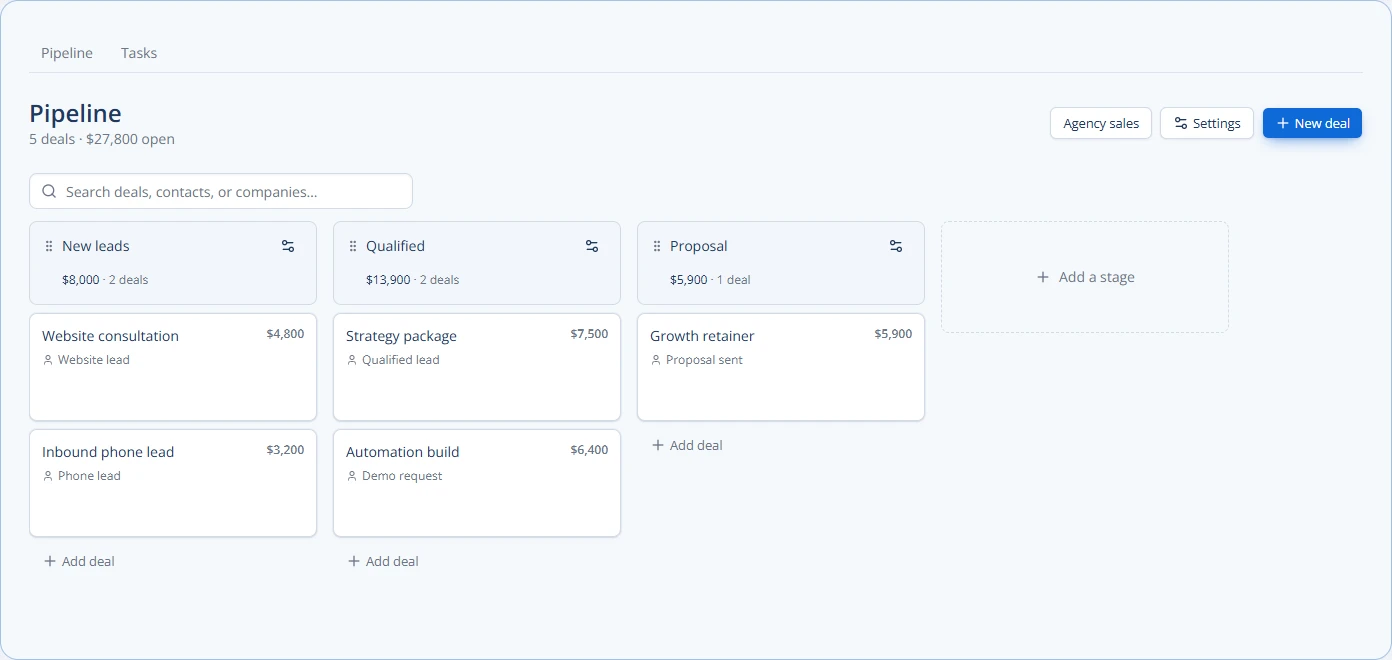
The image shows Chirply's actual pipeline component with sample deals. It illustrates the downstream sales record, not a GA4 report or measured customer revenue. A useful reporting process follows the call through qualification and the deal outcome instead of stopping at the first event.
Test the failure cases and report business results
Include a phone-link click without a call, an unanswered call, a connected test call, a qualified lead and a repeated notification in your acceptance checklist. Each case should have a known expected result. Use controlled destinations and label test traffic so it does not become a reported business win.
Compare systems over the same time range and timezone. Investigate duplicates and missing attribution before evaluating campaign performance. GA4 event counts, provider call counts and CRM deal counts answer different questions, so a difference between them is a reason to inspect the definitions rather than immediately changing the numbers.
For example, a fictional campaign could produce ten connected calls, three qualified opportunities and one sale. The useful questions are which calls qualified and which evidence supports the sale. Reporting all ten calls as revenue would hide the part of the funnel the agency needs to improve.
Finish the pilot by documenting the event definition, integration owner, duplicate handling and a successful test record. Then review Chirply's plans and trial terms if you need the CRM and calling workflow. The trial requires a card; connected-provider usage is billed separately. Expand measurement only after one complete call-to-outcome path is verified.
Common questions
Answers at a glance
Does a phone-link click count as a completed call?
No. It records activation of a link. Use provider call evidence to measure an answered call and a separate business rule to identify a qualified lead.
Should a new setup use Universal Analytics?
No. Universal Analytics is retired. Use GA4 events and the current key-event setup.
Does marking a GA4 key event start call tracking?
No. It classifies an event that your implementation sends. You still need a working source and integration for the call outcome.
Does a Chirply call conversion automatically appear in GA4?
Do not assume that. Verify the separate integration that sends the event to your GA4 property; a CRM conversion record is not proof of analytics delivery.
Put this into practice
Use a setup guide and its acceptance checks to turn the idea into a working process.
- Customer Service Sales Scripts: Setup & Practice Guide
- Call Tracking & Dynamic Number Insertion Setup Guide
- CRM Email Sender Setup: Domain, Identity & Reply Checks
Put the system to work
Run the whole client journey in one place.
CRM, phone, messaging, automation, funnels, and AI, connected on one contact record and ready for your brand.
See Chirply plans