Chirply
Agencies can automate sales demos and presentations by using tools that help personalize content, schedule follow-ups, and keep track of how people engage with what you show them. This saves time and makes sure every potential client gets a great, consistent experience.
Why Automate Your Sales Demos?
Imagine you have to show off your agency's services many times a day. Each time, you explain the same things. You answer similar questions. This takes a lot of time and energy. It can also be hard to make every demo feel fresh and exciting.
Automation helps with this. It means you set things up once, and then the system does the work for you. This frees up your sales team to focus on what they do best: talking to clients and closing deals. When you automate, you can make sure every demo is high-quality. It also helps you keep track of what works and what doesn't.
Think about these benefits:
- Save Time: Less time spent preparing and setting up each demo.
- Be Consistent: Every client gets the same clear message.
- Personalize: Even with automation, you can make demos feel special for each client.
- Track What Happens: See who watched your demo and what parts they liked.
- Follow Up Easily: Automatically send emails or messages after a demo.
How to Personalize Demos with Automation
Making a demo personal means showing a client how your services fit their specific needs. Automation can help with this, even if you're not there live.
First, you need to know about your potential client. What industry are they in? What problems are they trying to solve? What are their goals? You can collect this information through forms on your website or during initial calls.
Once you have this data, you can use automation tools to:
- Dynamic Content: Imagine a demo video that changes certain slides based on the client's industry. If they're in real estate, it shows real estate examples. If they're in healthcare, it shows healthcare examples. This makes the demo much more relevant.
- Customized Presentations: Instead of one big presentation for everyone, create modules. An automation system can then pick and choose which modules to show based on the client's profile.
- Branding: Automatically add the client's logo or company name to the presentation. This makes it feel like you've made something just for them.
For example, let's say a potential client fills out a form saying they need help with social media marketing for their restaurant. Your automation system could then create a demo that highlights your agency's success with other restaurants, shows social media examples for food businesses, and talks about how you can help them get more diners through social media. This is much more powerful than a generic presentation.
Automating Follow-Ups and Scheduling
After a demo, what happens next is crucial. You want to keep the conversation going. Automation can handle this smoothly.
Scheduling Demos
Instead of back-and-forth emails trying to find a time, use an automated scheduling tool. You send a link, and the client picks a time that works for them from your available slots. This saves time for both you and the client.
Automated Follow-Ups
Once the demo is over, automation can take over. Here's how:
- Immediate Thank You: Send an email right after the demo, thanking them for their time. Include a link to a recording of the demo or key takeaways.
- Resource Sharing: If you promised to send specific information, automation can deliver it. This could be case studies, pricing guides, or more detailed service descriptions.
- Next Steps: Remind them about the next planned step, like a follow-up call or a proposal.
- Nurturing: If they haven't responded, automation can send a series of gentle reminders or additional helpful content over time. This keeps your agency top-of-mind without you having to manually send each email. For more on this, check out our article on automating follow-ups for agency sales pipeline.
Here’s a simple follow-up checklist:
- Day 0 (Immediately after demo): Thank you email + link to demo recording/summary.
- Day 2: Email with relevant case study or resource.
- Day 5: Gentle check-in email, asking if they have questions.
- Day 10: Offer to schedule a quick call to discuss next steps.
Tracking Engagement with Your Presentations
How do you know if your demo was effective? Did the client watch the whole thing? Did they click on any links? Automation tools can give you these answers.
When you send out automated demo videos or interactive presentations, the system can track:
- Who opened it: Did they even look at your email?
- Who watched it: Did they click play on the video?
- How much they watched: Did they watch 10% or 90% of the video? This tells you if they were engaged.
- What they clicked on: If you included links to your website or other resources, you can see if they explored further.
- Time spent on each slide: For interactive presentations, this can show what parts interested them most.
This information is gold. If a client watched only the first few minutes, you know they might not be very interested, or your intro needs work. If they spent a lot of time on your pricing slide, you know that's a key concern for them. This data helps you improve your demos and tailor your future conversations.
For example, if you see a client watched a specific part of your demo multiple times, your sales team can start their next conversation by addressing that specific point. It shows you've paid attention and understand their interests. This kind of insight helps your sales team have more productive conversations.
Integrating Automation for a Seamless Sales Process
The real power of automation comes when all these pieces work together. This means connecting your scheduling tools, your personalized demo content, your follow-up emails, and your engagement tracking.
Imagine a system where:
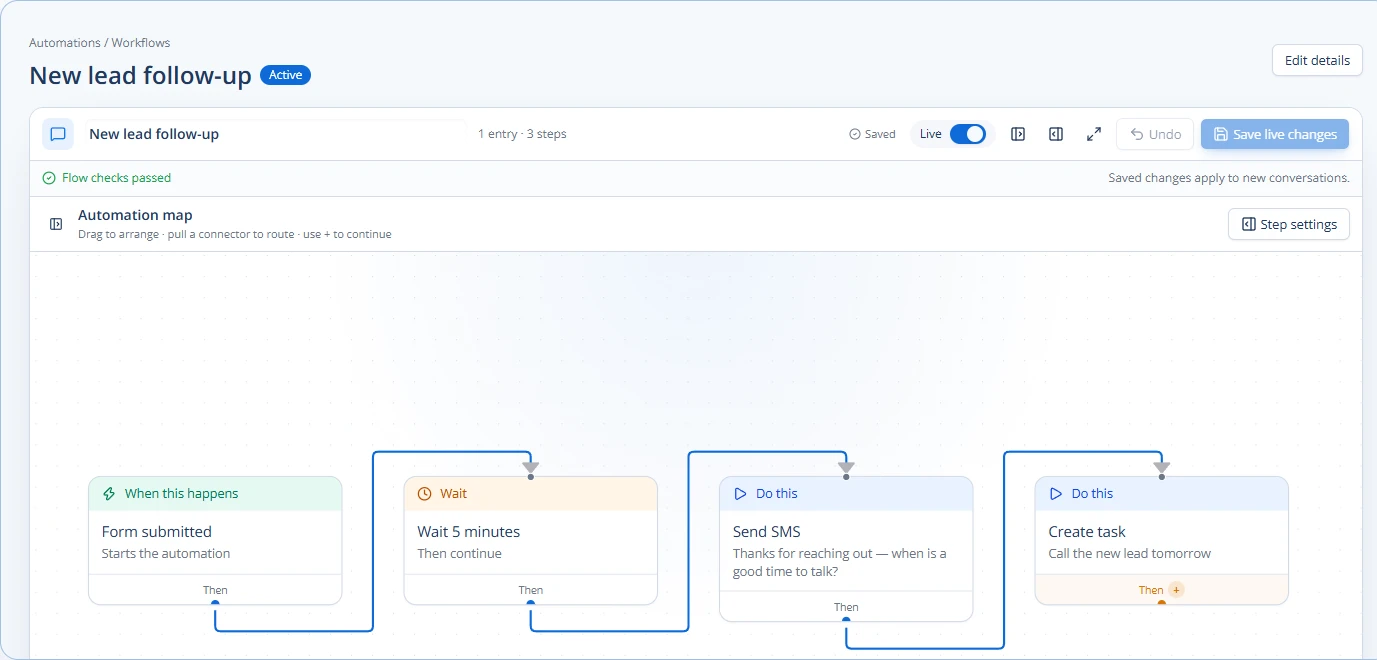
- A potential client fills out a form on your website (lead generation).
- Based on their answers, an automated system schedules a demo time that works for everyone.
- The system then pulls relevant information to create a personalized demo presentation.
- After the demo (live or recorded), automated follow-up emails are sent, tailored to what was discussed.
- Engagement data from the demo and follow-up emails is collected and shown to your sales team.
- If the client shows high interest, an alert is sent to a sales rep to call them.
This entire process can be managed within a comprehensive CRM that connects all these different parts. For agencies, a white-labelable CRM like Chirply can help connect contact records, pipelines, tasks, appointments, calling, SMS, and email. This means all your client information and interactions are in one place, making it easier to automate and manage the sales process from start to finish. You can even use automation to streamline other parts of your agency, like project handoffs. Learn more about that at streamline agency project handoffs with automation.
By putting these automated systems in place, agencies can make their sales process more efficient, more consistent, and more effective. It allows your team to spend less time on repetitive tasks and more time building relationships and closing deals.
To start, identify one or two areas in your current sales demo process that take up the most time or are often inconsistent. Then, research automation tools that can help solve those specific problems.
Common questions
Answers at a glance
What does it mean to automate sales demos for an agency?
Automating sales demos for an agency means using technology to handle parts of the demo process that are usually done manually. This includes things like personalizing presentation content, scheduling meetings, sending follow-up emails, and tracking how potential clients interact with your demo materials.
How can automation personalize a sales demo?
Automation can personalize a sales demo by using information you already have about a client (like their industry or specific needs) to automatically change parts of the presentation. This could involve showing relevant case studies, adjusting examples, or even adding their company logo to make the demo feel custom-made for them.
What are the benefits of automating follow-ups after a demo?
Automating follow-ups ensures that every potential client receives timely communication after a demo, without manual effort. Benefits include sending immediate thank-you notes, sharing promised resources, reminding clients about next steps, and nurturing leads over time, all of which help keep your agency top-of-mind.
Can automation help track how effective my sales demos are?
Yes, automation tools can track client engagement with your demos. You can see who opened your demo, how much of a video they watched, what links they clicked, and how long they spent on different sections. This data helps you understand what parts of your demo are most engaging and where you might need to make improvements.
Put this into practice
Use a setup guide and its acceptance checks to turn the idea into a working process.
- CRM Workflow Testing Checklist & Acceptance Matrix
- Lead Follow-Up Automation: Chirply Setup Checklist
- CRM Data Quality Checklist: Fields, Tags & Ownership
Put the system to work
Run the whole client journey in one place.
CRM, phone, messaging, automation, funnels, and AI, connected on one contact record and ready for your brand.
See Chirply plans