
 Chirply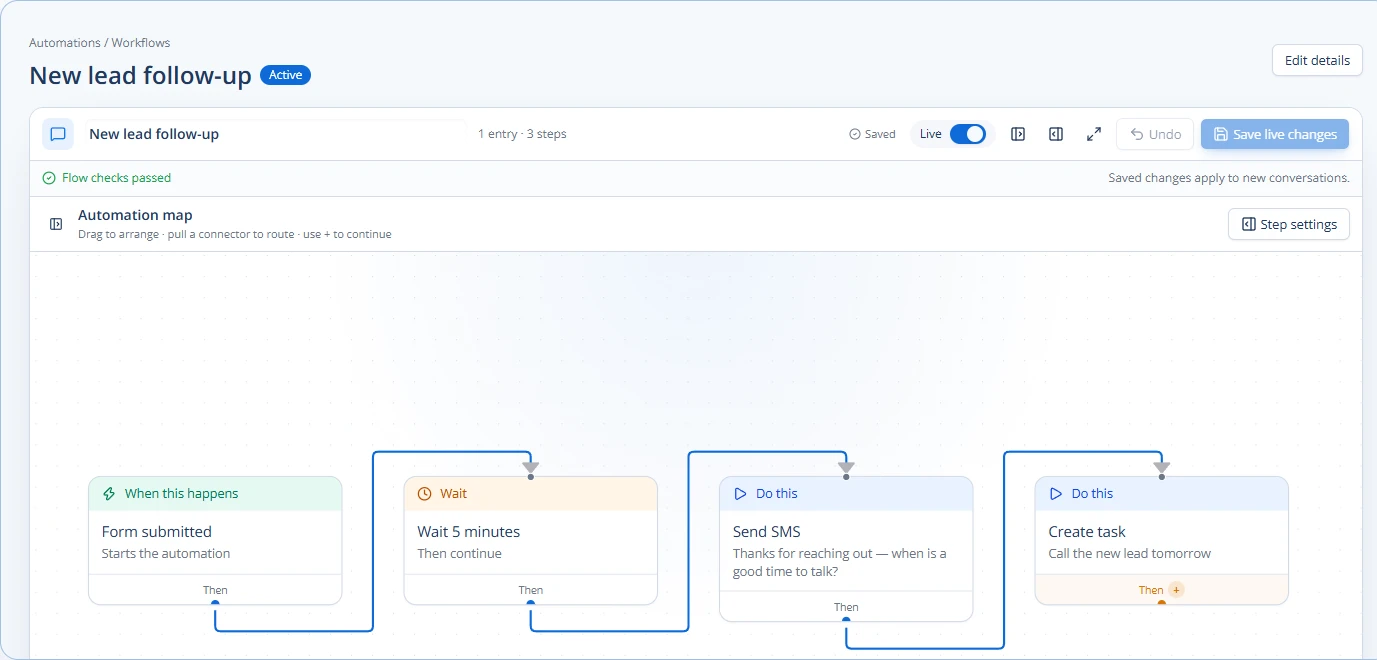
Slow lead response times can hurt your agency. When new leads come in, they expect a quick reply. If they don't get one, they might go to another agency. Automating your lead response can reduce the delay before an acknowledgment, provided the trigger, contact details and sending provider are working. This guide will show you how to set up automatic responses using email, text messages (SMS), and your customer relationship management (CRM) system.
Build and check the first lead-response workflow in Chirply
Use one lead source first. A small workflow makes it easier to tell whether an intake problem, a missing field or a provider failure caused a delay.
- Open Automations → Workflows and create a workflow for the intended source. Choose Form submitted and select the relevant native form, funnel or page. Leaving those filters blank makes the trigger broader, so check that scope deliberately.
- Add the first useful action: a confirmation message, an internal notification or a task. Send SMS needs a usable phone number and a connected sending provider; email needs a ready sending identity. Use only contacts who should receive that communication.
- Add the handoff your team will actually work. Create task and pipeline-stage actions are available in the shared action list. Give the task a concrete purpose, such as reviewing the inquiry before a discovery call.
- Use a controlled sample contact and submit the real intake form. A manually enrolled test checks the actions, but only a form submission checks the form trigger and its filters too.
- Open Automations → Runs. No run means the event or enrollment conditions need investigation. A failed run identifies the step to inspect. Confirm the message and next task on the contact, not just the workflow's visual layout.
The hero image is a sample flow with a five-minute wait, SMS and task. That delay is an example of the builder, not a recommended response-time target for every business. Choose the timing that fits your process and avoid overlapping confirmations from separate automations.
See Chirply's speed-to-lead workflow, then test one inquiry all the way to a human-owned next action before adding more channels.
Why Automate Your Lead Response?
Think about it: when someone fills out a form on your website or calls your agency, they're interested right now. Waiting even an hour can make them lose interest. Automation helps you:
- Respond sooner: A tested workflow can acknowledge new inquiries while your team prepares a useful reply.
- Save Time: Your team doesn't have to manually send the first few messages. This frees them up for more important tasks.
- Stay Organized: All lead information and communication history are kept in one place.
- Reduce missed follow-up: A shared task and run history make unhandled inquiries easier to spot, including during busy periods.
- Improve Prospect Experience: Leads feel valued when they get a fast, helpful response.
This means happier potential clients and a better chance of winning their business.
Step 1: Define Your Lead Journey and Response Goals
Before you set up any automation, think about what happens when a new lead comes in.
- Where do leads come from? (e.g., website forms, social media ads, phone calls, referrals)
- What information do you need from them? (e.g., name, email, phone, company, project type)
- What's the first thing you want to tell them? (e.g., "Thanks for your interest!", "We got your message!", "Here's what happens next...")
- What's the next step? (e.g., schedule a call, send a case study, ask more questions)
Your goals might be:
- Acknowledge receipt within 1 minute.
- Provide helpful resources within 5 minutes.
- Schedule a discovery call within 24 hours.
Write down these steps and goals. This will be your roadmap for setting up your automation.
Step 2: Choose Your Automation Channels and Tools
You'll use a mix of tools to automate your responses. The main channels are email and SMS. Your CRM system will be the central hub that connects everything.
Email Automation
Email is great for longer messages, sending links to your portfolio, or providing detailed information.
- Welcome Email: This is the first message. It thanks them, confirms their inquiry, and sets expectations.
- Information Email: Follow up with relevant case studies, a link to your services page, or a video about your agency.
- Scheduling Email: Suggest booking a meeting directly with a link to your calendar.
SMS Automation
Text messages are good for short, urgent messages. They have very high open rates.
- Instant Acknowledgment: "Thanks for reaching out! We received your message and will be in touch shortly."
- Quick Follow-up: "Just checking in. Did you have any questions about our services?"
- Appointment Reminders: "Reminder: Your call with [Agency Name] is tomorrow at [Time]."
CRM as Your Central Hub
Your CRM is where all your lead information lives. It's also where you'll set up the rules (triggers) for your automation.
- When a new lead comes in, your CRM should automatically create a new contact record.
- It should then trigger the first email or SMS.
- It can also assign the lead to a sales team member and create a task for them.
Some CRMs, like Chirply, are designed to connect all these parts. They can link contact records, handle emails and SMS, and manage tasks and appointments all in one place. This makes setting up multi-channel automation much easier.
Step 3: Build Your Automated Workflows
Now let's put it all together. Here's how to build your automated sequence:
- Lead Capture:
- Trigger: A new lead fills out a form on your website.
- Action 1 (CRM): Create a new contact record in your CRM.
- Action 2 (CRM): Assign the lead to a sales representative.
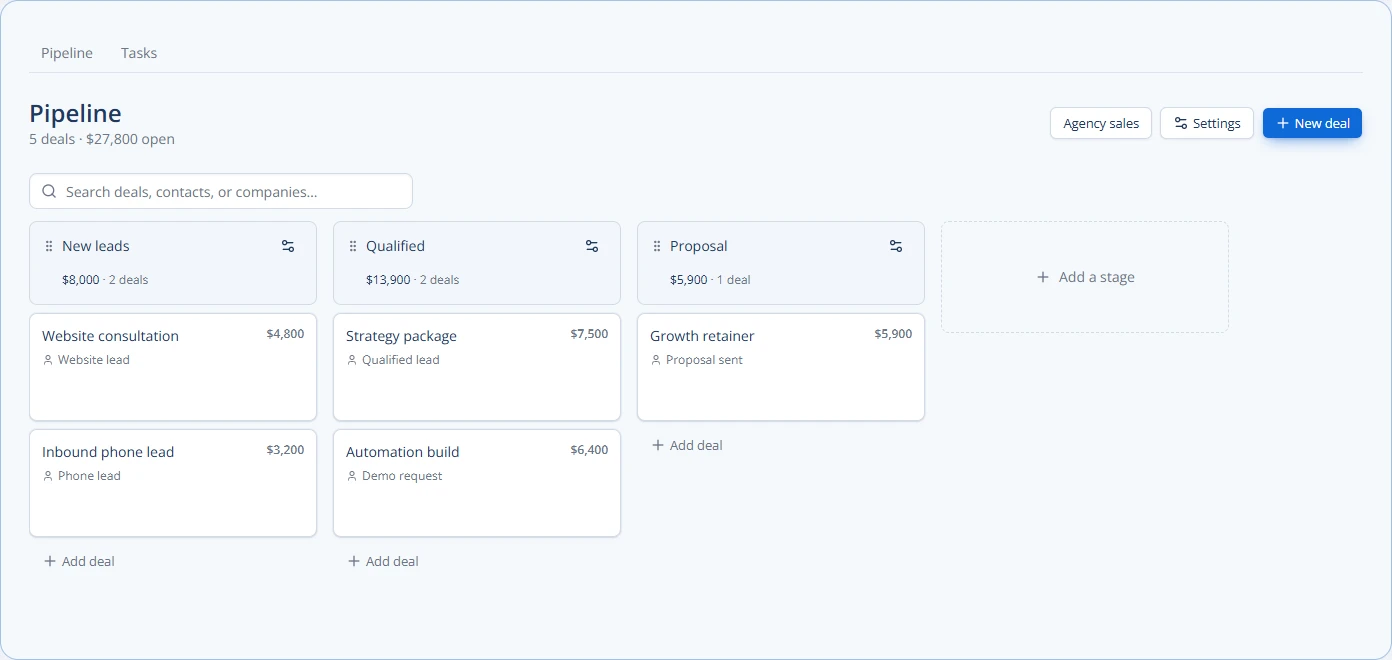
- Action 3 (CRM): Add the lead to a "New Leads" pipeline stage.
- Instant Acknowledgment:
- Trigger: New contact record created (from Step 1).
- Action (SMS): Send an immediate text message: "Hi [Lead Name], thanks for contacting [Agency Name]! We've received your inquiry and will review it soon."
- Welcome & Information Email:
- Trigger: New contact record created (from Step 1).
- Action (Email): Send an immediate email:
- Subject: "Thanks for reaching out to [Agency Name]!"
- Body: Thank them, briefly explain what you do, and include a link to your agency's services page or a relevant case study.
- Example: "We specialize in [your niche]. You can see our work here: [Link]."
- Schedule a Call (Optional, but Recommended):
- Trigger: 15 minutes after the Welcome Email (if no reply).
- Action (Email): Send an email with a direct link to book a meeting.
- Subject: "Ready to chat about your project, [Lead Name]?"
- Body: "We'd love to learn more about your needs. You can easily book a quick chat with us here: [Link to Calendar]."
- Internal Notification:
- Trigger: New contact record created.
- Action (Internal Email/Slack/CRM Task): Notify the assigned sales rep that a new lead has come in and the automation has started. This reminds them to follow up personally soon.
Checklist for Setting Up Automation:
- Map out your ideal lead journey.
- Write clear, concise messages for email and SMS.
- Set up triggers in your CRM (e.g., new form submission).
- Connect your email sending tool.
- Connect your SMS sending tool.
- Test the entire workflow with a dummy lead.
- Train your team on how the automation works and when to step in.
Step 4: Monitor and Optimize Your Automation
Setting up automation isn't a one-and-done task. You need to keep an eye on how it's performing.
- Track Open and Click Rates: Are people opening your emails? Are they clicking on the links?
- Monitor Reply Rates: Are leads replying to your automated messages?
- Check Conversion Rates: How many leads who go through your automation end up becoming clients?
If something isn't working, change it. Maybe your email subject lines aren't catchy enough, or your SMS messages are too vague. Try different messages, timings, or offers. Small changes can make a big difference.
For more advanced troubleshooting, you might look into troubleshoot crm automation failures a guide for agencies. Understanding how to fix issues will help your automation run smoothly.
Advanced Automation Ideas
Once you have the basics down, you can make your automation even smarter.
- Conditional Logic: Send different messages based on what the lead is interested in. For example, if they checked "web design" on your form, send them web design case studies.
- CRM Pipeline Triggers: When a lead moves to a new stage in your sales pipeline (e.g., "Proposal Sent"), automatically send a follow-up email or SMS.
- AI Phone Agents: For some inquiries, an AI phone agent could answer common questions or qualify leads before a human steps in. This is a capability some CRMs, like Chirply, offer.
- Personalized Follow-ups: Use the information you collect to make messages feel more personal. "Hi [Lead Name], I saw you're interested in [Service Type]..."
Remember, the goal is to make the lead feel heard and valued, not just to send automated messages. The automation should support your human sales efforts, not replace them entirely.
A tested lead-response workflow can make follow-up more consistent. Monitor failures and replies so automation supports a useful first impression. This frees up your team to focus on building real relationships and closing deals.
Next Step: Review your current lead intake process. Where can you add an instant, automated touchpoint?
Common questions
Answers at a glance
What is automated lead response?
Automated lead response means using software to send instant messages (like emails or texts) to new potential clients as soon as they show interest. This helps your agency reply quickly without manual effort.
Why is fast lead response important for agencies?
When a lead contacts your agency, they're interested right then. A fast response shows you're professional and attentive. If you wait too long, they might lose interest and go to a competitor.
What tools do I need to automate lead response?
You'll need a CRM system to manage contacts and trigger actions, an email sending tool, and an SMS (text message) sending tool. Many CRMs combine these features into one platform.
How do I know if my automated lead response is working?
You should track how many people open your emails, click on links, reply to messages, and ultimately become clients. If numbers are low, you can adjust your messages or timings to improve results.
Put this into practice
Use a setup guide and its acceptance checks to turn the idea into a working process.
- CRM Workflow Testing Checklist & Acceptance Matrix
- Lead Follow-Up Automation: Chirply Setup Checklist
- CRM Data Quality Checklist: Fields, Tags & Ownership
Put the system to work
Try the workflow in your own account.
Review the feature, choose one sample contact and test the handoff before you expand it to the rest of your team.
Explore this Chirply feature See Chirply plans