Chirply
Many small to medium-sized agencies think that advanced AI-powered CRM systems are too expensive or too hard to use. This isn't true. Modern AI-powered CRM tools are now made to be easy for agencies of all sizes. They can help you save time, make clients happier, and find new business. Let's look at how these smart tools can work for your agency.
What is AI-Powered CRM and Why Does Your Agency Need It?
CRM stands for Customer Relationship Management. It's a system that helps you keep track of all your interactions with clients and potential clients. Think of it as a super-organized digital Rolodex, but with a lot more power.
When you add AI (Artificial Intelligence) to CRM, it makes the system much smarter. AI can learn from your data and do things automatically that used to take a lot of human effort. For example, it can suggest the best time to contact a client or identify which leads are most likely to become paying customers.
For small and medium agencies, time is money. You don't have big teams or endless budgets. AI-powered CRM helps you:
- Save time: Automate repetitive tasks like sending follow-up emails or scheduling appointments.
- Improve client service: Understand client needs better and respond faster.
- Find new clients: Spot good leads and help you turn them into customers.
- Grow your business: Work smarter, not harder, to take on more projects and clients.
It's not about replacing people. It's about giving your team superpowers so they can focus on the creative and strategic work that truly matters.
Accessible AI Features for Agencies
You don't need a team of data scientists to use AI in your CRM. Many features are built-in and easy to set up. Here are some examples:
Automated Lead Scoring
Imagine you get 100 new leads. Which ones should your sales team call first? AI can help. It looks at information like how a lead found you, what pages they visited on your website, and how they interact with your emails. Then, it gives each lead a "score." High-score leads are more likely to buy, so your team knows exactly who to focus on. This saves time and makes your sales efforts more effective.
Smart Communication and Personalization
AI can help you send the right message to the right person at the right time.
- Email and SMS automation: Set up campaigns where AI sends personalized emails or texts based on what a client does (or doesn't do). For example, if a client clicks on a link about "web design," the AI can automatically send them more information about your web design services.
- AI Phone Agents: For answering common questions or qualifying leads, AI phone agents can handle basic calls. This frees up your human staff for more complex conversations. They can even schedule appointments.
- Predictive analytics: AI can look at past client behavior and predict what they might need next. This allows you to offer relevant services before they even ask.
Task and Workflow Automation
Many daily tasks in an agency are repetitive. AI can take these off your plate.
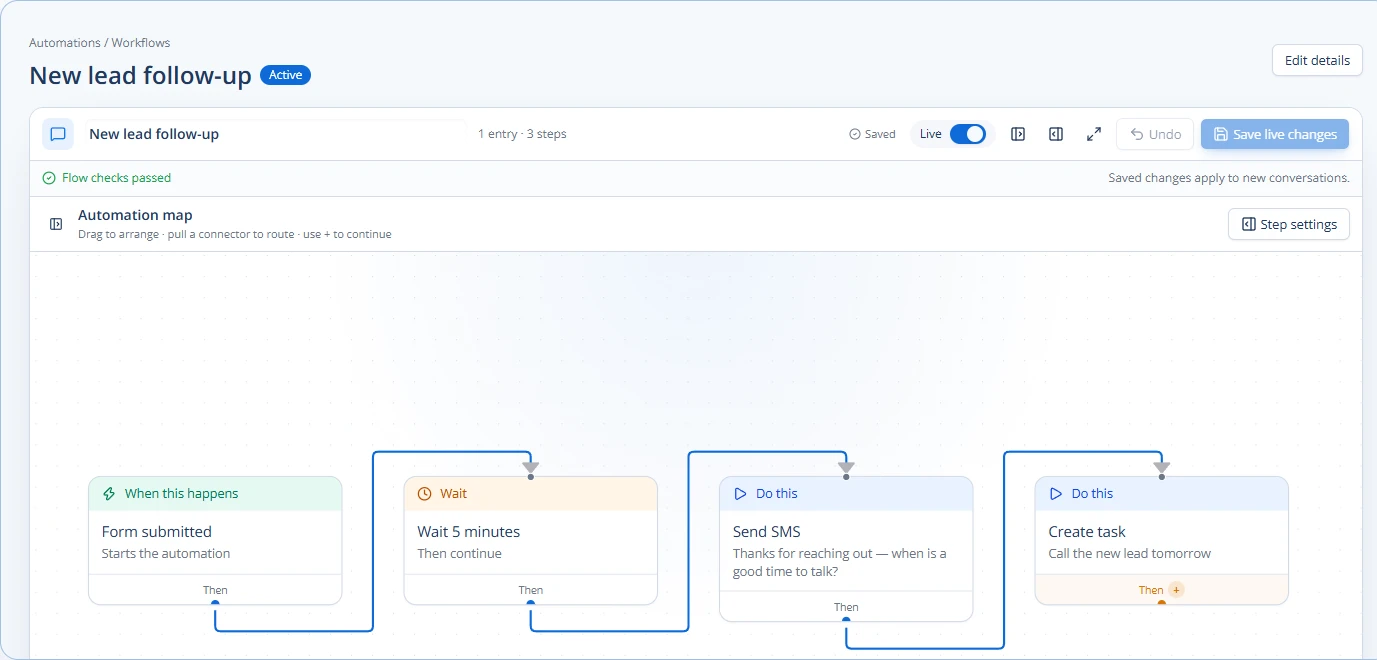
- Automatic task creation: When a new lead comes in, the CRM can automatically create tasks for your sales team to follow up.
- Meeting scheduling: AI-powered tools can find open slots in calendars and send out invites, saving back-and-forth emails.
- Report generation: Get automated reports on sales performance, client engagement, or project status without having to manually pull data.
These features mean your team spends less time on administrative work and more time on client strategy and creative output. For more on automating internal tasks, check out this guide: Automate Internal Team Notifications for Agencies.
Real-World Use Cases for Small Agencies
Let's look at how a small agency might actually use these AI features day-to-day.
Scenario 1: Boosting Lead Generation and Qualification
An agency specializing in social media marketing runs an online ad campaign. Potential clients click the ad and fill out a form on the agency's website.
- Without AI: A team member manually checks each form, tries to figure out if the lead is a good fit, and then assigns it to a salesperson. This can take hours, and hot leads might go cold.
- With AI-powered CRM:
- The lead fills out the form.
- The CRM's AI instantly scores the lead based on their answers and online behavior.
- If the lead has a high score, the AI automatically sends a personalized follow-up email and an SMS message.
- An AI phone agent might even call the lead to answer basic questions and schedule a discovery call with a human salesperson.
- The salesperson gets a notification with all the lead's information and their high score, knowing exactly who to prioritize.
This process is faster, more efficient, and ensures no good lead slips through the cracks. For more on this, see: AI for Lead Scoring and Prioritization in Agency CRM.
Scenario 2: Improving Client Onboarding and Success
A web design agency just landed a new client. The onboarding process involves many steps: contracts, discovery calls, collecting assets, and setting up project timelines.
- Without AI: The project manager manually creates tasks, sends emails, and keeps track of everything in spreadsheets. Things can get missed, leading to delays and client frustration.
- With AI-powered CRM:
- Once the contract is signed (marked in the CRM), an AI-powered automation workflow kicks in.
- It automatically sends the client a welcome email with a link to an onboarding portal.
- Tasks are created for the design team, content team, and project manager.
- Automated reminders are sent to the client to provide necessary assets.
- The AI monitors progress and alerts the project manager if any step falls behind schedule.
This ensures a smooth, consistent experience for every new client, making them feel valued and confident in your agency. You can learn more about building these workflows here: Building an Automated Client Success Workflow.
Choosing the Right AI-Powered CRM for Your Agency
When looking for an AI-powered CRM, small to medium agencies should consider these points:
| Feature | Why it matters for SMB Agencies |
|---|---|
| Ease of Use | You don't have a dedicated IT department. The system should be intuitive and easy to learn. |
| Scalability | It should grow with you. You don't want to switch systems every time you add a few clients. |
| Integration | Can it connect with other tools you already use (email, accounting, project management)? |
| Automation | Look for robust automation for tasks, emails, SMS, and lead management. |
| AI Capabilities | Does it offer practical AI features like lead scoring, predictive analytics, or AI phone agents? |
| Support | Good customer support is crucial if you run into questions or issues. |
| Cost | Find a solution that fits your budget without sacrificing essential features. |
| White-labeling | If you offer services to other businesses, a white-label CRM allows you to brand it as your own. |
Some platforms, like Chirply, offer an all-in-one approach. They combine contact management, sales pipelines, task management, appointments, communication tools (calling, SMS, email, broadcasts), automation, funnels, invoicing, lead generation, reputation management, and AI phone agents. This means you don't need to piece together many different tools, which can save time and money. Agencies can even set up separate workspaces for each client and connect their own service providers for things like phone calls or emails. The ability to expose human actions through an API or in-app Copilot also means you can truly customize and automate workflows to your agency's unique needs.
Getting Started with AI in Your Agency
You don't have to implement every AI feature at once. Start small and grow.
- Identify a pain point: What's one area in your agency that takes up too much time or causes frustration? (e.g., following up on leads, onboarding new clients).
- Research solutions: Look for CRM platforms that offer AI features specifically designed to address that pain point.
- Start with one automation: Set up a simple automation, like an automatic welcome email for new leads or a task reminder for your team.
- Train your team: Make sure everyone understands how to use the new tools and how they benefit the agency.
- Measure and adjust: See if the automation is working. Is it saving time? Is it improving client satisfaction? Make changes as needed.
By taking a step-by-step approach, your agency can successfully adopt AI-powered CRM without feeling overwhelmed. It's about making smart choices that lead to real improvements in how you do business.
Common questions
Answers at a glance
Is AI-powered CRM only for large companies?
No, modern AI-powered CRM systems are designed to be accessible and affordable for small to medium-sized agencies. Many features are easy to set up and provide immediate benefits without requiring a large IT team.
What are the main benefits of AI-powered CRM for an agency?
The main benefits include saving time through automation, improving client satisfaction with personalized communication, better lead qualification, and overall business growth by making your team more efficient and effective.
How can AI help with lead generation for my agency?
AI can automatically score leads based on their behavior and details, helping your team focus on the most promising prospects. It can also automate initial follow-up emails, SMS messages, or even use AI phone agents to qualify leads and schedule appointments.
Do I need to be a tech expert to use AI in my CRM?
No, most AI-powered CRM platforms offer user-friendly interfaces and pre-built automation templates. You don't need to be a coding expert to set up and use these smart features.
How much does an AI-powered CRM cost for a small agency?
Costs vary widely depending on the features and number of users. Many providers offer tiered pricing plans, making it possible to find a solution that fits a small agency's budget. It's important to compare features and pricing to find the best value for your specific needs.
Put this into practice
Use a setup guide and its acceptance checks to turn the idea into a working process.
- CRM Workflow Testing Checklist & Acceptance Matrix
- Lead Follow-Up Automation: Chirply Setup Checklist
- CRM Data Quality Checklist: Fields, Tags & Ownership
Put the system to work
Run the whole client journey in one place.
CRM, phone, messaging, automation, funnels, and AI, connected on one contact record and ready for your brand.
See Chirply plans