Chirply
Agencies often lose potential clients because these leads aren't ready to buy right away. They go "cold" and are forgotten. Automated lead nurturing campaigns fix this. They keep your agency in touch with these leads over time. This guide shows you how to build these campaigns using tools like your CRM, emails, and content. You'll learn to set up a system that works for you, even when you're busy.
What is Lead Nurturing and Why Does Your Agency Need It?
Lead nurturing means building relationships with potential clients. You do this by giving them useful information. The goal is to guide them through their buying journey. Not everyone who shows interest in your agency is ready to sign a contract today. Some need to learn more about what you do. Others need to feel confident in your expertise.
Think of it like planting a seed. You don't just plant it and expect a flower tomorrow. You water it, give it sunlight, and watch it grow. Lead nurturing is similar. You "water" your leads with helpful content. You "shine a light" on your agency's strengths. This helps them grow into paying clients.
Without nurturing, many leads simply disappear. Your agency spends time and money getting these leads. Letting them go cold is a waste. Automated nurturing helps you stay top-of-mind. It shows you care about their problems, not just their money. This builds trust. When they are ready to buy, your agency will be the first one they think of.
Building Your Multi-Stage Nurturing Campaign
A multi-stage nurturing campaign has different steps. Each step gives the lead more information. It moves them closer to becoming a client. Here’s how to set it up:
Stage 1: Awareness At this stage, leads are just realizing they have a problem. They're looking for information, not solutions yet.
- Goal: Educate them about their problem and show your agency understands it.
- Content: Blog posts, short videos, infographics, simple guides. These should be general and helpful.
- Trigger: When someone downloads an e-book or signs up for a newsletter.
Stage 2: Consideration Now, leads know their problem and are looking for ways to solve it. They're comparing different options.
- Goal: Show how your agency's services can solve their problem.
- Content: Case studies, webinars, detailed guides, comparison charts. Show how your agency helped others like them.
- Trigger: When someone visits your services page or watches a product demo.
Stage 3: Decision At this point, leads are almost ready to choose a solution. They need a final push.
- Goal: Convince them your agency is the best choice.
- Content: Free consultations, proposals, testimonials, pricing information. Make it easy for them to take the next step.
- Trigger: When someone requests a quote or asks for a meeting.
Here’s a simple example of how a lead might move through these stages:
| Stage | Lead Action (Trigger) | Automated Response (Content) |
|---|---|---|
| Awareness | Downloads "5 Ways to Get More Website Traffic" guide | Email 1: "Thanks for downloading! Here's another tip." (Link to a blog post) |
| Consideration | Clicks on "SEO Services" page | Email 2: "Saw you were interested in SEO. Here's a case study on how we helped [Client Name]." (Link to case study) |
| Decision | Views "Contact Us" page | Email 3: "Ready to boost your traffic? Schedule a free chat with our experts." (Link to booking calendar) |
This table shows a basic path. Your campaigns can be much more detailed.
Tools for Automation: CRM, Email, and Content Triggers
To make these campaigns work, you need the right tools.
CRM (Client Relationship Management)
Your CRM is the brain of your operation. It stores all your lead information. It tracks their actions, like which emails they open or which pages they visit. A good CRM can also automate tasks. For example, when a lead reaches a certain stage, the CRM can automatically send an email. Or it can notify a salesperson to follow up.
For agencies, a CRM like Chirply can manage all these pieces. It connects contact records, pipelines, and automations. This means you can see where every lead is in their journey and what they've done. You can also learn more about CRM automation for agency task management.
Email Marketing Platforms
These platforms send your emails. They let you create professional-looking emails. More importantly, they connect with your CRM. This allows for automated email sequences. For instance, if a lead downloads a guide, the system automatically sends a series of emails over the next few weeks.
You can set up rules:
- If a lead opens Email 1, send Email 2 three days later.
- If a lead doesn't open Email 1, send a different reminder email a week later.
This ensures leads get relevant messages based on their engagement.
Content Triggers
Content triggers are actions a lead takes that start an automation. These are crucial for making your nurturing personal.
- Website visits: If a lead visits your "Social Media Marketing" page multiple times, it can trigger an email about your social media services.
- Content downloads: Downloading an e-book about "AI in Marketing" could trigger a sequence of emails about your agency's AI solutions.
- Email clicks: Clicking a link in an email about "Website Redesign" could move them to a different nurturing path focused on web development.
By combining your CRM, email platform, and smart content triggers, you create a powerful system. This system works 24/7, keeping your leads warm without constant manual effort from your team.
Setting Up Your Automated Workflow
Here’s a step-by-step guide to setting up your automated lead nurturing campaign:
- Define Your Lead Stages: Use the Awareness, Consideration, Decision model. Think about what actions a lead takes at each stage.
- Map Out Content for Each Stage: Brainstorm blog posts, videos, case studies, or guides that fit each stage. What information does a lead need at each step?
- Identify Triggers: What actions will start a lead on a nurturing path? (e.g., filling out a form, visiting a specific page).
- Design Your Email Sequences: Write the emails for each stage. Keep them short, helpful, and focused on one clear call to action (e.g., "Read more," "Download now," "Schedule a call").
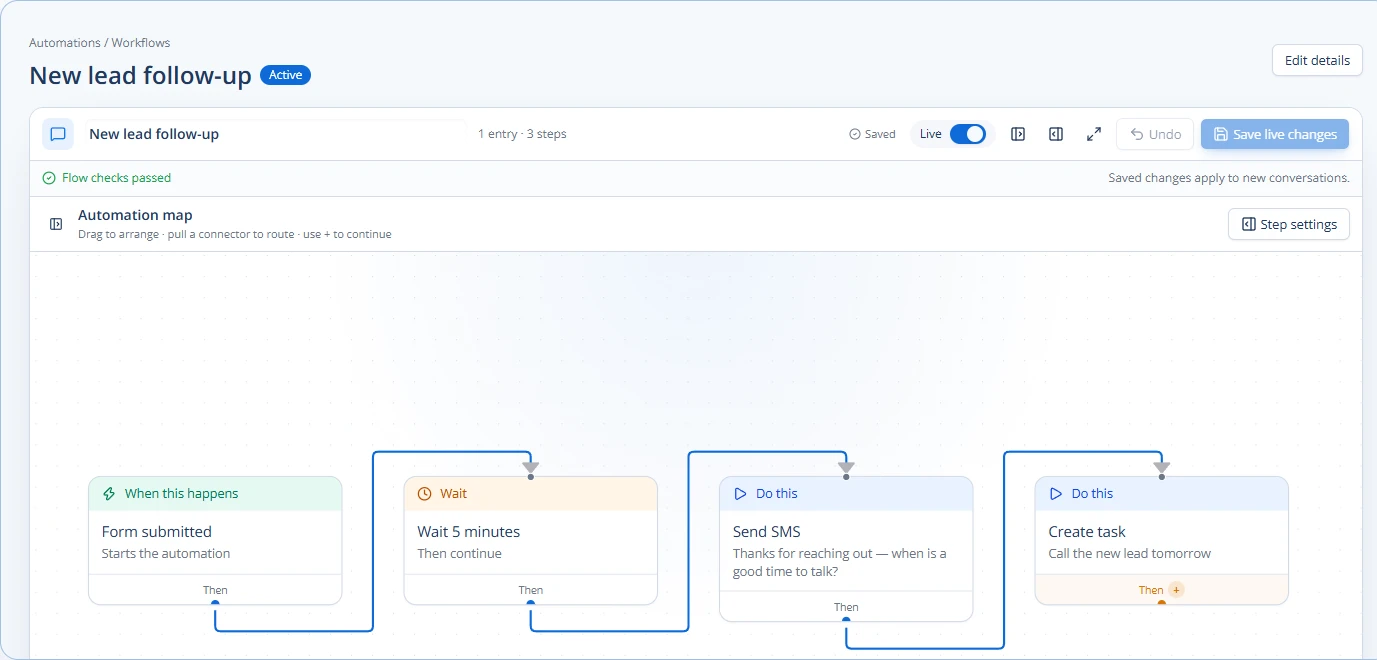
- Build Workflows in Your CRM: This is where the automation happens.
- Start with an Entry Point: When a lead takes a trigger action (e.g., fills out a form), they enter the workflow.
- Set Up Delays: Don't bombard leads. Space out your emails (e.g., 3 days, 5 days, 7 days).
- Add Conditional Logic: "If lead opens Email A, then send Email B. If not, send Email C." This makes the campaign smarter.
- Include Internal Notifications: If a lead takes a high-value action (e.g., requests a demo), notify a salesperson immediately.
- Update Lead Status: As leads move through the campaign, update their status in your CRM (e.g., from "New Lead" to "Nurturing - Consideration").
- Test Everything: Before you launch, test every step. Send test emails to yourself. Make sure links work. Check that triggers fire correctly.
- Monitor and Adjust: Once live, keep an eye on your campaign's performance. Which emails get opened? Which links get clicked? Adjust your content and timing based on what you learn. You can also use AI for sentiment analysis in client communications to understand engagement better.
For example, an agency might use Chirply to create a "New Web Design Lead" automation. When a lead fills out a "Get a Quote" form, the platform could:
- Automatically send a "Thank You" email with a link to their web design portfolio.
- Add the lead to a "Web Design Nurturing" email sequence that sends case studies over two weeks.
- Create a task for a sales rep to call the lead within 24 hours if they click on the portfolio link.
- Update the lead's status in the pipeline to "Qualified Lead."
This integrated approach ensures no lead falls through the cracks and your team focuses on the most engaged prospects.
Measuring Success and Continuous Improvement
Once your automated lead nurturing campaigns are running, it's important to measure their success. This helps you understand what's working and what needs improvement.
Look at these key metrics:
- Open Rates: How many people open your emails? If low, your subject lines might need work.
- Click-Through Rates (CTR): How many people click links in your emails? If low, your email content or calls to action might not be engaging enough.
- Conversion Rates: How many nurtured leads eventually become paying clients? This is the ultimate measure of success.
- Time to Conversion: How long does it take for a nurtured lead to become a client? Nurturing should ideally shorten this time.
- Unsubscribe Rates: Are too many people unsubscribing? Your content might not be relevant, or you might be sending too many emails.
Use your CRM to track these numbers. Most email platforms also provide detailed reports. Don't be afraid to make changes. Test different subject lines, try new content, or adjust the timing of your emails. Lead nurturing is an ongoing process of learning and improving.
By consistently refining your campaigns, your agency can turn more cold leads into warm opportunities and ultimately, satisfied clients.
Next Step: Review your current lead generation efforts. Identify where leads are falling out of your pipeline and design a simple 3-email nurturing sequence to re-engage them.
Common questions
Answers at a glance
What is lead nurturing for agencies?
Lead nurturing for agencies means building relationships with potential clients who aren't ready to buy immediately. It involves sending them helpful information over time to guide them towards choosing your agency's services.
Why do agencies need automated lead nurturing?
Agencies need automated lead nurturing to prevent potential clients from going "cold." It ensures continuous engagement, builds trust, and keeps your agency top-of-mind, increasing the chances of converting leads into paying clients without constant manual effort.
What tools are essential for automated lead nurturing?
Essential tools include a CRM (Client Relationship Management) system to store lead data and automate actions, an email marketing platform to send automated email sequences, and content triggers (like website visits or downloads) to personalize the nurturing process.
How do I start building an automated nurturing campaign?
Start by defining your lead stages (awareness, consideration, decision), mapping out relevant content for each stage, identifying triggers for automation, designing email sequences, and then building these workflows in your CRM. Always test and monitor your campaigns.
Put this into practice
Use a setup guide and its acceptance checks to turn the idea into a working process.
- CRM Workflow Testing Checklist & Acceptance Matrix
- Lead Follow-Up Automation: Chirply Setup Checklist
- CRM Data Quality Checklist: Fields, Tags & Ownership
Put the system to work
Run the whole client journey in one place.
CRM, phone, messaging, automation, funnels, and AI, connected on one contact record and ready for your brand.
See Chirply plans