
 Chirply
Project management tools for marketing agencies should make four things clear: what the client approved, who owns the next action, when it is due, and what counts as finished. Start with those requirements before comparing dashboards or buying another subscription.
A campaign can look busy while its launch is blocked by one unanswered approval. A CRM can show a promising deal while nobody owns the handoff to delivery. This guide gives you a worksheet for evaluating agency project management software, a sample campaign handoff, and a practical way to decide where Chirply belongs in your workflow.
Match the tool to the work that is getting stuck
Write down the last three missed handoffs. Describe what someone could not find or do. “We need better project management” is too broad to test; “the designer could not find the approved offer” is specific enough to reproduce in a trial.
| Recurring problem | Capability to evaluate | Evidence to request in a demo |
|---|---|---|
| Follow-up disappears after a sales call | Contact-linked tasks and an accountable owner | Create a task from a sample client record and find it again |
| Nobody knows which creative was approved | Version history and an approval process | Follow one revision through feedback and approval |
| Several campaigns depend on the same specialist | Capacity planning and scheduling | Assign overlapping work and inspect the conflict |
| A late task pushes every later deadline | Dependencies and schedule changes | Move the first deadline and observe downstream work |
| Client requests expand the agreed work | Scope and change-request records | Separate the original deliverable from a proposed addition |
| Billable work never reaches an invoice | Time capture and billing reconciliation | Trace an example time entry through an export or invoice |
These are evaluation requirements, not a claim that every all-in-one platform includes every capability. Keep specialist requirements visible so a good CRM demo does not accidentally stand in for an approval or resource-planning test.
Use this agency software scorecard
Choose one sample campaign, such as a landing page and follow-up sequence for a fictional client. Give every product the same brief and evaluate the same actions. Start with synthetic data until you have checked access controls and how to remove trial data.
Copy this worksheet for each candidate:
| Requirement | Importance, 1–3 | Result, 0–2 | Evidence or unresolved limitation |
|---|---|---|---|
| Find the client, brief and agreed deliverables | |||
| Assign an owner and due date to the next task | |||
| Find overdue work without opening every record | |||
| Record feedback and identify the approved version | |||
| Limit what a client or contractor can access | |||
| Handle a changed deadline or absent owner | |||
| Export the records your agency needs to retain | |||
| Reconcile delivery work with billing, if required |
Score a result as 0 when it fails, 1 when it needs a workaround, and 2 when the team completes it in the normal workflow. Multiply importance by result and compare totals only after reviewing the limitations. These numbers are an example scoring method, not an industry benchmark.
A failed mandatory requirement should remain a failed requirement even when the total looks good. For example, a high score for convenience does not solve a client-access restriction that your agency needs. Record subscription requirements, extra tools and manual steps next to the score.
Test a complete sales-to-delivery handoff
Use the following fictional campaign to see whether the software supports the way your team works. The deliverable is one landing page, an inquiry form and a follow-up plan. The client must approve the offer before the team launches anything.
- Record the agreement. Identify the client contact, deliverables, exclusions, target date and person who can approve the work. Keep a link to the agreed brief.
- Assign the next action. “Collect the approved offer from the client” needs an owner and a due date. “Landing page project” is a label, not an actionable task.
- Define completion. For the offer task, completion means the approved wording and any restrictions are recorded in the brief. Sending a reminder does not complete it.
- Expose the dependency. Page production is waiting on the offer. Test whether the chosen tool can represent that dependency or whether the team must maintain it manually.
- Introduce a change. Ask for another page after approval. Record the request separately and follow your scope-change process before promising additional work.
- Close the handoff. The delivery owner should be able to explain the current state without asking the salesperson to reconstruct the conversation.
During the trial, note missing information, duplicate entry and tasks with no owner. Those observations are more useful than a general impression that one dashboard feels easier.
Where Chirply fits in agency project management
Chirply connects CRM records with tasks and communication. Its tasks support an owner, due date, priority and status, and can be associated with a contact or deal. That makes it a candidate for client follow-up and the actions surrounding a sales-to-delivery handoff.
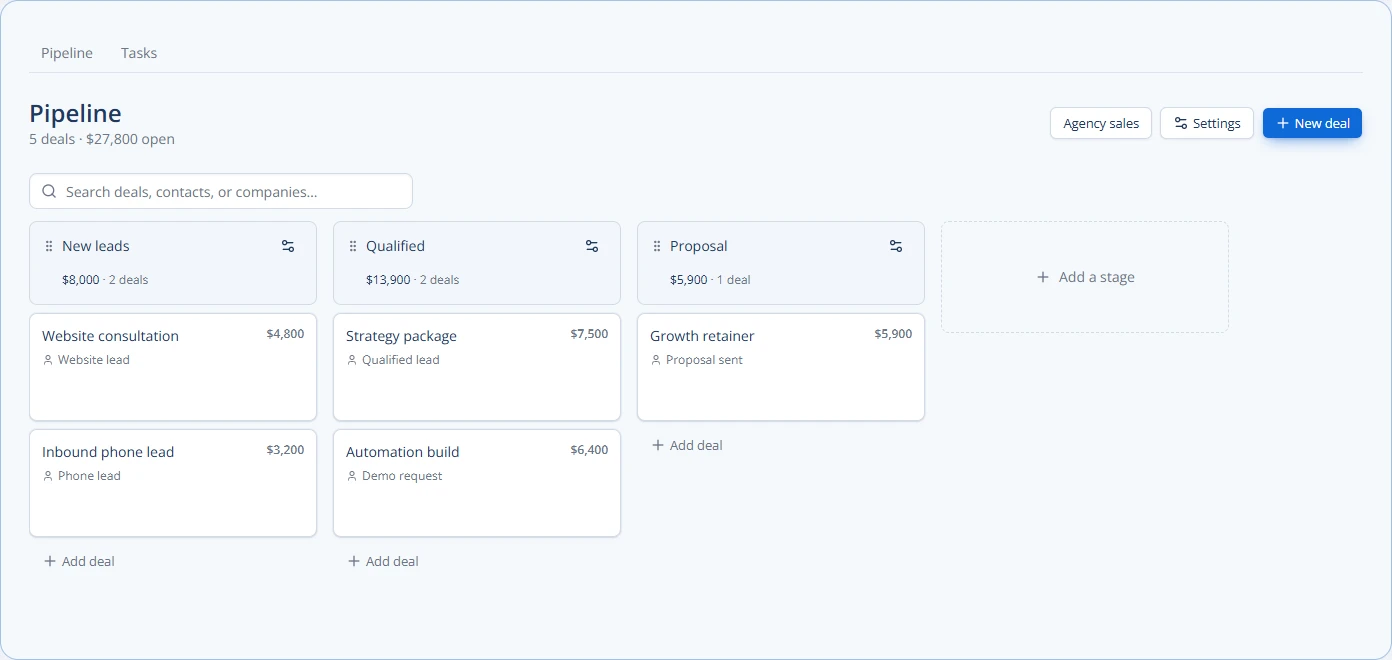
The Chirply pipeline screenshot uses sample data to show deal stages. A sales stage tells you where an opportunity stands; use assigned tasks and the delivery brief to describe the actual work that follows.
For a practical trial, create a sample client record, associate a deal, and assign a task with a clear due date and completion condition in its description. Have a second teammate find the record and explain the next action. Review the Chirply feature overview alongside this test.
If your agency requires critical-path scheduling, billable utilization, formal proofing or advanced resource planning, demonstrate those requirements explicitly in the tools you are considering. CRM-linked tasks alone do not prove that a system meets them. You can retain a specialist delivery tool while using Chirply for the client relationship and follow-up, provided your team defines which system owns each record.
For the setup step, use the Chirply task-automation handoff guide. It separates the fields the workflow action sets from the owner and deal associations your team needs to review.
Decide who owns each record before rollout
Write a short operating agreement: client details live in the CRM; the approved brief lives at one agreed location; each task has one accountable owner; the team records changes before acting on them. Specify where the client should send feedback so approvals do not split across several inboxes.
At the end of the pilot, review missed handoffs, overdue tasks, duplicate entry and the time required to locate an approval. Keep the raw observations rather than inventing a percentage improvement from a tiny sample. Roll out to another project only after the team can repeat the workflow.
If client follow-up and communication are the gaps you want to solve, review Chirply pricing and plan details, then test the sample handoff against your requirements. Choose the combination your team can operate reliably, including any specialist tools the work still needs.
Common questions
Answers at a glance
How should a marketing agency choose project management software?
Start with the handoffs that fail, turn each into a testable requirement, and evaluate the same sample campaign in each tool. Check mandatory requirements before comparing weighted scores.
Can a CRM replace an agency project management tool?
A CRM with linked tasks can support client follow-up and sales-to-delivery handoffs. Requirements such as resource planning, formal proofing and dependency scheduling need separate evaluation; CRM-linked tasks alone do not establish those capabilities.
What should an agency include in a project handoff?
Record the client contact, agreed deliverables and exclusions, approval owner, target date, next task owner and a clear completion condition. Keep the approved brief at one agreed location.
How can Chirply support agency delivery workflows?
Chirply tasks support an owner, due date, priority and status, with links to a contact or deal. Teams can use these for the next actions around client relationships and test specialist delivery requirements separately.
Put this into practice
Use a setup guide and its acceptance checks to turn the idea into a working process.
- Client Onboarding Checklist: Owners, Access & Handoff
- Client Reporting Template: Metrics, Evidence & Actions
- CRM Pipeline Stages: Setup & Exit-Criteria Worksheet
Put the system to work
Run the whole client journey in one place.
CRM, phone, messaging, automation, funnels, and AI, connected on one contact record and ready for your brand.
See Chirply plans