Chirply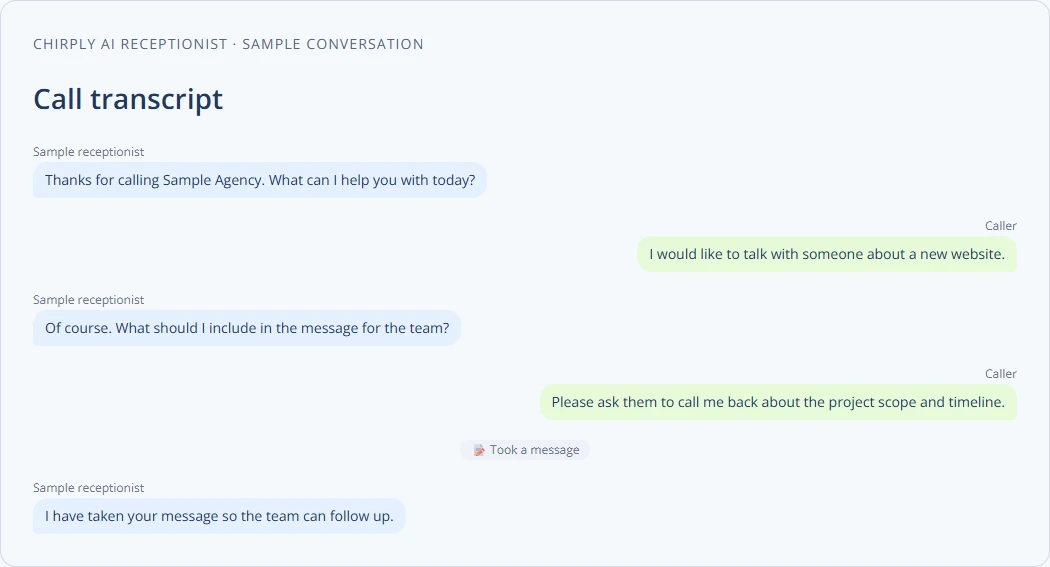
AI phone agents improve agency lead qualification by handling first-contact calls, applying consistent scripts, capturing clear qualification fields, and routing only sales-ready leads to human teams. They free staff from repetitive screening tasks so teams can focus on proposal work, strategy, and higher-value client conversations.
Configure and evaluate an AI receptionist in Chirply
Qualification starts with a short decision: which details does the human team need before deciding the next step? Give the agent that job, along with a clear fallback when it cannot help.
- Open AI → AI Agents → New agent. Enter a name, create the agent and work through Identity, Voice, Persona & goals and Knowledge.
- Put approved service information and answers in the Knowledge Brain. Choose whether this agent reads the entire brain or selected topics. In Persona & goals, specify the few facts it should collect and when it should take a message or hand off.
- Review What this agent can do and Guardrails. Enable only the actions needed for this job. Save with Save agent before testing.
- In Test call, use Your number and Call me to hear the behavior. This makes a real, provider-billed call, so use a number you control. Test an ordinary inquiry, a question outside the knowledge base and a request for a person.
- When the test meets your requirements, open Phone → Numbers, select the line and set Inbound routing → Send incoming calls to → AI receptionist answers. Choose the agent and save.
Review the transcript for collected details and tool events, not just a pleasant greeting. The image above is the production transcript component with a synthetic exchange; it does not claim a real call occurred or that every inquiry can be qualified automatically.
Track how often the required information is present, whether handoffs are appropriate and which questions the agent cannot answer. Explore Chirply's AI receptionist, then pilot one narrow call type before routing the rest of the business through it.
Why AI phone agents help agencies qualify leads faster
Manual qualification takes time and is inconsistent. Humans miss questions, forget to log responses, or apply different thresholds. AI phone agents can follow a defined qualification goal, ask for missing details and record information in the CRM when the required tools are configured. Their output still needs review: callers may decline to answer, the agent may misunderstand, or a tool may fail. Test the questions and inspect the resulting records before relying on them.
Concrete benefits:
- Consistent questions every call.
- Structured answers saved as fields, not notes.
- Instant routing to the right team or calendar slot.
- 24/7 availability for inbound leads or campaign follow-up.
Note: confirm any call-recording and privacy rules with your provider or legal counsel before deploying.
Practical steps to deploy AI phone agents for pre-qualification
- Define qualification criteria.
- List the must-have and nice-to-have items. Example must-haves: budget range, timeline, target market. Nice-to-haves: technology preferences, referral source.
- Design a short, testable script.
- Keep it 60–120 seconds for cold or warm inbound leads. Start with a greeting, one or two rapport lines, three to five qualifying questions, and a clear next step.
- Map script answers to CRM fields.
- Decide which answers become structured fields (e.g., budget_min, project_timeline, decision_authority).
- Decide handoff rules.
- Which answers trigger an immediate human handoff? Which go to nurture sequences? Which are disqualified and should receive a standard message?
- Integrate with your CRM and phone stack.
- Use webhooks or APIs to push contact updates, call transcripts, and call metadata back into records.
- Pilot, measure, iterate.
- Run a two-week pilot on a single campaign. Track conversion to sales calls and update the script based on failures or common clarifications.
Script design: example and tips
Example script for an agency selling website redesigns (keep voice friendly and direct):
- "Hi, this is Alex from [Agency]. Thanks for your interest. Do you have two minutes?"
- "Great. What’s the main goal for your website right now?" (capture short text)
- "Do you have a budget range for this project?" (map to budget_min and budget_max)
- "When do you hope to launch the new site?" (map to timeline)
- "Who will sign off on the project?" (decision_authority)
- "Thanks — based on that, I can put you on a short list for a free discovery call. Is [date/time] OK?" (schedule or offer options)
Tips:
- Use closed questions where you need specific fields (yes/no, ranges).
- Use one open question to capture context or pain points.
- Give a clear next step: schedule, email follow-up, or disqualify politely.
Integration checklist for your CRM and workflows
- Create structured fields for each qualifying item.
- Set up an inbound call record type that stores audio, transcript, confidence scores, and flags (human-needed, qualified, disqualified).
- Map scheduling responses to calendar events or booking links.
- Automate follow-up sequences for nurtures and disqualifications.
- Log every human handoff so reps see the call history and transcript.
Practical mapping example (table):
| Script question | CRM field | Action |
|---|---|---|
| Budget range? | budget_min / budget_max | If >= threshold, tag "high_budget" |
| Timeline? | project_timeline | If <30 days, set priority to urgent |
| Decision-maker? | decision_authority | If "no", set nurture sequence |
Decision framework: when the AI agent handles it vs when a human should
Use a simple scoring model to decide handoffs.
- Give points for each desirable answer (budget, timeline, decision-maker).
- Set a threshold for automatic handoff to a salesperson.
- Low-score contacts go to nurture sequences.
- If the transcript includes phrases like "can I speak to someone now" or high sentiment urgency, escalate automatically.
Example rule set:
- Budget >= threshold = 2 points.
- Timeline within 90 days = 2 points.
- Decision-maker = 1 point.
- Total >=4 → route to senior rep.
- Total 2–3 → route to junior rep or schedule discovery call.
- Total <2 → add to lead-nurture sequence.
Measuring success and iterating
Track these metrics in the first 30–90 days:
- Qualified leads per day from AI agents.
- Percentage of AI-handled leads routed to sales calls.
- No-answer and hang-up rates on AI calls.
- Time from lead capture to booked call.
Use the metrics to change the script, the scoring, or the routing rules. For compliance and privacy, check current requirements with your provider or counsel before recording or storing calls.
Practical example: two-week pilot plan
- Day 1: Select one campaign and list three qualification fields (budget, timeline, decision_authority).
- Day 2: Write a 90-second script and map answers to CRM fields.
- Day 3: Configure AI agent voice flow and set up CRM field mapping.
- Days 4–14: Run live with supervisor monitoring for the first 200 calls.
- Day 15: Review transcripts, update script, and adjust scoring thresholds.
Where to start with tools and platform fit
Choose a platform that supports phone calling, field mapping, webhooks, and easy rule editing. Verify it can expose human actions through APIs if you need to integrate with external systems. If you already use an all-in-one CRM, check whether it offers white-label phone agents and built-in automations to avoid bolting on many separate tools.
Platforms like Chirply provide connected calling, automations, and AI phone agents inside a single CRM, which can simplify mapping and handoffs when you want fewer moving parts.
Final checklist before launch
- Written qualification criteria and scoring rules.
- Short, tested script mapped to CRM fields.
- Handoff rules and escalation triggers.
- Call recording and data storage compliance verified.
- Pilot plan and measurement dashboard.
Next step: pick one lead source, map three must-have fields, write a 90-second script, and run a two-week pilot. That will give you real data to improve the system and save human time.
Learn how automation fits into agency features and check operational checklists in this CRM automation guide: /blog/checklist-for-implementing-crm-automation-in-agencies. For tracking long-term results, see metrics guidance: /blog/metrics-to-track-your-agency-s-automation-performance.
Common questions
Answers at a glance
What is an AI phone agent for lead qualification?
An AI phone agent is an automated voice system that answers or places calls to gather qualifying information from leads. It follows a script, captures structured responses, and routes or schedules next steps in the CRM.
How do I design a script for an AI phone agent?
Keep scripts short (60–120 seconds). Start with a greeting, ask three to five qualifying questions, map answers to CRM fields, and end with a clear next step such as scheduling a call or sending an email.
How do I decide when the AI should hand off to a human?
Use a scoring system tied to qualification criteria like budget, timeline, and decision-maker. Set thresholds where high scores trigger immediate human handoff, mid scores schedule discovery calls, and low scores go to nurture.
What integration steps are needed for CRM compatibility?
Create structured fields in your CRM, map script answers to those fields, enable webhooks or API calls for call data and transcripts, configure scheduling links, and log every handoff for reps to review.
Put this into practice
Use a setup guide and its acceptance checks to turn the idea into a working process.
- CRM Workflow Testing Checklist & Acceptance Matrix
- Lead Follow-Up Automation: Chirply Setup Checklist
- CRM Data Quality Checklist: Fields, Tags & Ownership
Put the system to work
Try the workflow in your own account.
Review the feature, choose one sample contact and test the handoff before you expand it to the rest of your team.
Explore this Chirply feature See Chirply plans